
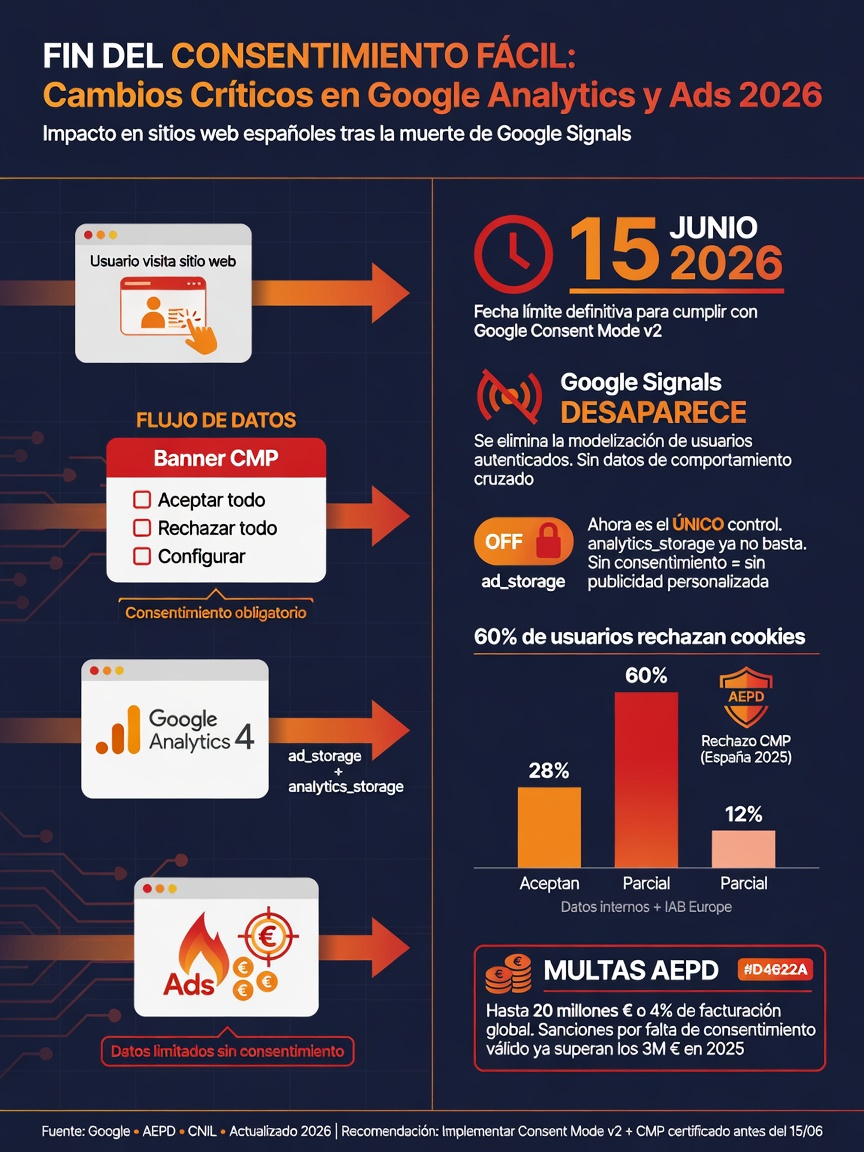
This is moving fast. On June 15, 2026—exactly five days from now—Google removes a piece of the puzzle that many Spanish SMBs were using as a shield without realizing it: Google Signals will stop blocking data flow to Google Ads. From that day on, the only mechanism deciding whether Google can use your visitors' advertising data is your cookie banner.
If your banner has the "ad_storage" parameter set to "granted" by default—and many do, either out of habit or because the plugin you installed configured it that way—Google is already collecting data from anyone entering your site. Before they accept anything. Before they read a single line of your cookie policy.
It doesn't matter if you're not investing in Google Ads today. If your Analytics account is linked to an Ads account (even one you created years ago and forgot about), this change affects you.
I'll explain what's happening, why it matters more than it seems, and what you can do before June 15.
The change in one sentence: one lock disappears and only the other remains
Until now, data flow between Google Analytics 4 and Google Ads worked with two independent control layers. Think of them as two locks on the same door. You could disable one and the other stayed locked.
Lock 1: Google Signals. This was a setting inside your GA4 property. When you disabled it (and many SMBs either disabled it by default or never enabled it), GA4 stopped sharing advertising cookies and user identifiers with Google Ads. No matter what happened with the banner—data stayed restricted by this additional technical layer.
Lock 2: Consent Mode (the ad_storage parameter). This is the mechanism communicating the user's cookie banner decision to Google systems. If the user rejects, ad_storage stays "denied" and Google doesn't activate advertising cookies.
From June 15 onward, lock 1 disappears. Google Signals stops governing data flow to Google Ads entirely. Remove it, leave it as is, doesn't matter. Only lock 2 remains: your cookie banner.
And here's the problem.
Why your cookie banner might be breaking the law right now
Most cookie banners I see on Spanish SMB websites share a common flaw: the "ad_storage" parameter comes configured as "granted" by default. Before the user clicks anything.
This means: someone lands on your website, the banner appears, the user ignores it or closes it without accepting or rejecting, and meanwhile Google is already activating advertising cookies, collecting device identifiers, and linking the user's session to their Google account.
Without prior consent. Without legal basis. In direct breach of Article 22.2 of the LSSI and Article 6 of the GDPR.
It doesn't matter if the banner has good design. It doesn't matter if a pop-up shows three categories. If the default value for "ad_storage" is "granted" in the code before user interaction, the implementation is unlawful. That simple.
And the responsibility, as always with GDPR, falls on you—the website owner. Not Google. Not your marketing agency. Not the plugin you installed. You.
"Setting ad_storage to 'granted' before user interaction has the same effect as a pre-checked consent box in a form: consent is not free, not specific, and therefore not valid."
Who this affects (hint: almost every SMB with a website)
If your website has Google Analytics installed, this affects you. If you also have a Google Ads account linked to that property, it affects you double. And linking doesn't require active ad spending: if you connected both accounts once, or if your agency did, the connection exists.
Even if you don't use Google Ads at all, the data GA4 collects is subject to GDPR when it stores unique identifiers, IP addresses, or behavioral information that lets someone identify a person. The fact that Google is a third party you send data to doesn't exempt you from responsibility.
Spain's National Cybersecurity Institute (INCIBE) registered over 97,000 incidents in 2024, and Spain's data protection authority (AEPD) has intensified supervision of cookies and tracking on SMB websites precisely because it knows real compliance is low.
What Google says you need to do
Google published technical documentation of the change in April 2026. Key requirements include:
First: review how the ad_storage parameter is configured in your CMP (Consent Management Platform, aka cookie banner). If it's set to "granted" by default, you need to change it to "denied" and only switch to "granted" when the user actively consents to advertising cookies.
Second: update your privacy policy and cookie policy to reflect the new data flow architecture. Google explicitly requires this as part of GDPR Article 13 compliance.
Third: document the decision you made about ad_storage configuration. Date, who decided, why. GDPR requires you to prove compliance at all times, not just when a regulator shows up.
There's a nuance many are missing: Google warns that if you set ad_storage to "denied" by default, your Google Ads campaigns lose measurement capability. This is a business decision (you want to comply with law) that has a data cost, and you need to understand that.
What's being rumored (be careful with this)
There's talk circulating in the industry lately: that the GDPR reform proposal called "Digital Omnibus" will exempt consent for web analytics. That after June 15 all this will be irrelevant because the law will change.
Don't believe it. For two reasons.
One: Digital Omnibus isn't approved. It's in the parliamentary process. Its final content could change substantially. And even if it passes as currently written, it wouldn't come into force before June 15. The law that applies is what's in force today, not what Parliament might approve months from now.
Two: even in the best scenario, the proposal only allows using legitimate interest for statistical measurement. Data flows for advertising purposes—which is exactly what Google's change regulates—would still require consent. No escape route.
What to do before June 15: practical checklist
If you want to make sure your website is compliant before the rules change, here's what to review this week:
1. Check the default value of ad_storage. Open your website in an incognito window. Before touching the cookie banner, open the browser console (F12, Console tab) and search for consent status. If you see "ad_storage: granted" before accepting anything, you have a problem. If you use Google Tag Manager, verify that Google Ads tag triggers are blocked until the user consents.
2. Verify that rejecting really rejects. Click "Reject all" on your banner. Then check with a tool like Cookiebot Scanner, your browser's cookie inspector, or Google's Tag Assistant mode that Google advertising cookies aren't loading. If Google Ads cookies are still there after rejecting, your implementation doesn't work.
3. Check that accept and reject have equal visual prominence. Spain's data protection authority fines designs that make rejection buttons harder to use. If "Accept all" is a big branded button and "Reject" is a small gray link, that's a dark pattern. And they've already fined for this.
4. Update your privacy policy. It must show what data you send to Google, for what purpose, and what basis you have for consent. A generic phrase like "we use cookies to improve your experience" isn't enough. It needs to be specific, concrete, and understandable.
5. Document what you've done. Date of review, what configuration you changed, who decided. Keep a screenshot of your CMP before and after. If the authority ever asks, this is what proves you made informed decisions.
If you use a cheap (or free) cookie plugin, read this
Many SMBs used free or cheap plugins to comply with GDPR when cookie banners became a thing. The reality is that most of these plugins don't implement Consent Mode v2 correctly. They don't manage all four parameters (analytics_storage, ad_storage, ad_user_data, ad_personalization), or they don't do prior script blocking, or they don't log consent in an auditable way.
For websites with real traffic and real risk, you need a CMP that truly manages Consent Mode v2: OneTrust, Cookiebot, Iubenda, or similar certified solutions. It's not about price—it's about functionality. If your plugin doesn't support ad_user_data and ad_personalization (the two new parameters in v2), Google Ads won't be able to do remarketing with your website's audiences after June.
The good news: tools like CookieYes or Cookie Script have free plans that do support Consent Mode v2 and work for sites under 25,000 monthly visits. There's no technical excuse to get this wrong.
The fact that should make you act
We started this article with a date: June 15, 2026. We're five days away. Many SMBs will discover they had Google Signals disabled as a privacy measure—and it was working—only when that protection disappears without warning this coming Monday.
Tracking cookies without consent are one of the two most common reasons for complaints to Spain's data protection authority in 2025 and 2026. A change like this from Google turns what looked like compliance into real breach, without the business even knowing.
Review your banner this week. Not next week. This week.
Frequently asked questions
What exactly is Google Signals and why is its function disappearing?
Google Signals was a setting inside Google Analytics 4 that, when enabled, let you link web activity to authenticated users' Google accounts. When disabled (which was common among SMBs), it blocked advertising data flow to Google Ads. From June 15, 2026 onward, this setting stops affecting data flow to Google Ads. Only Consent Mode's ad_storage parameter remains as control.
Do I need to have Google Ads to be affected by this?
No. It's enough that your GA4 property is linked to a Google Ads account, even if you've never spent a euro on ads. Responsibility for the data you collect applies regardless of whether you use advertising.
What if my cookie banner has no reject option?
Your banner already breaks current law. LSSI and data protection authority guidelines require a reject option with equal visual prominence to accept. Designs hiding rejection or making it less visible are "dark patterns" and are enforceable violations.
Can I do nothing and wait for Digital Omnibus to pass?
Not recommended. Digital Omnibus isn't approved, its content could change, and even if it passes, it wouldn't come into force before June 15. Plus, advertising data flows would still need consent even under the reform. Current law applies today, not tomorrow's debate.
How much does it cost to fix this if my banner doesn't comply?
Depends on the platform. If your plugin or CMP has an option to change the ad_storage default from "granted" to "denied," it's a 15-minute fix. If you need to switch tools, platforms like CookieScript have free plans for small sites. If you need professional legal-technical audit and documentation, it usually costs €500–€2,000 for an SMB.
Does consent affect my Google Ads data quality?
Yes. If ad_storage stays "denied" by default (which is correct legally), Google can't associate conversions from users who reject with their advertising profiles. This reduces measurement and remarketing effectiveness. Consent Mode v2 helps recover some data through statistical modeling, but it's never 100%. That's the legal cost: less advertising data, but a business without a legal sword hanging over it.
How do I know if my website is already breaking the law?
Open your website in incognito mode. Don't touch the banner. Open your browser's developer tools (F12) and check your domain's cookies—see if Google cookies are already there (like _ga, _gcl_au, or advertising IDs) before you've accepted anything. If they are, your implementation has a problem. You can also use free tools like Google's Tag Assistant to verify which tags fire before consent.