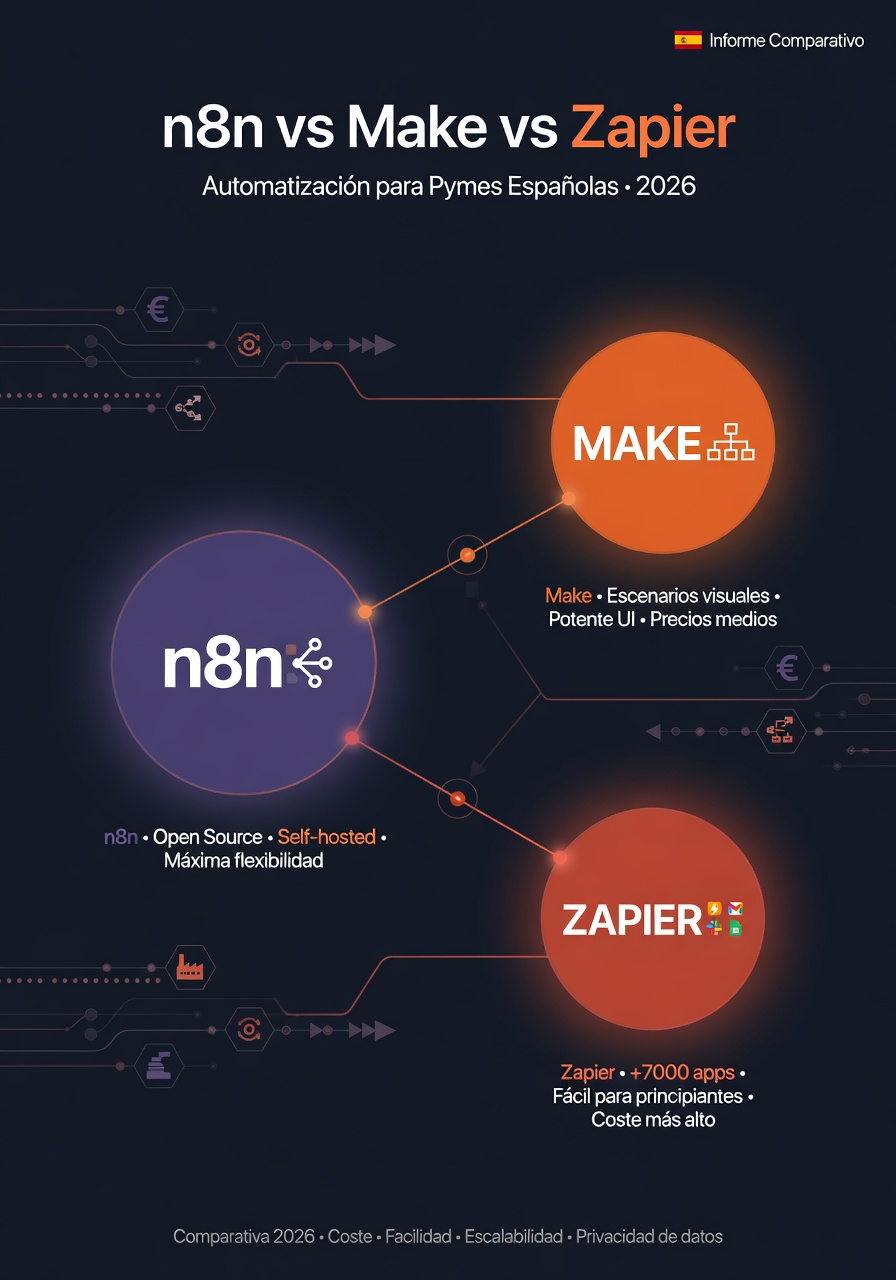
Why you need this comparison (and not the other ones)
Google "n8n vs Make vs Zapier" and you'll find generic articles saying the same thing: "Zapier is easiest, Make is more powerful, n8n is most flexible." Helpful. But that doesn't tell you what you'll actually pay in six months, or which platform will lock you in once you depend on it.
This one is different. We show real numbers: what you pay at 5,000, 20,000, and 50,000 executions monthly. What you gain or lose on privacy. How AI integration changes the equation in 2026. Process automation for SMBs means using connected tools — no code or minimal code — so tasks like sending emails, updating CRMs, generating quotes, and managing orders run themselves. The three platforms (Zapier, Make, n8n) are the major automation orchestrators, and each pricing model dramatically changes total cost at scale.
What each platform does (in two sentences, no fluff)
Zapier: easiest to start, most painful to scale
Over 7,000 native integrations, interface anyone gets in 10 minutes, and pricing that works beautifully if your volume stays low. The catch: bills per task (each step counts), and as workflows grow, bills explode. Perfect for launching tomorrow without help. Terrible for cheap scaling.
Make (formerly Integromat): Europe's middle ground
Built in Prague, with a powerful visual editor supporting branches, loops, and data transforms. Around 2,000 integrations. Charges per operation but more generously than Zapier. Good value for SMBs building complex logic without coding. Servers available in Europe.
n8n: open source, unlimited, but not for everyone
The only platform you can install on your own server (self-hosted) with unlimited executions. Around 500 native integrations, but connecting any API via HTTP is trivial. Includes native AI nodes (OpenAI, Anthropic, Ollama for local models). Learning curve is steeper, but if you handle Docker or hire someone to manage it, cost savings at scale are dramatic.
The pricing that matters: what you actually pay by volume
Here's where it gets interesting. All three charge differently, and that changes everything:
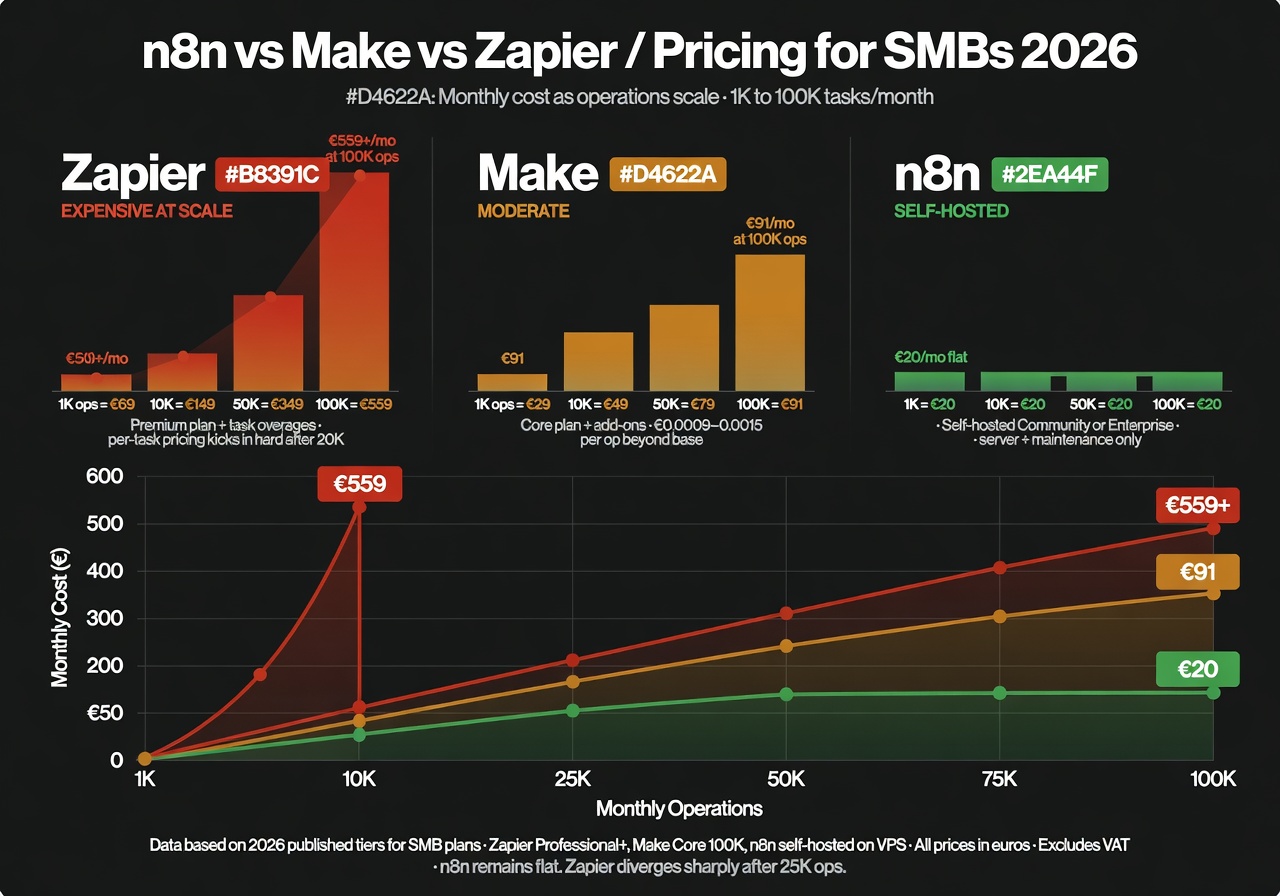
- Zapier bills per "task": each action within a workflow. If your automation has 5 steps and runs 100 times daily, that's 500 tasks per day. 15,000 per month.
- Make bills per "operation": similar to Zapier but more generous in practice.
- n8n bills per "execution": the entire workflow, all steps, counts as 1 execution. Those same 5 steps × 100 daily runs = 100 executions daily. 3,000 per month.
That billing model difference is why n8n can be up to 20 times cheaper than Zapier at medium-high volume.
Scenario 1: Small SMB – ~5 automations, 2,000 actions/month
| Platform | Plan needed | Monthly cost | Annual cost |
|---|---|---|---|
| Zapier | Professional | ~€45 | ~€540 |
| Make | Core | ~€9 | ~€108 |
| n8n (VPS) | Self-hosted | ~€8 | ~€96 |
At low volume, all three are affordable. Zapier is noticeably pricier, but if simplicity is your priority, it may make sense.
Scenario 2: Growing SMB – 15-20 automations, 20,000 operations/month
This is typical for a Spanish SMB hitting its stride with automation: website connected to CRM, email marketing automated, customer onboarding workflows, internal chatbot...
| Platform | Plan needed | Monthly cost | Annual cost |
|---|---|---|---|
| Zapier | Team | ~€275 | ~€3,300 |
| Make | Pro / Teams | ~€27 | ~€324 |
| n8n (VPS) | Self-hosted | ~€12 | ~€144 |
This is where it gets serious. Zapier costs 23 times more than n8n self-hosted to do exactly the same work. It's not that Zapier is a bad product — their pricing model doesn't scale well.
Data privacy: the factor everyone ignores (but shouldn't)
This is important and most comparisons skip it. When you use Zapier or Make in the cloud, your data — customer info, orders, emails, financial data — passes through their servers.
- Zapier: servers in the US by default. EU data option only on Enterprise plans (most expensive).
- Make: EU servers available, which simplifies GDPR compliance.
- n8n self-hosted: data never leaves your server. Total control. If you handle health, financial, or legal data, this isn't a luxury — it's a requirement.
Honest truth: if you're a local shop connecting your online store to a WhatsApp chatbot, server location probably won't be a deciding factor. But if you work in a regulated industry or prefer your customers' data stay off external servers you don't control, n8n self-hosted is the only real choice.
AI integration: how the game changed in 2026
Maybe the biggest difference in 2026. All three support LLM connectors, but integration level varies dramatically:
- Zapier: AI features in beta. LLM connectors available but limited in customization.
- Make: AI modules available with good flexibility for automations involving content generation or data classification.
- n8n: advanced native nodes (LangChain, agents with memory, tools, chains). Support for local models via Ollama. Chain complex calls with sophisticated logic. Unlimited use if self-hosted.
If your automation strategy includes AI agents, RAG over your own docs, or workflows requiring intelligent LLM calls, n8n is objectively superior. That gap widens monthly.
"What you pay monthly is today's cost. The cost of migrating 50 automations in two years is what will really hurt."
BigLobster, Technical TeamNative integrations: how many do you actually need?
Zapier has 7,000+. Make has ~2,000. n8n has ~500. But there's a nuance that changes everything:
n8n includes a generic HTTP node letting you connect any API without waiting for a native connector. Spanish tools like Holded, Quipu, or Factus connect in minutes via API. For popular SaaS (Gmail, Slack, Notion, HubSpot, Shopify), all three handle them well.
The real question isn't "how many integrations?" but "does it have what I need?" For common tools, the answer is yes for all three.
Learning curve: what it costs to get started
Zapier: 30 minutes to working
No exaggeration. Built for non-technical users to build workflows in minutes. Extensive docs, thousands of templates, 24/7 chat support.
Make: a weekend to master basics
Visual interface is intuitive but branches and iterators need more attention. Good docs and plenty of tutorials.
n8n: 1-2 days for basic workflows, weeks to unlock full power
Simple workflows compare to Make. But advanced features (custom code, sub-workflows, AI nodes) need technical skills. Self-hosted setup needs Docker knowledge or someone to manage it.
So which do you pick? Quick guide by situation
After all this, the decision comes down to three things: volume, technical skill, and data requirements. Find your situation:
Pick Zapier if...
- You want to automate 2-3 simple things tomorrow, alone.
- You have no technical team and don't want to hire one.
- Your execution volume stays low (<5,000/month).
- Budget isn't your main concern and you prioritize absolute simplicity.
Risk: costs climb fast if you grow. Plan for migration mid-term.
Pick Make if...
- You need workflows with complex logic (branches, loops, transforms).
- You want good balance between price and power.
- You prefer managed cloud (no server worries) but think Zapier is pricey.
- Your team has some tech comfort (not developers, but tech-comfortable).
Risk: lower than Zapier but you still depend on an external provider.
Pick n8n if...
- Your execution volume is or will be high (>10,000/month).
- You need AI integrations (smart chatbots, RAG, agents).
- You handle sensitive data and need full control (health, legal, finance).
- You have technical skills or access to someone who does (or hire an agency).
- You want costs not to explode when you scale.
Risk: upfront setup investment. Requires server maintenance (or paying someone).
Can I use all three at once?
Yes, and it's smart. Many companies use Zapier for one-off integrations only they need, Make for business logic with complexity, and n8n self-hosted for sensitive data or high-volume processes.
You also don't have to decide forever. Start with Zapier (low barrier), move to Make when you need more power at better price, jump to n8n when volume justifies it.
What we don't recommend: picking a tool without thinking about scaling. Migrating 50 automations is serious work. Better to think first than pay later.
Frequently asked questions
Which is cheapest: n8n, Make, or Zapier?
n8n self-hosted wins at scale — cost capped at server cost (€8–€20/month) regardless of executions. Make undercuts Zapier everywhere. Zapier is priciest at medium-high volume but can work for very light use.
Is n8n really free?
The self-hosted version is completely free: unlimited executions, users, features. You only pay for the server (VPS starting at €8/month). n8n also offers paid cloud (starting €20/month) if you don't want to manage infrastructure.
Which has the most integrations?
Zapier leads with 7,000+ native integrations. Make has ~2,000. n8n has ~500 but can connect any API via HTTP. For common tools (Google Workspace, Slack, HubSpot, Notion, Shopify, WhatsApp), all three cover well.
Can I try before committing?
Yes. Zapier has a free tier (100 tasks/month), Make offers 1,000 operations/month free, and n8n you can install locally at no cost. Test with a real workflow from your business, not a generic example.
What if I choose wrong and want to switch?
All three let you export workflows (usually JSON). Migration is possible but time-consuming: redesign, reconfigure, reconnect everything. Worth thinking it through first. n8n and Make support full export; Zapier is most limited here.
Best choice for a solo entrepreneur with no technical skills?
Start with Zapier or Make. Zapier if you need only simple stuff and don't mind paying more long-term. Make if you need more power while staying cloud-managed. When your business grows and bills hurt, evaluate migrating to n8n with agency help.
Free template: if you want to try n8n, download the template that saves your contact form to Google Sheets and emails you.
Not sure which fits your business?
Tell us what you need to automate. We recommend the tool that actually serves you, not what makes the best sales pitch. If it's n8n, we build it.
Free automation consultation →