
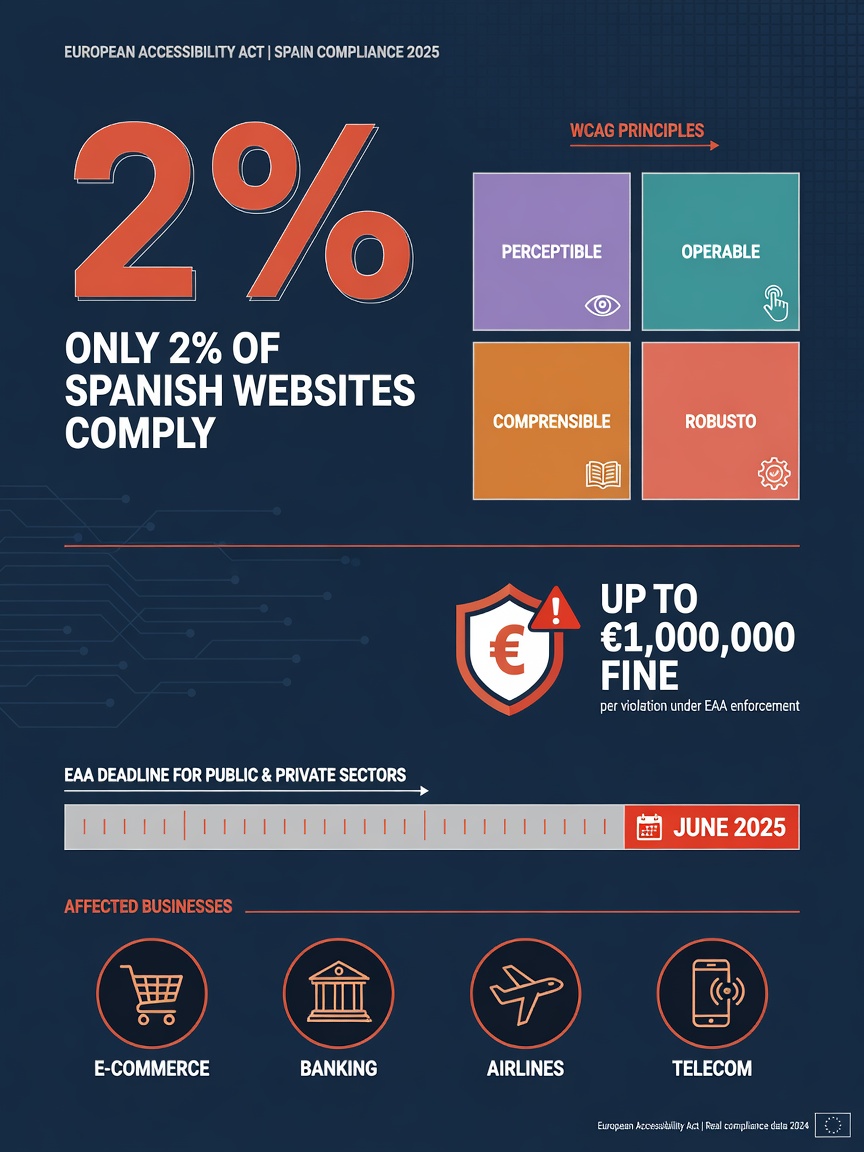
I'll be direct: if you have a company website, online store, or any digital service oriented toward customers, and it hasn't passed an accessibility audit in the last year, you're almost certainly breaking the law. Not maybe. Definitely. According to European authority data, only 2% of private-sector websites meet accessibility standards. The other 98% face fines up to €1 million.
And this isn't something that happens in the distant future. The obligation went into effect June 28, 2025. Inspections are already underway. The compliance deadline for existing websites is June 28, 2030, but if your site is new or you redesign it, it must comply from day one.
This article walks you through what the law actually requires, who it affects, what's at risk if you do nothing, and most importantly, concrete steps you can take to comply without losing your mind.
Where did this come from? The European Accessibility Act and WCAG 2.2
The story starts in 2019, when the European Union approved Directive 2019/882, known as the European Accessibility Act (EAA). Goal: anyone, with or without disability, should use digital products and services without barriers. Not just the public sector, which had its own rules already, but also private companies.
Member states transposed this into national law. The compliance obligation went live June 28, 2025, for private companies offering digital services. It's already happening.
At the core, the law requires your website to meet WCAG 2.2 Level AA. WCAG stands for Web Content Accessibility Guidelines, a technical standard developed by the W3C (the same body that sets HTML and CSS standards). Level AA includes 56 success criteria organized into four principles: perceivable, operable, understandable, and robust. I'll break down what each means.
Who does it affect? Spoiler: probably you
The law affects private companies offering digital products or services in the EU. In practice, this includes:
- E-commerce: online stores, marketplaces, any website selling products or services to consumers.
- Banking and financial services: online banking, investment apps, insurance.
- Transportation: flight, train, bus booking sites, mobility platforms.
- Audiovisual services: streaming platforms, on-demand multimedia content.
- E-books: e-books and digital reading platforms.
- Telecommunications services: operator websites and apps, communication services.
There is one important exemption: micro-enterprises providing services (under 10 employees and under €2 million annual revenue) are exempt. But there's nuance. If you sell products (not just services), technical obligations still apply even as a micro-enterprise. And if you work with public administrations or bid for public contracts, accessibility might be a procurement requirement.
For SMBs with 10+ employees: no exemption. Full compliance required.
Fines are not a joke
The law sets up a penalty system with three levels. The numbers are serious:
- Minor violation: €301 to €30,000
- Serious violation: €30,001 to €90,000
- Very serious violation: €90,001 to €1,000,000
But the monetary fine isn't all that's at stake. A penalized company can lose access to public grants (including digital subsidies), be excluded from public procurement, face product removal from the market, or have non-compliance published. In reputation terms, the damage might exceed the fine itself.
What the standard technically requires: the 4 pillars of WCAG 2.2
The technical reference is WCAG 2.2 Level AA. You don't need to memorize all 56 criteria, but understand the four principles they're organized around. Here's a practical summary:
Perceivable. Information must reach all users regardless of sensory abilities. This means every image needs descriptive alt text, text-to-background contrast must be high enough (minimum 4.5:1 ratio for regular text), text must scale to 200% without breaking the page, and information can't be conveyed solely by color. If your chart shows data where colors alone distinguish "pass" from "fail," someone colorblind can't interpret it. That's a problem.
Operable. Every interactive element must work without a mouse. Full keyboard navigation, visible focus (when you tab between elements you see clearly which one you're on), buttons at least 24x24 pixels, and alternatives to drag-and-drop actions. This also covers timing: if your carousel auto-rotates, users must be able to pause it.
Understandable. Navigation must be predictable. Menus in the same spot on every page, forms with visible labels linked to each field, no asking for the same info twice in one process, and language declared in the HTML. Seems obvious, but you'd be surprised how many sites miss this.
Robust. Code must work with assistive tech: screen readers, magnification software, voice recognition. This comes from semantic HTML (using the right element for each thing: nav for navigation, main for main content, button for buttons, not divs with onclick), logical heading hierarchy (one H1, H2-H4 in order), and ARIA roles when semantic HTML isn't enough.
The most common errors I see in audits
After reviewing SMB websites, five errors appear repeatedly. If your site has any of these, you know where to start:
Images without alt text. Most common and easiest to fix. Decorative images need empty alt="" and informative images need descriptions that make sense out of context. Not "photo_2024.jpg" but "physical therapy team conducting a rehabilitation session in Madrid clinic".
Insufficient contrast. Light gray text on white that looks "elegant" on your office monitor is unreadable for many. The free WebAIM Contrast Checker tells you in seconds if your color combo meets the minimum ratio. Use it today.
Forms without labels. A form field without an associated label is invisible to screen readers. Users don't know what to type. Solution: add label elements linked to each input. Basic HTML, but often done wrong.
Navigation that doesn't work with keyboard. Press Tab on your site and watch. Can you reach every interactive element? Can you see which one you're on? Can you activate buttons and links with Enter? If the answer is no to any of these, you have a navigation problem.
Broken heading hierarchy. Many sites use H2 and H3 based on visual size, not logical structure. Screen readers navigate by heading. If the structure doesn't make sense, content becomes incomprehensible to someone who can't see the page.
"Web accessibility isn't making a 'special' website for people with disabilities. It's making a site that works for everyone. When done right, it improves the experience for all users, not just those with disabilities."
The accessibility statement: what the law requires you to publish
The law requires your website to have a public accessibility statement. Not an internal document locked in a drawer. It has to be accessible from your site, ideally from the footer or legal links menu.
This statement must include three things: your website's conformance level (complete, partial, or in process), known issues still unresolved with a fix timeline, and a contact mechanism for users to report accessibility barriers.
If your site meets none of what I've described, your statement should say something like: "Our website is in the process of adapting to WCAG 2.2 Level AA. We have identified the following areas for improvement and plan to complete them by [date]. If you encounter a barrier, contact us at [email]".
No shame in saying you're working on it. The problem is saying nothing.
Your action plan: what to do in the next 30 days
If you've read this far thinking "I need to do something but don't know where to start," here's a realistic 30-day plan:
Week 1: Diagnosis. Run your site through the free Google Lighthouse tool (built into Chrome DevTools, Accessibility tab). Also try the WAVE browser extension or Axe tool. Won't give complete diagnosis, but shows major problems clearly. Make a list of everything that fails.
Week 2: Quick fixes. Start easy: add alt text to images, check color contrast, label form fields, declare language in the html tag. These don't require changing site structure and solve a big chunk of problems. If you use WordPress, plugins like WP Accessibility or One Click Accessibility can help with several of these.
Week 3: Navigation and structure. Check keyboard functionality across your site. Fix heading hierarchy. Ensure navigation menus are consistent across pages. Replace divs and spans used as interactive elements with proper button or a elements.
Week 4: Statement and documentation. Draft and publish your accessibility statement. Document changes you've made and what's left. If your site needs deeper fixes (structure changes, complex form redesigns), contact an accessibility specialist for a full manual audit.
How much does it cost to make a website accessible?
Depends on site size and what needs fixing. A small corporate site (4-6 pages) with typical issues (alt text, contrast, labels, heading structure) can be fixed in 1-3 days of work. At €400-800/day for a developer or specialist, that's €400-2,400 total.
A mid-size online store with dozens of product pages, complex forms, and custom features costs more. A professional accessibility audit for a medium e-commerce can run €1,500-5,000, with fixes costing similar amounts.
Compare that to the alternative: a fine up to €1 million, plus loss of public subsidies access, plus reputational damage. The math works itself out.
Now compare that to the alternative: a fine up to €1 million, plus loss of public grant access, plus reputational damage. The ROI is clear.
What doesn't work (and they're selling you)
Before closing, I want to be honest about tactics you'll see recommended that don't solve the problem:
Accessibility widgets installed with one click. Those toolbars in the corner promising to "make your site accessible automatically." They don't work. They might superficially change font size or contrast, but don't fix core issues: semantic HTML, keyboard navigation, alt text, heading structure. Google and accessibility inspectors see through these patches. Many also worsen screen reader experience.
Automated audits showing you a 95% score. Automated tools catch 30-40% of accessibility problems. The rest needs human review: Does this alt text make sense? Is this navigation structure logical? Does this form work with a screen reader? No automated test answers those questions.
Ignoring this until 2030. Yes, the transition deadline for existing sites is 2030. But inspections have started. And if you redesign or launch a new site, it must comply now. It's not a date to relax on — it's the grace period given to catch up without immediate penalties.
Frequently asked questions
Can they actually fine me if my site isn't accessible?
Yes. Since June 28, 2025, private companies offering digital services covered by this law can be penalized. Fines range from €301 to €1,000,000 depending on severity. You can also lose public subsidy access and be excluded from public procurement.
Are micro-enterprises exempt?
Micro-enterprises offering only services (under 10 employees, under €2 million annual revenue) are exempt from the Directive. But if you sell products (not just services), technical obligations still apply. And if you bid for public contracts, accessibility may be required.
What exactly are WCAG 2.2?
Web Content Accessibility Guidelines version 2.2, a technical standard from the W3C. Defines 56 success criteria in four principles: perceivable, operable, understandable, robust. Level AA is what the law requires. You can check them at w3.org/WAI/WCAG22/quickref.
Do I need a specialist or can I do it myself?
Basic fixes (alt text, contrast, form labels, heading structure) anyone with HTML knowledge can do. For complete audits and complex fixes (keyboard navigation, screen reader compatibility, dynamic forms), hire a web accessibility specialist.
How long until a site is fully accessible?
For a small corporate site, basic fixes take 1-3 weeks. Full professional audit and fixes for medium sites take 4-8 weeks. What matters is starting, not being perfect on day one.
Does accessibility help SEO?
Yes, directly. Google rewards good user experience, and many accessibility criteria (semantic HTML, alt text, clear structure, load speed) are also ranking factors. An accessible site is generally a site Google understands and ranks better.
Do I need to make PDFs and documents accessible too?
Yes. The law isn't limited to websites. Any digital content you offer users (PDFs, Word docs, newsletters) must be accessible. This includes heading structure, image alt text, adequate contrast, and logical reading order.