
Ask any owner where the day goes and "social media" sits right next to email and payroll. You know you should post. You know a quiet profile looks like a closed shop. But between writing the caption, finding the photo, deciding the time, answering the comment, and checking what landed, it swallows the one resource you can't buy more of.
Here's the thing: the part of social media that drains you - coming up with ideas, writing the post, resizing for each platform, keeping a calendar - is exactly the part AI is now good at. Not perfectly, not hands-off. But well enough that owners who use it report posting far more often and spending a third of the time.
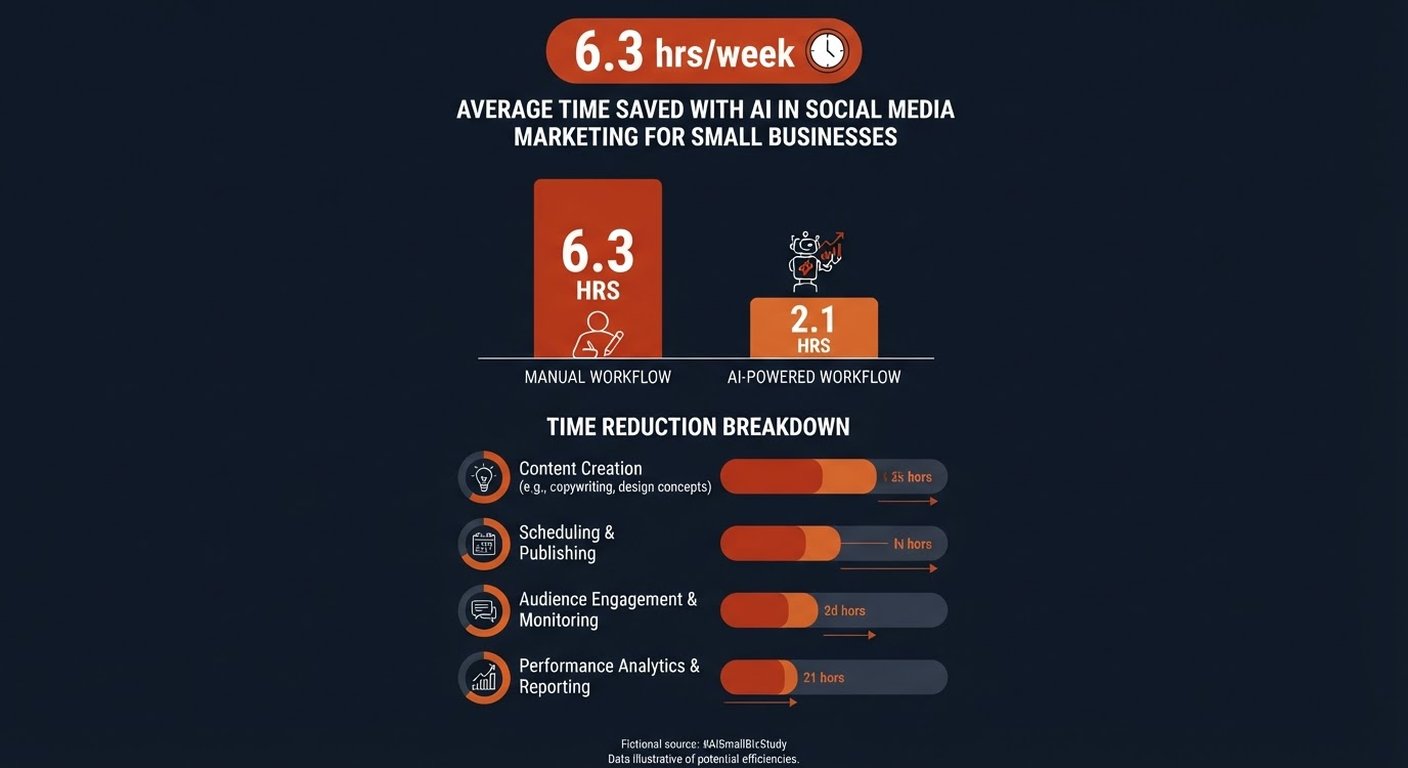
The 6.3-hour for a normal user, and about 10 hours for a power user. These figures comes from a May 2026 survey of 200 European small-business owners (Picmim). The AI-users-spending-a-third number is from the same study: those owners posted about four times as often and rated their satisfaction 5.8 out of 10 versus 4.2 for everyone else. The 77% is from Fiverr's 2025 Small Business survey across nearly 6,000 businesses in 25 countries.
What actually eats the time
Break down those 10 hours and the picture is clear. In the same survey the weekly split looked like this:
- Content creation: 3.8 hours - by far the biggest sink. Staring at a blank box, writing the caption, picking the image.
- Community management: 2.1 hours - replying to comments and messages across platforms.
- Scheduling and publishing: 1.5 hours - the logistics of "which day, which time, which channel."
- Analytics and reporting: 1.4 hours - figuring out what worked.
- Strategy and planning: 1.2 hours - deciding what to say next.
These aren't clean, separate buckets — an owner usually writes the caption and schedules it in the same sitting, so the pieces overlap and don't add up to exactly 6.3.
Notice that four of those five are writing, deciding, and repeating the same work across channels. That's not strategy. That's grinding. And it's the exact work a language model does in seconds.
The expensive loss isn't the six hours. It's the product decision, the sales call, or the hiring choice that didn't happen because you were resizing a graphic at 11pm.
— The pattern behind every owner who finally automated their posting
Where AI earns its keep
AI won't run your brand for you. What it does well is the repetitive middle of the job:
- Ideation. "Give me 10 post ideas for a plumbing business this month, tied to seasonal problems." You still pick, but you start from a list, not a void.
- Drafting in your voice. Feed it your website and a few past posts and it learns how you talk - so captions read like you, not like a press release.
- One idea, every format. Turn one announcement into an Instagram caption, a LinkedIn post, an X thread, and a short video script without rewriting from scratch.
- Scheduling. Tools suggest post times from your own audience data instead of a generic "best time to post" blog from 2021.
- Replying. Draft responses to comments and DMs you review and send - faster than typing each one.
- Reading the results. Ask "which post drove the most profile visits this month?" in plain English instead of exporting a spreadsheet.
The catch: generic AI content is easy to spot and it hurts trust. The tools that work pull from your actual business - your services, your tone, your customer reviews - not a blank prompt. That's the difference between "AI slop" and a feed that sounds like a person.
Start with what you already pay for
Before you sign up for anything, check the apps you already use. Most owners miss this and then pay twice.
- Canva: its Magic Write and batch-create features turn one design into a week of resized, on-brand posts. If you already pay for Canva, you already own most of this.
- Meta Business Suite: free, and it now drafts caption suggestions and lets you schedule to Facebook and Instagram from one place.
- LinkedIn: its post composer suggests expansions and rewrites; useful if B2B is your lane.
- Buffer and Hootsuite: both ship AI assist inside the scheduler you may already use to queue posts.
Test these for two weeks on your real accounts. If they get you to "posted three times this week without dread," stop there. You don't need a specialist tool to solve a problem the free one already handles.
The dedicated tools worth a look
If bundled features fall short - usually because you want brand-voice learning, multi-platform publishing, or a content calendar that fills itself - a dedicated tool earns its price. A few that target small businesses:
| Tool | Best for | Rough price |
|---|---|---|
| Ocoya | AI-written posts plus built-in design and scheduling | from ~$15/mo |
| Predis.ai | Caption + carousel + video from a single prompt | from ~$29/mo |
| Loomly | Calendar workflow with AI idea prompts per platform | from ~$35/mo |
| Vista Social | Multi-channel publishing with AI drafting and replies | from ~$25/mo |
Prices move, but the shape holds: most land between $15 and $40 a month. Against the opportunity cost of six hours a week, that's a cheap trade for most owners. Pick by the job you hate most - design, ideas, or scheduling - not by which one has the flashiest demo.
A simple way to start this week
Keep it small. The win you can feel beats a platform migration you abandon in March.
- Pick one channel you actually care about. Don't try all six at once. One profile, done well, beats six left for dead.
- Name the pain. Ideas? Writing? Sizing? Replying? Fix that one, not the whole funnel.
- Let it draft a week. Feed the tool your website, generate a batch, and schedule it. You review, you don't write from zero.
- Set one rule: nothing goes live without your OK. Auto-publish is a trap for early users.
- Track two numbers. Hours spent, and posts published. If both move in your favor after two weeks, expand. If not, you've lost an afternoon, not a quarter.
The mistakes that waste the money
- Letting it auto-post blindly. A tone-deaf caption or a wrong claim goes live at 2am and you find it at 9. Keep the approval step on until you trust the output - and even then, review the sensitive stuff.
- Accepting generic voice. If every caption reads like a brochure, the tool isn't learning you. Spend ten minutes feeding it your real tone, or switch tools. Robotic content costs you trust, the one thing social media is supposed to build.
- Ignoring each platform's norms. A LinkedIn post and a TikTok script are different jobs. One block of text pasted everywhere looks lazy. Let the tool adapt per channel.
- Chasing every platform. Being absent everywhere is bad; being half-present on eight channels is worse. Three solid profiles beat a ghost town of twelve.
- Skipping the measurement. If you can't say which post brought a customer, you're guessing. Use the tool's plain-English analytics or you've just typed faster into the void.
What it costs versus what you get back
Tooling runs from free (Meta Suite, your design app's AI) to around $40 a month for a specialist. The real return isn't the subscription you avoid - it's the hours. Claw back four of those six weekly hours and you've returned roughly two full workdays a month to the work only you can do: talking to customers, fixing the product, making the call.
And there's a quieter benefit the survey picked up: owners using AI weren't just faster, they were happier with the results. Posting consistently - instead of in guilty bursts - changes how your business looks to someone discovering you for the first time. An active profile reads as "open, current, cared for." A stale one reads as "maybe gone."
Frequently asked questions
Will AI post without my approval?
It shouldn't, and you should make sure it can't. The useful tools draft and schedule; they don't fire posts to your followers on their own. Keep the approval gate on, especially at the start. The draft is the product, not the publish.
Does AI-written content sound like a robot?
Only if you let it write from nothing. The tools worth using learn your voice from your website and past posts, so captions sound like you at your best. If the output reads like a press release, the tool isn't learning you - fix that, or switch. Generic content hurts the trust social media exists to build.
Do I need to be on every platform?
No, and trying is how owners burn out. Pick the one or two channels your customers actually use and show up there consistently. Three solid profiles beat a ghost town of twelve. You can always expand once the routine works.
Can it write for my market and language?
Yes. Modern tools handle dozens of languages and adapt tone per region. If you serve a specific local market, feed it local examples and review the first batch closely - the model will mirror what you show it. Review matters more in a tight-knit community where voice is everything.
How fast will I see results?
The time savings show up immediately - you'll feel it the first week, because you start from drafts instead of a blank box. Visibility and engagement build slower; consistent posting over a couple of months is what moves profile visits and inbound. Measure posts published and hours spent from day one, and the gap is your proof.