
You're not bad at email. The setup is rigged.
Most owners I talk to blame themselves. "I'm behind on email again." "I need to be more disciplined." No. The problem isn't you - it's that a founding owner ends up as the company's only receptionist, only sales assistant, and only customer-support queue, all in one inbox.
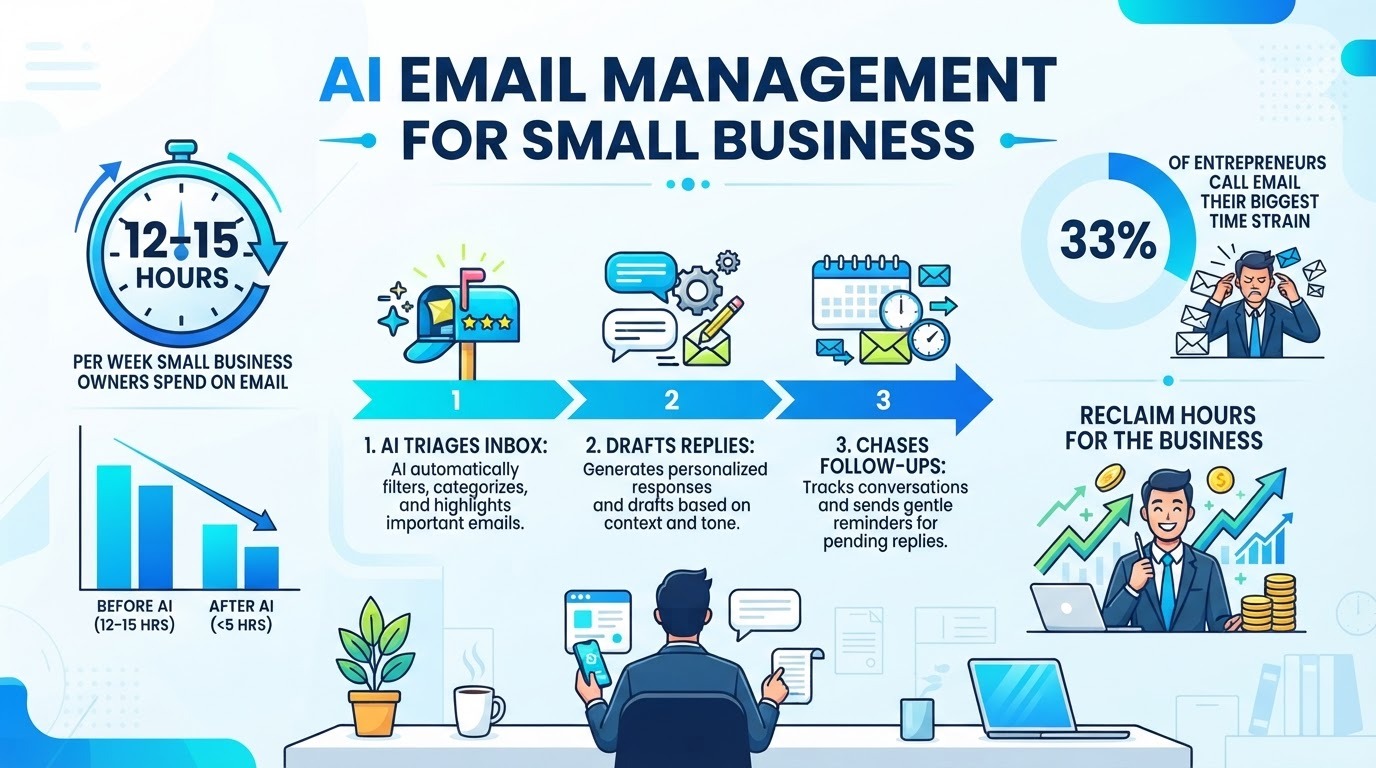
The numbers are ugly. Small business owners spend 2.4 to 3.1 hours a day on email (Adobe Email Survey, via McKinsey Digital 2025) - that's 12 to 15 hours a week. Founders running solo or with a tiny team average 2.6 hours a day, more than 12% of a 55-hour week, and most of it is coordination that doesn't need the owner's judgment: vendor chatter, scheduling, routine follow-up, inbox triage. A UK Slack study found small-business staff spend nearly a full working day a week just writing emails, and only 42% of those emails get fully read and understood by the recipient. And 33% of entrepreneurs in The Alternative Board's Business Pulse Survey called email the single biggest time strain on their business. For wider data on productivity gains, see AI productivity in Spanish SMBs.
Here's the part that should annoy you: owners who have someone handling admin drop to 1.1-1.5 hours a day. The work didn't vanish - it got handled by a system instead of the founder's attention. AI is the cheap version of that admin person, and you can switch it on this week.
So what does AI email management actually do?
Strip the marketing talk and it comes down to four jobs:
- Triage. The tool reads incoming mail and sorts it: needs-reply-now, needs-reply-soon, FYI, and noise. Some do this before you even open the app, so you start the day with the five messages that matter instead of 80 unread.
- Draft in your voice. It reads the thread and writes a reply the way you'd write it - your tone, your shorthand, pulling facts from your calendar or CRM. You read, tweak, send.
- Chase follow-ups. If you said "I'll send the proposal Friday" and Friday passes, it nudges you with a draft already written. You stop dropping balls you never meant to drop.
- Book and summarize. It pulls a meeting time from an email and offers to drop it in your calendar, or condenses a 30-message thread into three lines so you don't re-read the whole thing.
The thing to internalize: it proposes, you approve. A good tool never sends on your behalf unless you've explicitly allowed a specific, low-risk type of reply. Everything else waits for your yes.
The tools worth knowing in 2026
You don't need to learn a new app to benefit. The two biggest email platforms already ship AI, and a handful of specialists sit on top of them. Here's the lay of the land:
| Tool | Best for | Starting price |
|---|---|---|
| Gmail + Gemini | Teams already on Google Workspace | Bundled in Business Standard (~$14/user/mo) |
| Outlook + Microsoft 365 Copilot | Teams already on Microsoft 365 | Copilot add-on (~$20-30/user/mo) |
| Superhuman | High-volume founders who live in email | ~$25-40/user/mo |
| Missive | Shared team inbox (support, ops, sales) | Free up to 3 users; Starter $14/user/mo |
| Fyxer | Automatic triage before you open the inbox | ~$30/mo ($22.50 annual) |
| SaneBox | Triage without switching your email app at all | ~$7/mo ($59/yr) |
| Ellie / MailMaestro | Cheap, fast reply drafting | ~$15-19/mo |
| ChatGPT | Occasional heavy-lift drafting, no commitment | Free; Plus $20/mo |
Prices shift, but the pattern holds: if your company already pays for Google Workspace or Microsoft 365, the AI you need is one setting away. Third-party tools earn their keep only when the built-in option doesn't solve your specific problem - usually triage at scale or a shared team inbox.
Start with what you already pay for
Before you sign up for anything, check your current plan. This is the part most people skip and then overpay.
- On Google Workspace? Gemini sits inside Gmail. Open an email and it offers a summary of the thread, a draft reply, and "what needs my attention." If you're on Business Standard or above, you've already bought it.
- On Microsoft 365? Copilot adds drafting and thread summaries to Outlook, plus it reads your calendar and files. It's a separate add-on, but it plugs into the ecosystem you're in.
- Test for two weeks on real mail. Not a demo inbox - your actual firehose. If the bundled AI gets you to inbox zero faster, stop there. Don't buy a specialist tool you don't need.
I won't sugarcoat it: the bundled tools are a bit more generic than the dedicated ones. But "free because you already pay for it" beats "perfect but another subscription" for most owners.
When a dedicated tool is actually worth it
The specialists make sense in specific situations, not as a default:
- You process huge volume personally - Superhuman's keyboard-driven speed and auto-drafts pay off once email is genuinely your main job (founder, consultant, sales lead). At $25-40/month, only worth it if the time returned clears that easily.
- Your team shares one address - Missive (free for 3 users, then $14/user/mo) or similar gives one inbox with internal notes and assignments, so "who replied to the customer?" stops being a mystery.
- Your problem is triage, not typing - SaneBox ($7/mo) or Fyxer ($30/mo) sort the noise before you open the app and don't ask you to switch clients.
- You just want faster replies - Ellie ($19/mo) or MailMaestro ($15/mo) turn bullet points into full emails on top of Gmail or Outlook.
How to set this up this week
Keep it deliberately small. The point is a win you can feel, not a platform migration.
- Name one inbox problem. Triage? Drafting? Follow-ups slipping? Pick the one that stings most.
- Check what's bundled. Open Gemini in Gmail or Copilot in Outlook and try it on ten real emails today.
- If that's not enough, trial one specialist. Pick by job, not by hype: SaneBox for triage, Missive for shared inbox, Superhuman for speed.
- Run it on real mail for a week. Not a test folder. Your actual threads.
- Measure two numbers. Time to inbox zero each morning, and follow-ups you would've missed. Expand only if both move.
That's the whole rollout. No data team, no six-month plan, no consultant. Most of these tools are live in an afternoon.
The mistakes that waste the money
- Buying the premium client before testing the free one. I've watched owners pay $40/month for Superhuman when Gmail's Gemini already did 80% of what they needed. Test bundled first.
- Letting it auto-send. Some tools can send replies without you. Turn that off. The value is the draft, not the autonomous send. A wrong auto-reply to a client costs more than the time saved.
- No follow-up tracking. Drafting faster doesn't help if you still forget the proposal was due. Use the reminder/chase feature or you've just typed faster into a hole.
- Ignoring where your data goes. Your inbox is the most sensitive file your business has - contracts, salaries, client complaints. Read the privacy policy. Require that your emails aren't used to train a public model. A data-processing agreement isn't optional here.
What it costs versus what you get back
Tooling runs from $7 to $40 a month per person. Against that, clawing back even five of those 12-15 weekly hours at an owner's opportunity cost is a clear win - and the hours are the cheap part. The expensive loss is the strategic work that doesn't happen because you were buried in replies.
One more angle: every hour you spend triaging is an hour a customer, a product decision, or a sales call didn't get. The email tool doesn't just save time; it returns your attention to the work only you can do.
Frequently asked questions
Will AI send emails without me approving?
It shouldn't, and you should make sure it can't. The useful tools draft and remind; they don't fire off replies to your clients on their own. Turn off any auto-send setting on day one. The draft is the product, not the send.
Is my email data safe with these tools?
It depends on the vendor, so check before connecting. The serious ones sign a data-processing agreement and promise your mail isn't used to train public models. For sensitive work - legal, health, finance - prefer providers that host in your region or let you self-host. Read the privacy policy; don't skip it because the onboarding is smooth.
Do I need to switch email apps?
Usually no. Gmail and Outlook both ship AI now, and tools like SaneBox, Fyxer, Ellie, and MailMaestro sit on top of the inbox you already have. You only switch clients (to Superhuman or similar) if raw speed becomes your bottleneck, and that's a minority case.
How long until I see the time savings?
Faster than you'd think, because the win shows up daily. Most people feel the triage difference in the first week - starting the day with five real messages instead of 80 unread. Drafting savings build as the tool learns your voice. Measure time-to-inbox-zero on day one and again in two weeks; the gap is the proof.
Can it handle a shared team inbox?
Yes, that's exactly what shared-inbox tools like Missive are built for - one address, multiple people, internal notes, and clear ownership so nothing falls between seats. If your pain is "we all answer the support address and duplicate each other," that's the right category, not a personal AI drafter.
Want your inbox to stop running your day?
We set up AI email workflows on top of the tools you already use - Gmail, Outlook, your CRM - so triage, drafting, and follow-ups happen before you sit down. No six-month rollout, no jargon, just a pilot that works this month. Tell us where email hurts most and we'll show you the build.
Talk to BigLobster →