
On September 15, 2026, Anthropic shipped the biggest update yet to Claude for Small Business: 43 ready-made workflows and 27 new connectors, taking the total to 37 partner tools. Shopify, Stripe, Square, Xero, Gusto, Zapier, Slack, Zoho, MYOB and Salesforce are now on the list. The plugin has been installed more than 900,000 times since May.
Want an AI agent to handle this for you? See the agents and their prices →
I read the launch page three times looking for the sentence a small business owner needs, and it is not there. It says what you can connect. It never says which ones are worth connecting, and it certainly never says which ones will quietly cost you a weekend of cleaning up data you did not know was dirty.
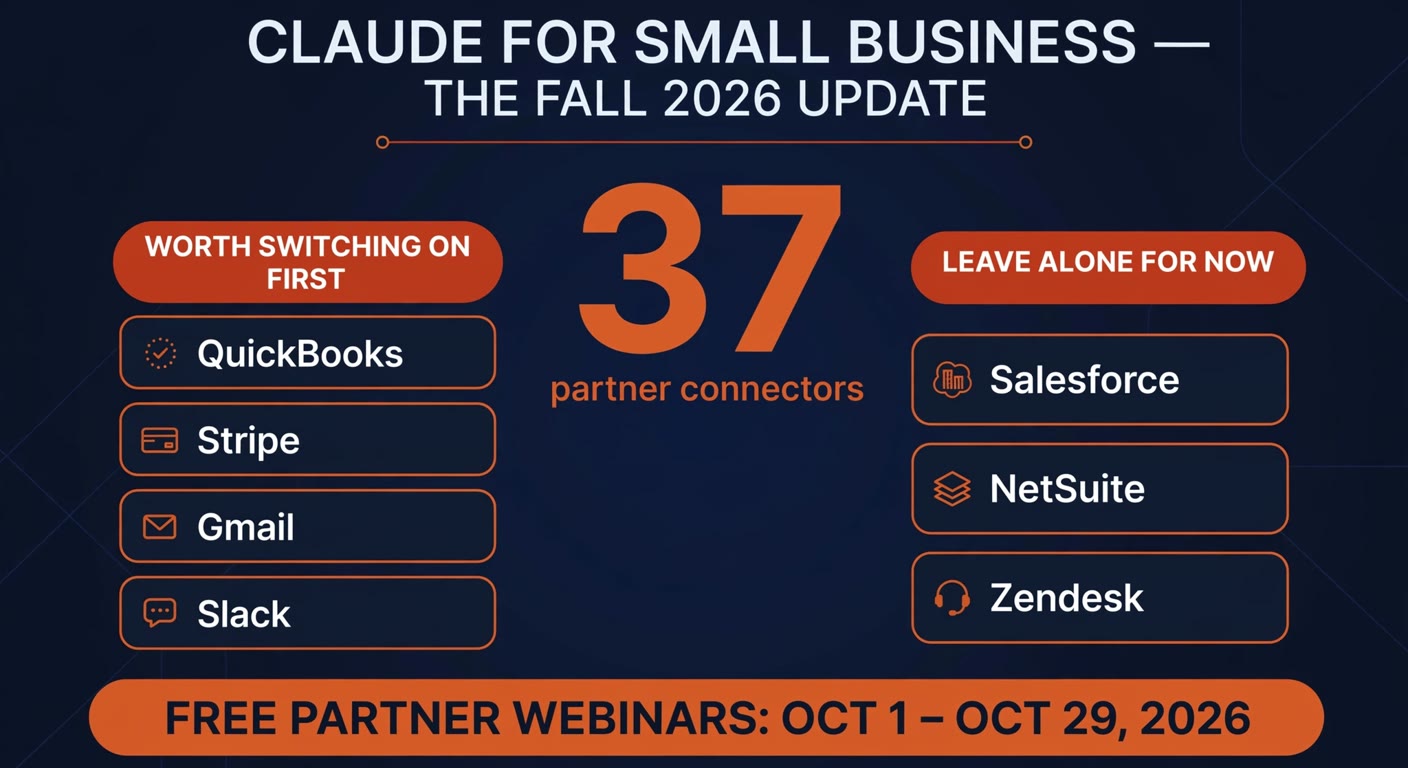
So here is the version for a business with five people and no IT department: connect two tools, run one workflow for a month, and ignore the other 35 until the first one pays for itself.
What actually changed on September 15
Two things, and only one of them matters to you.
The first is breadth. Claude for Small Business launched in May with connectors to the usual suspects: QuickBooks, PayPal, HubSpot, Canva, DocuSign, Google Workspace, Microsoft 365. That set is now 37 partners deep, and the additions are the tools smaller businesses actually run on — Square and Stripe for payments, Shopify and Wix for online sales, Xero and MYOB for books outside the US, Gusto for payroll, Zapier for everything the connectors missed, Notion, monday.com, Trello, Zoom, RingCentral, Expensify, Ramp, Zoho's whole stack.
The second is that the workflows stopped being only about the back office. About a third of the owners Anthropic surveyed on its spring tour asked for help growing the business rather than running it: qualifying inbound leads, answering enquiries after hours, writing proposals, sending a Monday brief. Those now exist as templates you schedule, not prompts you type.
The plugin runs inside Claude Cowork, the desktop app. You install it, connect tools, and pick tasks. In the vendor's own words, Claude does the work and waits for your approval before anything sends, posts or pays.
The 37-connector list is a menu, not a checklist
Here is the part the announcement skips. Every connector you switch on is another place your business data now flows, another credential that can go stale, and another thing that has to keep working after the person who set it up has forgotten how it works. That is not a reason to avoid the feature. It is a reason to treat the list the way you treat a restaurant menu with 37 pages: order two things, see how the kitchen does, and do not order the whole thing on your first visit.
Practically, the connectors divide into three groups.
| Group | Examples | What to do with it |
|---|---|---|
| Money and books | QuickBooks, Xero, Stripe, Square, PayPal, Gusto, Ramp | Start here. Read-only, one tool, one report you already produce by hand. |
| Inbox, calendar, notes | Gmail, Google Calendar, Microsoft 365, Slack, Notion | Second. Cheap to try and hard to break, because the source data is already messy. |
| Sales and ops platforms | Salesforce, NetSuite, Zendesk, monday.com, Shopify, TikTok Ads | Later, and only if a person already owns that system. These are the ones that punish a half-configured setup. |
If you run one tool from the first group, you have a Monday brief inside an hour: cash position, last week's sales, overdue invoices, and the three things that need you. That is the workflow Anthropic put on the front page, and it is the right one to copy first, because you can check its output against numbers you already know.
Where the real risk sits, and it is not the model
Nobody who has run automation for a living worries about Claude reading a spreadsheet. The things that bite are duller.
Scopes that are wider than the job. A connector that can write when it only needs to read is a connector that can corrupt your books at 2am. Start read-only, take the approval step seriously, and only escalate permissions once you have watched a month of correct output.
Scheduled workflows nobody watches. The plugin lets you put a workflow on a schedule. That is the feature, and it is also how "answer new leads as they come in" turns into a customer getting a reply you never read. If a workflow touches a customer, keep the approval step on. If it only touches a report you read, let it run.
Data that was already wrong. Claude does not fix a CRM where three people spelled the company name three ways. It just gives you a faster, more confident version of a wrong answer. This is the honest reason to leave Salesforce and NetSuite alone at the start: the connector is easy, the cleanup is not.
And the cost question, which the announcement answers only partly. Claude for Small Business is available on every paid Claude plan, and Anthropic recommends the Team plan for businesses with more than one person. What is not on that page is what an always-on workflow costs you when it runs against a plan limit, because the limits are session-based rather than a message count. Watch the first month before you put four people on it.
Is the free training worth an hour?
Anthropic's fall programme is the most underrated part of this release, and it is free. Fourteen integration partners are each hosting one live webinar on their own connector, from late September through November: RingCentral on October 1, Zoom on October 8, monday.com on October 12, Expensify on October 13, Apollo on October 15, HubSpot on October 20, Gusto on October 21, Zapier on October 22, Xero on October 27, Clay on October 28, TikTok on October 29, with Alignable and Atlassian in early and mid November. There are also half-day in-person workshops in ten US cities and more than 750 community sessions run by trainers Anthropic has certified.
Take one of those hours, but take the right one. Each session is supposed to cover three things: what the connector does inside Claude, how your data moves between the two systems, and a workflow you run live before the session ends. That second item is the reason to attend. Sales pages do not explain data movement, and the privacy answer for your business is not the same as the privacy answer for the vendor's demo. Register for the session belonging to the tool you were already planning to connect, treat the US business hours as a scheduling problem, and skip the rest.
A 30-day plan that costs you nothing but an hour
The failure mode with tools like this is a weekend of enthusiastic setup followed by six weeks of nobody looking at it. Do the opposite.
- Week 1 — pick one connector. The books or the payment processor. Read-only if the connector offers the choice. Nothing else.
- Week 1 — run one report you already produce. The Monday brief, or the overdue-invoice list. You need a baseline you can check it against.
- Week 2 — compare the output with your own numbers, twice. Once on a day that was normal, once on a day that was not.
- Week 3 — put one workflow on a schedule and keep the approval step switched on for anything that leaves the building.
- Week 4 — decide. Either add a second connector from the same group, or write down why this one did not earn its keep. Both are useful outcomes.
Set the calendar reminder now. In my experience the difference between businesses that get value from these tools and businesses that pay for them is rarely the model. It is whether somebody defined what "working" means before the first month ran out.
When the honest answer is "not yet"
If you run your business on two tools and a spreadsheet, there is no version of this that beats the spreadsheet this quarter. Connecting an inbox to a model does not create a process that does not exist, and the vendor has even accounted for you: with no connectors at all, you can upload a spreadsheet and Claude builds the brief and the reports from whatever you shared.
There is also a version of "not yet" that is really "not this tool". If your books are a mess, the highest-return thing you can do in October is not connector setup. It is the cleanup. Automation multiplies whatever state you are in, including the bad one.
Frequently asked questions
Is Claude for Small Business free?
No. It is available on every paid Claude plan, and Anthropic recommends the Team plan for businesses with more than one person. If you are on the free tier, you can still test the underlying model, but the plugin itself needs a paid seat.
Do I need to be technical to set this up?
No, and that is the point of the plugin. You install it inside Claude Cowork, say "help me get set up", connect a tool with your normal login, and pick a task. Where owners get stuck is not the installation — it is deciding what the first workflow should be. Start with a report you already produce by hand.
Does Claude write to my accounts on its own?
By default, no. Anthropic's stated behaviour is that Claude does the work and waits for your approval before anything sends, posts or pays. That default is the reason this is safe enough to try. Check it still applies to every workflow you schedule, because a "standing workflow" is exactly where a lost approval step does damage.
Which connectors should a small business switch on first?
The one holding the number you check most often: QuickBooks, Xero, Stripe, Square, PayPal or Gusto. Read-only, one tool, one workflow. Everything else on the list of 37 can wait until that first workflow has been right twice in a row.
What data does Claude see through a connector?
Whatever the connector's permissions allow, which is set when the tool is connected and can be narrowed. The partner webinars cover this specifically for each tool. If you handle health, legal or financial records, read the data-movement section before you connect anything, and start with the most restricted scope available.
Will this replace my bookkeeper or my admin?
Not the person, the keystrokes. The published owner stories are about hours coming back — a Monday brief that used to take half a day, proposals drafted instead of written from scratch. Treat it as removing the copying and pasting between tools, and expect to still review the output.
Connecting tools is the easy half
BigLobster maps what a small business already pays for, decides which systems are worth wiring together, and builds the workflow that keeps working after the novelty wears off. Two connectors done properly beat thirty switched on.
Ask for a connector audit