
Most small businesses do not need another chat window. They need fewer loose ends: invoices waiting for a reply, leads sitting in a spreadsheet, and marketing work that gets pushed to next week.
Anthropic announced Claude for Small Business on May 13, 2026. The offer connects Claude to tools such as QuickBooks, PayPal, HubSpot, Canva, DocuSign, Google Workspace, and Microsoft 365. It includes ready-to-run workflows for finance, sales, marketing, HR, and customer service.
That sounds useful. It also puts a lot of trust in one interface. Before you connect anything, decide what Claude may read, what it may prepare, and what still needs your approval.
The sensible first question is not “What can Claude automate?” It is “Which recurring job has a clear owner and a safe review point?”
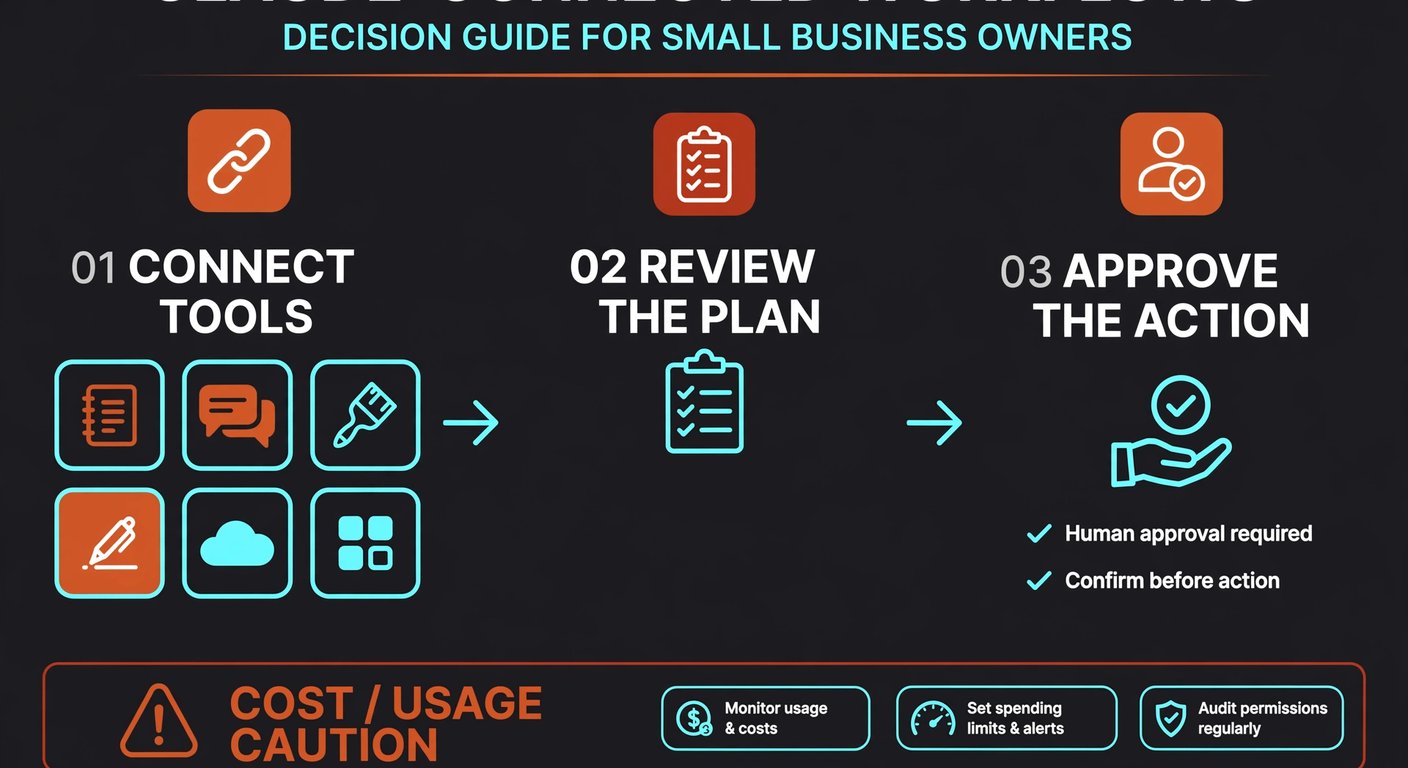
What does Claude for Small Business actually connect?
Anthropic describes a set of connectors and skills rather than a new accounting or CRM system. Claude sits across tools you already use and helps move a job from one step to the next.
- Finance: QuickBooks and PayPal can support reconciliation, invoice follow-up, disputes, refunds, and cash-flow work.
- Sales: HubSpot can provide lead triage, customer summaries, and campaign analysis.
- Marketing: Canva can turn a brief into channel-ready drafts while your team reviews the assets.
- Operations: DocuSign can prepare and track contracts, then file signed copies.
The pitch is simple: pick the job, let Claude prepare a plan, and approve the result. You are not buying a magic employee. You are giving an assistant access to several places where work currently gets stuck.
Which workflow should you test first?
Start with a job that happens often, has a clean input, and can be checked before anything goes out. Invoice follow-up is a better first test than payroll. A weekly sales summary is safer than letting a system change prices.
Use this filter. Can you name the person who owns the result? Can that person check the output in less than 15 minutes? Can you measure the baseline today, such as hours spent, overdue invoices, or time to prepare a report?
If the answer is yes, write down the workflow in plain language:
- Collect the new or changed records.
- Prepare a summary, draft, or list of next actions.
- Send nothing and change nothing until the named owner approves it.
That last step matters. Anthropic says workflows are initiated by you and that you can approve a plan before it runs end to end. Treat approval as part of the process, not as a button people will remember later.
What should you check before connecting a tool?
Access is the first risk. If Claude can see a shared drive, CRM, or accounting workspace, its usefulness depends on the permissions already in those systems. Old shared folders and former employees' accounts are not an AI problem; they are an access problem that an AI connection can expose faster.
Spend an hour on a permissions sweep before your pilot. Remove unused accounts, close public links, and check whether sensitive files sit in the same workspace as ordinary working documents. Give the pilot account the smallest access that still lets it complete the test.
Then set a data rule. Decide what must never be pasted into prompts or connected to a workflow. This may include bank credentials, unredacted identity documents, or customer information that your team does not need for the task. Put the rule in writing and show it to the person running the pilot.
Anthropic says Team and Enterprise plans do not train on customer data by default. That is useful context, not a substitute for reading the current plan terms and connector permissions before you switch anything on.
How much control should you keep?
Keep a human in front of every external action at the start. That includes sending an email, posting an asset, issuing a refund, changing a customer record, or sending a contract. A draft is easy to inspect. A completed action may be hard to reverse.
Ask Claude to show its source records and its proposed next step. If a summary says a customer is overdue, the owner should be able to open the invoice behind that statement. If a campaign draft uses a product claim, someone who knows the product should verify it.
Do not judge the pilot by how many tasks Claude runs. Judge it by whether the work gets finished with fewer corrections. A workflow that saves 30 minutes but creates a customer-facing mistake is not a win.
What does a sensible 30-day pilot look like?
Week one is for choosing one workflow, cleaning permissions, and recording a baseline. Do not connect six tools on day one. Pick the system that contains the starting data and add another only when the next step truly needs it.
Weeks two and three are for supervised runs. Keep a simple log with the date, task, time saved, corrections, and any access or cost surprise. Run the same task manually once in a while so you can compare quality, not just speed.
Week four is the decision point. Keep the workflow if the owner trusts the result, the review step is realistic, and the cost is visible. Rewrite it if the inputs are messy. Stop it if nobody owns the outcome or if the tool keeps producing work that takes longer to repair than to do by hand.
That may sound cautious. It is cheaper than discovering after a month that an automated workflow has been sending the wrong answer to the right customers.
A good first pilot is boring, repeatable, and easy to stop.
Is Claude for Small Business a fit for you?
It may be a fit if your team already works in the connected tools, repeats the same multi-step jobs every week, and can name the person who approves the result. It is less attractive if your records are scattered, permissions are unclear, or the process changes every time.
I would not connect accounting, CRM, and marketing at once just because the connectors exist. Start with one narrow job. If it earns trust, expand. If it does not, you have learned something without turning a new subscription into another system nobody uses.
Frequently asked questions
What is Claude for Small Business?
It is Anthropic's package of connectors, skills, and ready-to-run workflows for small-business tasks across tools such as QuickBooks, PayPal, HubSpot, Canva, DocuSign, Google Workspace, and Microsoft 365.
Does Claude send messages or make payments without approval?
Anthropic says workflows are initiated by the owner and can include an approval step before they run end to end. Keep approval required for external messages, refunds, payments, contracts, and customer-record changes during a pilot.
What should a small business automate first?
Choose a frequent, low-risk job with clear inputs and a named reviewer. Invoice follow-up drafts, weekly sales summaries, and internal campaign preparation are safer starting points than payroll or automatic refunds.
Will Claude see everything in our connected tools?
Access depends on the permissions granted to the connected account and the plan's connector settings. Review shared folders, former employee accounts, public links, and sensitive records before the pilot.
How long should the first Claude pilot run?
Use 30 days: one week to prepare, two weeks of supervised runs, and one week to decide whether the result is worth keeping. Track time, corrections, cost, and exceptions rather than task volume alone.
Want a practical second opinion?
BigLobster helps small teams choose one workflow, set the review points, and connect the tools without turning automation into another chore.
Talk through your workflow