
You probably use an AI API without thinking of it as an API. It may sit inside your helpdesk, CRM, document tool, coding assistant, or automation platform. You pay a monthly bill, connect an account, and get on with the work.
That setup is convenient. It also creates a small chain of trust: your staff, your automation vendor, the model provider, and every integration in between. On September 8, 2026, CISA, the NSA, and the FBI published a joint advisory describing industrial-scale attempts to extract capabilities from frontier AI models through huge volumes of API requests. The campaign was aimed at model providers, not ordinary shops. The lesson for a small company is still useful: know who can call your models, what they can send, and what happens when a provider or connector goes wrong.
What the new advisory changes for a small business
The advisory is not telling a five-person company to build a national-security operation. Its immediate recommendations are aimed at AI providers: detect unusual prompts and accounts, change responses for suspected abuse, and share intelligence across providers and platforms.
Still, the same patterns show up in smaller environments. A shared premium login hides who is using a tool. An automation platform forwards data through a connector you have never reviewed. A forgotten API key stays active after a contractor leaves. A sudden usage spike becomes a large bill before anyone notices.
None of those problems requires a sophisticated attacker. They are ordinary ownership and access failures. You can start fixing them this month.
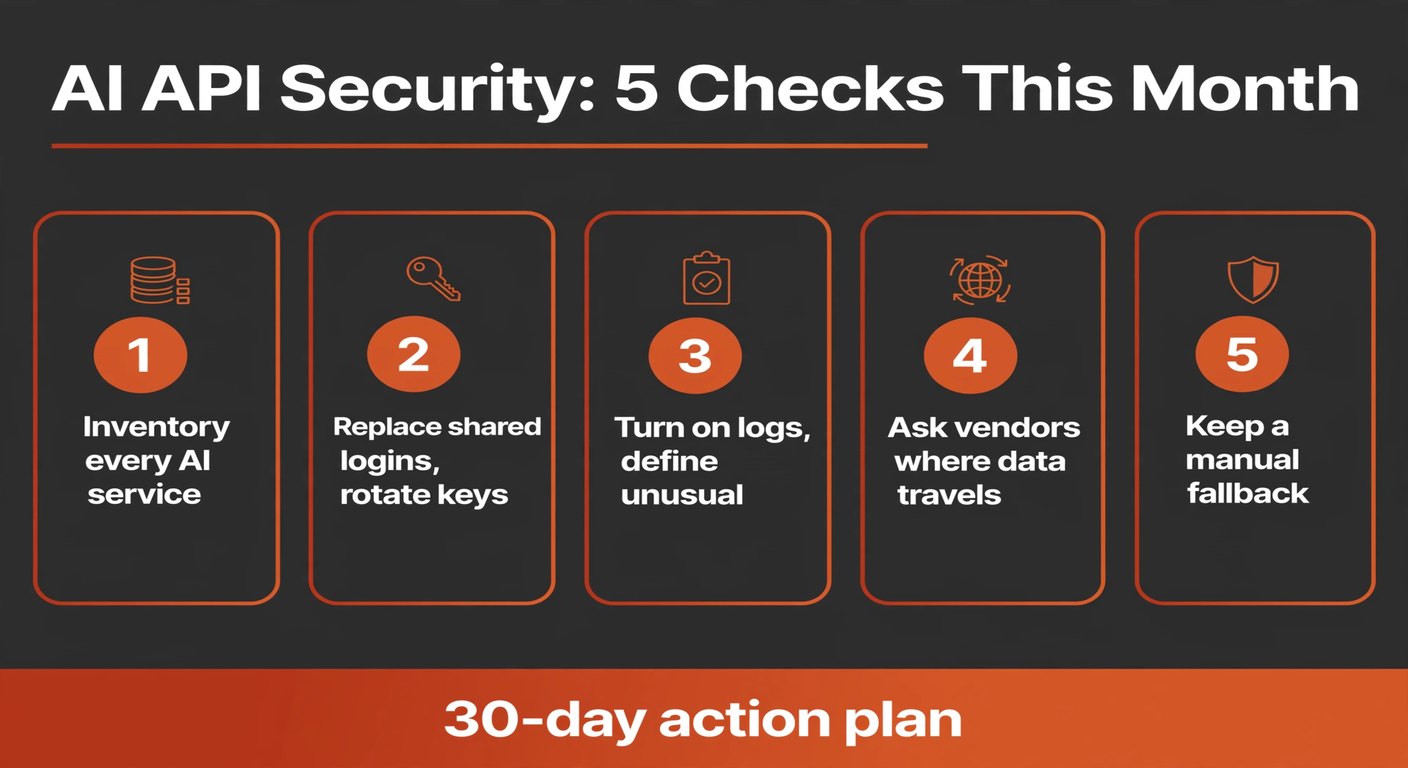
Start with an inventory, not a new security product
Open a spreadsheet. List every place your company sends text, files, images, audio, or customer details to an AI-powered service. Include the tools that staff bought on a card without telling anyone. Ask your accountant, operations lead, and whoever manages the website for their list too.
For each connection, record five facts:
- the tool and the person who owns it;
- the model provider behind it, if the vendor discloses one;
- what information goes in and what comes out;
- which account, key, or connector authenticates it;
- the fallback process if it stops working.
Do not wait for perfect documentation. “Website chatbot, managed by Ana, receives public FAQs, vendor unknown” is already more useful than a blank row. Mark unknowns for follow-up. The first action is to make the hidden connections visible.
Replace shared logins and tidy up API keys
A shared login is cheap until something goes wrong. Then you cannot tell who made a request, remove one person without changing the whole team, or prove what happened to a customer file.
Use individual accounts wherever the vendor supports them. For API connections, create separate keys for separate workflows: one for the website, another for invoice extraction, another for internal experiments. Keep keys in the automation platform’s secret store or your password manager, not in a spreadsheet or a code repository.
During the review, rotate keys that have been copied into chat, email, tickets, or old documentation. Remove keys belonging to former staff and unused experiments. Set spending limits and alerts when the provider offers them. A limit is not a security system, but it turns a quiet compromise into a visible problem.
Do this first: pick the connection that handles the most sensitive data and rotate its credential today. You do not need to redesign every workflow before making one important path safer.
Turn on logs and decide what “unusual” means
Logs are not just for developers. They answer basic business questions: which workflow ran, when did it run, with which account, how many requests did it make, and did the volume change?
Turn on the provider’s usage and audit logs, then check whether your automation platform keeps its own execution history. Save the minimum useful record without copying the contents of every customer conversation into a new database. For many small companies, timestamps, account IDs, workflow names, request counts, error rates, and spend are enough for a first pass.
Set a simple baseline for each workflow. A support assistant might run 200 times a week. A document extractor might run after each uploaded invoice. If either suddenly makes thousands of calls, pauses it and investigate before increasing the budget.
The CISA advisory describes attackers spreading requests across providers and pathways to avoid a single point of detection. Your response is simpler: compare the provider bill, the automation logs, and the business event that should have triggered the workflow. If those three stories do not match, stop and look closer.
Ask vendors where your data travels
“We use AI” is not a sufficient data-flow description. Ask the vendor which model providers and subprocessors receive your content, whether prompts are used to train models, how long inputs and outputs are retained, and which region handles the request. Ask what happens when the vendor changes model providers.
You may not get every answer. That is information too. For a low-risk public FAQ, an unclear answer may be tolerable. For payroll, customer contracts, health information, source code, or pricing plans, it should trigger a pause or a different design.
Do not send more data than the task needs. A document workflow that extracts a due date may not need a full customer history. Redaction before the API call is often cheaper than trying to clean up an exposure later.
Keep a manual fallback before you automate more
An AI workflow is not ready if nobody knows how to do the job when it fails. Write a short fallback for each important connection: who pauses it, where the work queue lives, how customers are told about delays, and how you restore service.
Test the fallback once. Disable a non-critical workflow for fifteen minutes and have someone process one item manually. You will find the missing password, undocumented approval, or impossible spreadsheet step while the stakes are low.
This is also the answer to model or vendor churn. You do not need to predict which provider will win. Keep your input data structured, avoid hard-coding one model’s quirks into every process, and preserve a human route for important decisions.
Your 30-day action plan
Keep the first pass small enough to finish:
- Days 1–5: inventory AI tools, owners, data types, keys, and vendors.
- Days 6–10: remove shared access, rotate the highest-risk keys, and set spend alerts.
- Days 11–15: enable usage and audit logs; record a normal week for each important workflow.
- Days 16–22: ask vendors about retention, subprocessors, training use, and incident notification.
- Days 23–30: test one manual fallback and write down the person who can pause each workflow.
At the end, you should be able to answer three questions without hunting through old email: what AI connections do we have, what can each one see, and who shuts it down?
Frequently asked questions
Do I need to stop using AI APIs?
No. The advisory describes abuse at a scale far beyond normal small-business use. It is a reason to manage access and usage, not a reason to abandon useful tools.
Is a monthly AI subscription safer than an API?
Not automatically. A subscription can still have shared credentials, unclear data retention, or weak offboarding. Review the account, permissions, and vendor terms either way.
What should I do if a provider will not explain its subprocessors?
Limit the data sent to that service, use it only for low-risk work, or choose a provider that gives you enough information to make a responsible decision. Do not put sensitive data in a black box because the workflow is convenient.
What is the one check I should do today?
Find the most valuable AI connection, identify its owner, rotate its credential if it has been shared, and turn on usage alerts. That is a useful start, even if the rest of the inventory comes next week.
Need a second pair of eyes on an AI workflow?
BigLobster helps small teams map practical automations, define human approvals, and keep a fallback in the process instead of bolting one on after a failure.
Talk through your workflow