
Here is the thing about a small team: the same person may be the owner, the operations manager, and the person who gets the angry customer email. A bad automated action does not disappear into a large support department. It lands on someone's desk immediately.
That is why “agent drafts, human approves” is not a timid way to use AI. It is often the fastest route to a workflow people trust. The agent handles the repetitive preparation. A person keeps control of the moment where money, reputation, or a customer relationship is at stake.
Do not ask whether an agent can perform a task. Ask which part of the task deserves a human decision.
A practical rule for small-business automation
Why approval gates matter now
Small and medium-sized companies are already piloting agents. Upwork's Research Institute surveyed 195 leaders at companies with 10–99 employees in Q1 2026. Thirty-four percent were actively piloting workflow automation, while 49% named data privacy and security as a barrier. The appetite is real. So is the need for a sensible control point.
The same survey found that 74% reported some productivity improvement, but most gains were below 25%. That is a useful reality check. An agent does not create value just because it completes a task. It creates value when the whole process gets faster without adding expensive mistakes.
A review step can make that trade-off visible. You can measure how many drafts a person approves unchanged, how often they edit one, and which cases they reject. Those are better signals than a vague claim that the AI “saved time.”
What should a person approve?
Start with the consequence of being wrong. Approval belongs before an action that is external, difficult to reverse, financially meaningful, or based on sensitive information.
- External messages: customer emails, public replies, sales outreach, and anything sent to a list.
- Money movement: refunds, discounts, payments, purchase orders, and changes to billing details.
- Record changes: deleting data, closing a deal, changing a contract status, or overwriting a customer field.
- High-impact decisions: rejecting an application, escalating a complaint, or changing a service level.
Not every AI step needs a meeting. Sorting an incoming message, extracting fields from a document, or producing an internal summary can usually run automatically when the output is checked by the next step and the original data remains available.
Use a simple test: if the action can be undone in seconds and nobody outside the team sees it, start with automatic execution. If undoing it requires an apology, a bank call, or a legal explanation, put a person in the loop.
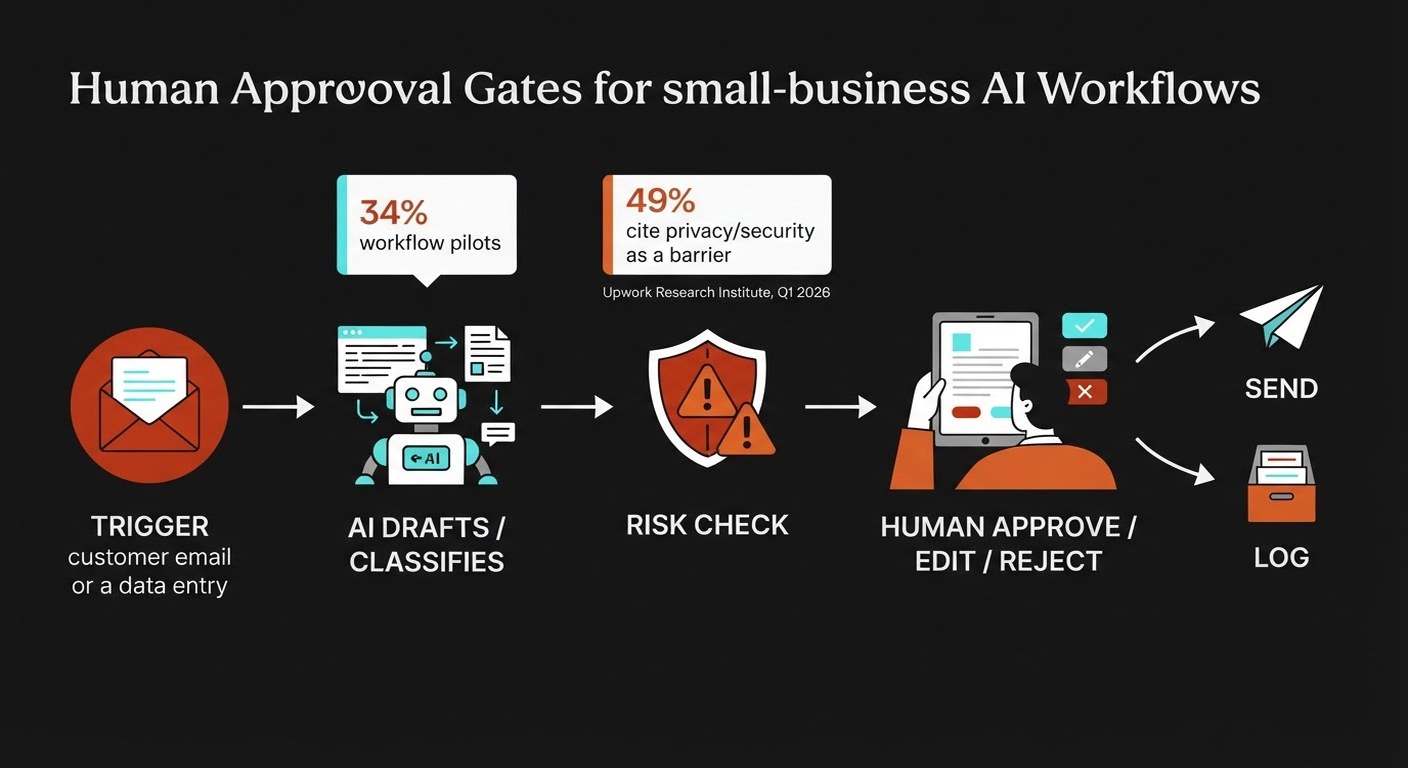
Design the workflow as a queue, not a chat
A chat window is a poor place to approve business actions. Important context gets buried, and nobody can tell which requests are waiting. A review queue is clearer: each item shows the proposed action, the source data, the reason it was selected, and the decision needed.
A useful approval item answers five questions:
- What triggered this request?
- What does the agent want to do?
- Which facts or documents did it use?
- What happens if someone approves it?
- What are the choices: approve, edit, reject, or ask for more information?
That last point matters. Approval should not be a rubber stamp. A reviewer needs an easy way to edit the recipient, amount, wording, or next step. LangChain's current human-in-the-loop documentation describes the same four useful decisions: approve, edit, reject, or respond. You do not need that exact framework to use the pattern; you need the decisions to be explicit.
Keep the first version narrow
Pick one queue with a clear input and a clear owner. Good starting points include draft replies to routine enquiries, quote preparation, overdue-invoice follow-ups, and lead qualification. These tasks happen often enough to produce evidence quickly, but a person can still check the output before it leaves the business.
Do not begin with “connect every system.” Begin with one workflow and one metric. For a quote assistant, track minutes from request to approved quote and the percentage of drafts that need a material edit. For invoice follow-up, track days-to-payment and the number of messages a person rewrites.
Run the queue in review-only mode for two weeks. The agent can prepare everything, but it cannot send or update the system by itself. This gives you a sample of real edge cases before you grant more permission.
Then widen the lane carefully. Low-risk internal classification can run automatically. Customer-facing drafts may still need approval. Refunds and record deletion can require a second approver. Permissions should follow the consequence of failure, not the excitement around the model.
Measure trust and throughput together
Speed is only half the result. Track the quality of the queue as well as its volume.
- Approval rate: how many proposals are accepted without changes?
- Edit rate: how often does a person fix a fact, tone, recipient, or amount?
- Escalation rate: how often does the workflow correctly ask for help?
- Time to decision: how long does an item wait before someone acts?
- Business result: did response time, payment time, conversion, or completion rate improve?
A high approval rate is not automatically good. It can mean the agent is accurate, or that reviewers are clicking through without looking. Sample a few approved items each week. You want a workflow that is fast because the proposals are clear, not because the control has become theatre.
Also record why people reject or edit a proposal. Repeated corrections usually point to a missing rule, a stale source document, or an input the agent cannot see. Fix that cause instead of adding a longer prompt every time.
What goes wrong when the gate is missing?
There are three common failure patterns.
The agent has too much permission. A tool account that can read, write, send, and delete makes a small mistake expensive. Give each workflow only the access it needs. Separate drafting credentials from sending credentials where you can.
The reviewer sees too little context. “Approve email?” is not a useful review request. Show the original message, the proposed reply, the relevant customer record, and any rule that caused the escalation.
The queue becomes a bottleneck. If every low-risk action needs a manager, people will approve blindly or abandon the process. Use conditional gates. Reserve human attention for actions where the consequence justifies it.
Good guardrails do not make the workflow slower by default. They make the risky part visible and let the safe part move.
How do you expand autonomy safely?
Earn permission with evidence. After a meaningful sample, review the edits and failures by category. If the agent handles internal tagging accurately for a month, let that step run without review. Keep the external message approval. If a quote workflow gets the product and price right but often misses delivery constraints, automate the easy path and route those exceptions to a person.
Set a stop rule before launch. For example: pause the workflow if the edit rate doubles, a source system changes, an unusual volume arrives, or an action fails twice. A workflow that knows when to stop is easier to trust than one that promises to handle everything.
Finally, assign an owner. Someone must review the queue, renew credentials, update the source documents, and decide whether the permissions still fit. In a small company, that may be one person wearing two hats. That is fine. Unowned automation is the real risk.
Frequently asked questions
Does human approval defeat the point of an AI agent?
No. The agent can still do the reading, classification, research, drafting, and data preparation. The person spends time on the decision that carries the consequence. If approval takes longer than doing the task manually, redesign the queue or choose a lower-risk workflow.
Can a small business build this without a developer?
Many first workflows can use features already inside your CRM, helpdesk, accounting system, or automation platform. Start with a manual approval step and a saved checklist. Add custom development only when the workflow needs deeper access to your systems or more specific routing.
How long should we keep every action behind approval?
Keep it there until you have enough real examples to understand the error patterns. For a daily workflow, two to four weeks can reveal a lot. Do not remove the gate because the first ten examples looked good; remove it for a narrow, low-risk action when the evidence supports that change.
What is the first metric to track?
Track time to a completed action and the rate of material corrections. Together they show whether the workflow is faster without hiding quality problems. Add a business measure such as response time or days to payment once the queue is stable.