
Launching an AI workflow feels like the finish line. You connect the inbox, form, CRM, or spreadsheet. The first outputs look good. Everyone moves on to the next project.
That is where the quiet problems begin. A supplier changes its PDF layout. A model gets updated. Your team changes the way it names products. A prompt that worked in January no longer matches the work in August. The automation still runs, so nobody sees the problem until a customer, invoice, or missed follow-up exposes it.
Maintenance does not need a data science department. For most small businesses, it means a named owner, a few useful signals, a short review cadence, and a manual route for when the system needs to stop.
Why AI workflows fail quietly
Traditional software often fails loudly. A page returns an error or a scheduled job stops. AI workflows can fail in a more awkward way: they return an answer that looks reasonable but is wrong.
A document extractor might read a tax total incorrectly. A lead classifier might start sending good prospects to the low-priority queue. A support assistant might draft replies using an old policy document. None of these needs to trigger a server error.
The NIST AI Risk Management Framework treats monitoring and ongoing risk management as part of the AI system lifecycle, rather than a one-time launch task. You do not need to copy an enterprise framework, but the idea is useful: the work continues after deployment.
What should you check after launch?
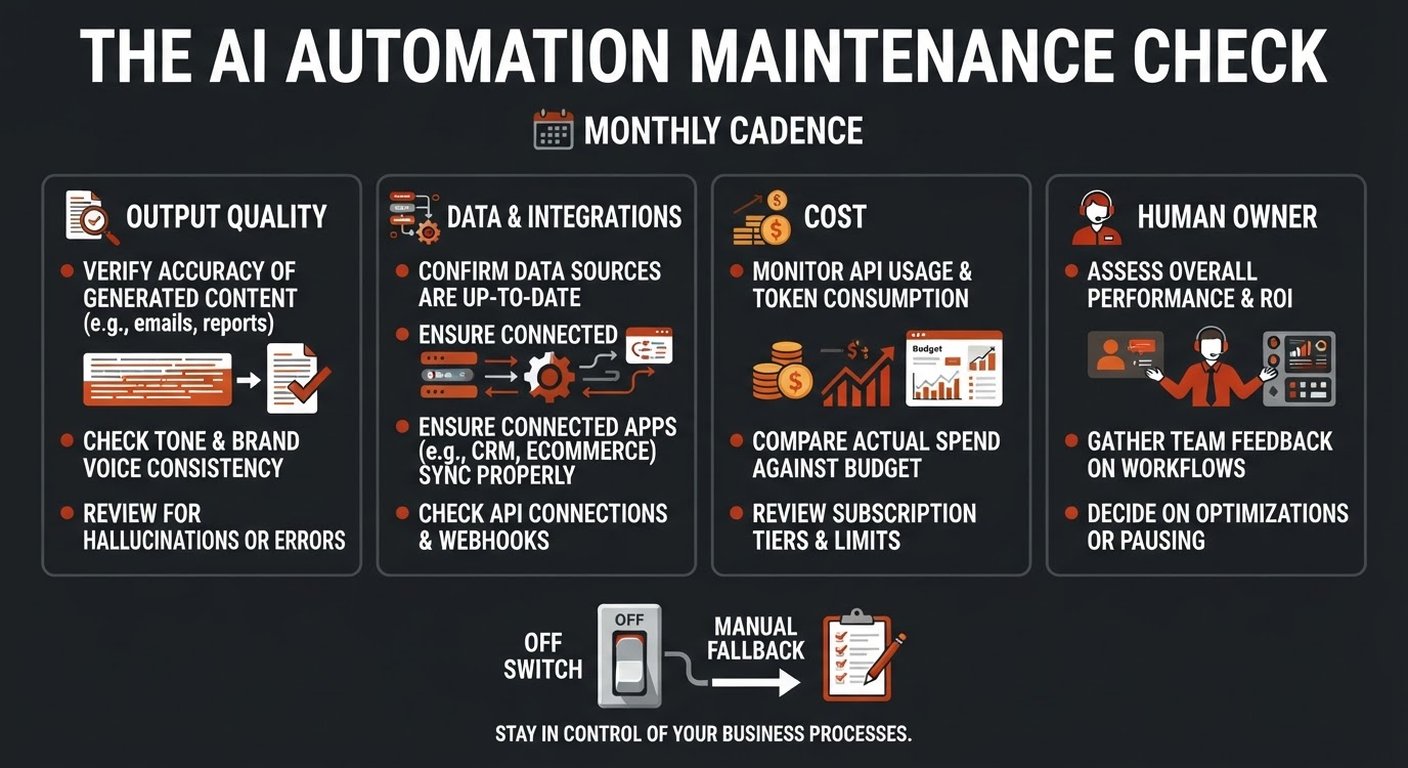
Start with four questions. They cover most maintenance work without turning a small automation into a reporting project.
Is the output still correct?
Pick a small set of real examples and review them on a schedule. Use the same kind of cases you used during testing, plus a few recent edge cases. For an invoice workflow, check vendor, date, line items, tax, and total. For lead triage, check the category, priority, and suggested next action.
Where possible, add a cheap check that does not trust the AI. Line items should add up to the total. A customer ID should exist in the CRM. A date should fit the expected format. These checks catch wrong answers that would otherwise look perfectly normal.
Have the inputs or integrations changed?
Look at the shape of incoming data. Are fields missing? Are documents arriving from a new sender? Did a connected service change its API or permissions? A change in input patterns often explains a sudden drop in quality.
Keep a short record of the systems involved, the fields the workflow expects, and the person who can change each connection. This is more useful than a 40-page technical document nobody opens.
Is the workflow costing more than expected?
Count runs, external API calls, model usage, and retries. A workflow that handles ten requests a week can become expensive when a form starts sending duplicate events or a failed step retries forever.
Set a monthly expectation and an alert above it. The exact amount depends on your tools and volume; the habit matters more than the number. Review cost per completed outcome, not only cost per AI call. A cheap call that creates ten minutes of manual correction is not cheap.
Does someone own the decision?
Write down one name. The owner does not need to build the workflow, but they must know what it does, what a bad output looks like, and when to pause it. “The team” is not an owner. It usually means nobody checks.
How often should you review an AI automation?
Use the risk and volume of the workflow to set the rhythm. A low-volume internal summary may need a monthly spot check. A customer-facing or finance-related workflow deserves closer attention.
- Every run: validate required fields, record success or failure, and flag exceptions.
- Every week: glance at failed runs, unusual volume, correction rates, and obvious cost spikes.
- Every month: review real outputs, compare results with the baseline, and confirm that the source data is still fresh.
- After a change: retest when a prompt, model, integration, policy, or major business process changes.
Do not create alerts for every small variation. A noisy dashboard trains people to ignore it. Alert on events that need a decision: the workflow stopped, output quality fell below an agreed level, spend jumped, or a high-risk item needs review.
What is drift, and how can a small team spot it?
Drift is a change in the data or behavior around a workflow that makes yesterday’s setup less reliable today. It can come from the outside world or from your own business.
Input drift shows up when the incoming material changes: new document layouts, different customer language, new product codes, or a different mix of requests. Output drift shows up when the workflow’s answers change: more manual corrections, more low-confidence classifications, or a growing number of exceptions.
You do not need a complex statistical system to start. Track one or two practical measures:
- the percentage of outputs a person corrects;
- the percentage of cases sent to manual review;
- the time from trigger to completed result;
- the number of records that fail a basic validation check.
Watch the trend against your first month, not a supposedly perfect industry benchmark. A correction rate that doubles from 4% to 8% deserves a look even if 8% sounds acceptable in isolation.
What should happen when the workflow is wrong?
Decide this before you need it. Add a pause or off-switch, define who can use it, and document the manual fallback in plain language.
The fallback might be as simple as routing new requests to an inbox and using a saved spreadsheet until the connection is repaired. For finance, it may mean holding records for a human check. For customer support, it may mean returning to the normal queue. The point is to keep the business moving without trusting a system you already suspect.
Also decide how far back to check. If you discover that a parser misread invoices for three days, fixing new invoices is only half the job. Find the affected records and review them. The right recovery window is a business decision, not something the AI can choose for you.
How do you keep maintenance from becoming busywork?
Attach the review to a meeting or process that already exists. Put the workflow owner’s name and the next review date in the same place as your operating notes. Keep the review short and make every check answer a question.
A useful monthly note can fit on one page:
- What changed in the workflow or its inputs?
- What was the correction or exception rate?
- What did it cost compared with expectation?
- Did a real person inspect recent outputs?
- What action, if any, is due next?
Remove checks that never lead to a decision. Add a check when a real failure teaches you that the current set missed something. That keeps the routine grounded in your business instead of turning it into dashboard theatre.
Frequently asked questions
Do small businesses need a dedicated AI operations team?
No. A simple workflow can have an operations owner who spends a few minutes checking it and a technical contact who handles changes. The responsibilities need to be clear even when one person holds both roles.
Should we retrain or replace the model every month?
Usually not. Start by checking real outputs and finding the cause of the problem. A changed input format, stale source document, or broken field mapping may be the issue. Change the model only when testing shows that it is the right fix.
What is the most important maintenance metric?
There is no universal winner. For most small-business workflows, the best starting point is the rate at which a person corrects the output, paired with a business result such as response time, quote turnaround, or successful routing.
Can we skip maintenance if the workflow is low risk?
You can use a lighter cadence, but do not skip ownership and a basic fallback. Low-risk workflows still waste time when they silently stop working, and a small check is cheaper than rediscovering the problem through a customer complaint.