
Here is a familiar scene: someone opens an invoice, reads the vendor name, copies the number into a spreadsheet, saves the PDF, forwards it for approval, and later types the same information into accounting software.
Multiply that by 200 invoices and you have a process that feels too small to fix and costs too much to ignore. The problem is not that your team cannot read invoices. It is that people are being used as a data bridge between files and systems.
AI document processing removes the copying. It reads a document, extracts fields, checks the result, and sends the data to the next step. It does not mean letting a model approve payments on its own. The best workflow keeps a person responsible for exceptions and money-moving decisions.
Source: Intuit QuickBooks 2026 AI Impact Report. The report covers the US, Canada, the UK, and Australia, so it is a useful international reference rather than a claim about every market.
What does AI document processing actually do?
Think of it as a translator between an unstructured file and a business record. The system can identify text, tables, labels, dates, totals, and line items. It then returns those values in a format that a spreadsheet, accounting platform, CRM, or ERP can use.
- Capture: watch a shared inbox, upload folder, form, or mobile scan.
- Classify: tell an invoice from a receipt, purchase order, delivery note, or customer form.
- Extract: pull out fields such as vendor, invoice number, due date, tax, total, and line items.
- Validate: compare values with rules, purchase orders, supplier records, or duplicate documents.
- Route: send clean records forward and send uncertain ones to a person for review.
Microsoft's prebuilt invoice model, for example, exposes confidence scores for extracted fields and supports a custom model when your documents need extra fields. That distinction matters: extraction is a first pass, not a guarantee that every value is right.
Which documents are worth automating first?
Start where volume is steady and the output is predictable. A document does not need to be exciting to be a good automation target. It needs a clear input, a short list of fields, and a next step that someone repeats every week.
| Document | Fields to capture | Useful next step |
|---|---|---|
| Supplier invoice | Vendor, number, date, total, tax, due date | Match, approve, and post to accounting |
| Expense receipt | Merchant, date, category, amount | Attach to expense record and flag missing data |
| Delivery note | Order number, items, quantity, signature | Update inventory and notify the operations team |
| Sales enquiry form | Name, company, need, budget, source | Create a lead and assign a follow-up |
Do not begin with every document in the company. Pick one type. If invoices are already stored in five different places, moving them into one intake folder may produce a bigger improvement than buying a more sophisticated model.
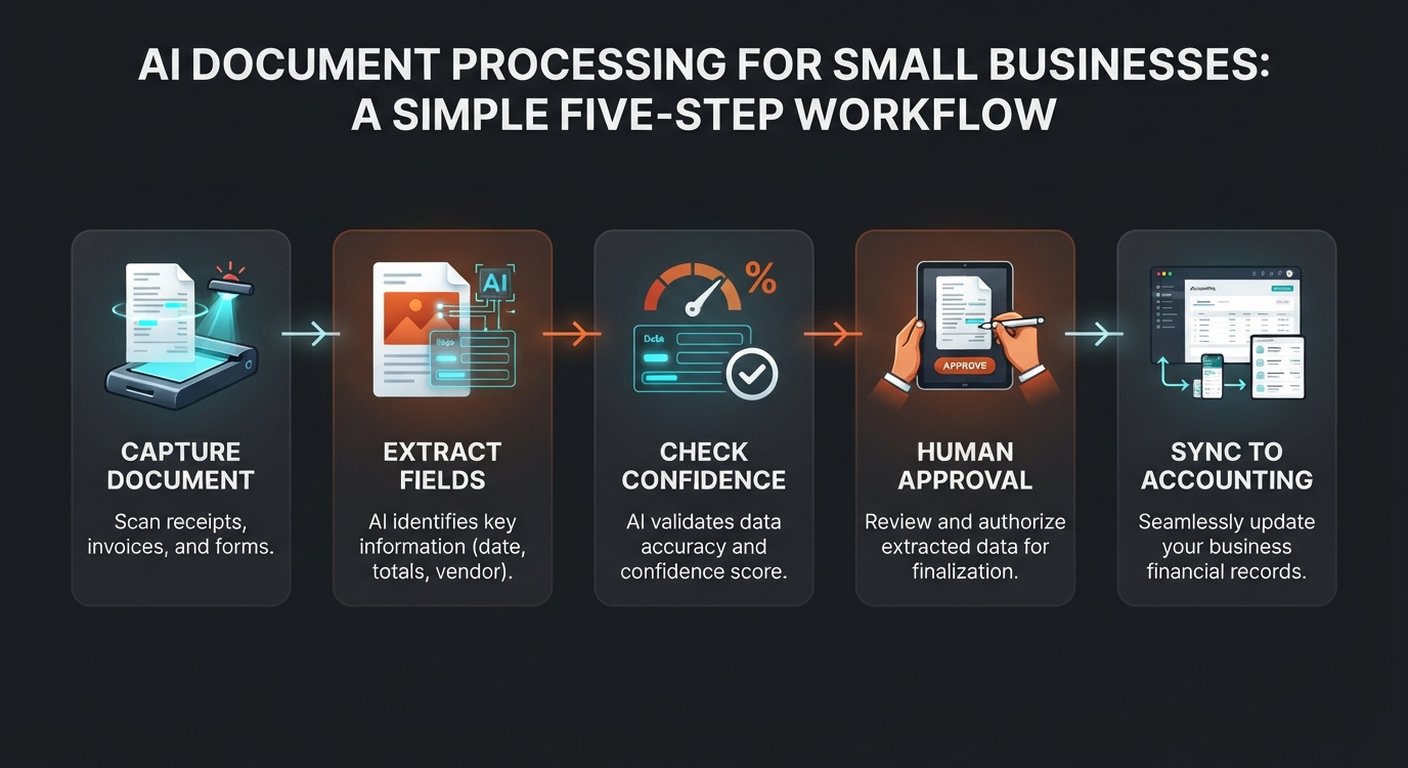
Why confidence scores are more useful than blind automation
A document model can be very sure about a clean printed invoice and much less sure about a blurry photograph, a handwritten note, or a supplier layout it has never seen. A useful workflow makes that uncertainty visible.
Set a rule for each important field. For example, a high-confidence invoice number can move on automatically, while a low-confidence total goes to a review queue. You can also require a second check when the total is above an amount chosen by your finance lead.
Never hide the original document. Store a link to it beside the extracted record. When someone asks why a total looks wrong, they should be able to compare the data with the source in seconds.
What should stay human?
Automation should remove keystrokes, not accountability. Keep a human in the loop for:
- new or unfamiliar suppliers;
- duplicate invoices and mismatched purchase orders;
- large payments or unusual bank details;
- documents with missing pages, unclear totals, or conflicting dates;
- decisions that change a customer, supplier, or employee record.
That review is not a failure of the system. It is the control that makes the system safe enough to use. Microsoft also documents a pattern where a custom model handles low-confidence cases and the prebuilt model acts as a fallback. The same idea works across other platforms: route the strange cases instead of forcing every file through one path.
How much can a small team save?
Use your own baseline. Count how many documents arrive in a normal month and time the full process, including filing, re-keying, approval chasing, and corrections. Do not count only the seconds spent reading the page.
Here is a simple example. A company processes 300 invoices a month. If each one takes eight minutes from inbox to accounting, that is 40 hours. Cut the routine work to two minutes and the team gets 30 hours back. If the workflow costs $250 per month, the break-even value is less than $8.35 per recovered hour.
That is not a promise of 30 perfect hours. Reviews, exceptions, and setup remain. It is a way to test the business case with numbers you can check. For a broader benchmark, the State of Accounts Payable 2026 report says 42% of finance leaders name manual processes as their biggest challenge. Treat vendor research as directional, then validate it against your own queue.
How do you choose a document automation tool?
Ignore the demo where a perfect sample invoice becomes a perfect spreadsheet. Ask what happens on the 20% of files that are messy.
- Input options: Can it handle email attachments, PDFs, photos, and scans?
- Field confidence: Can you see confidence per field, not just one score for the page?
- Human review: Is there a queue for corrections, with the original document visible?
- Integrations: Can clean data reach the accounting, CRM, inventory, or ERP system you already use?
- Audit trail: Can you see who changed a value and when it moved to the next step?
- Pricing: Is the cost based on pages, documents, users, model calls, or a mixture?
For a small operation, a simple flow across a shared inbox, a document model, and an approval queue may beat a large platform that takes months to configure. Your team should understand the workflow well enough to fix a failed run without waiting for a consultant.
What does a safe first pilot look like?
Run a two-week pilot with one document type and one destination system. Keep the scope boring. Boring is good here.
- Collect a representative sample. Include clean files, scans, different suppliers, and a few known exceptions.
- Write the field list. Decide what is required, what can be blank, and what must trigger review.
- Build the review path first. Make it easy to correct data and open the source file.
- Measure three numbers. Processing time, correction rate, and documents that reach the destination without manual re-entry.
- Expand only after the numbers hold. Add another document type when the first one is predictable.
Do not train the team to trust a percentage. Train them to ask whether the extracted value makes sense in context. A 99% confidence score cannot tell you that a real invoice was sent by a cloned supplier.
Frequently asked questions
Is AI document processing the same as OCR?
No. OCR turns pixels into text. Document processing goes further by identifying fields, tables, document types, and relationships. Many workflows use OCR underneath, but OCR alone does not know which number is the invoice total.
Can it process handwritten documents?
Sometimes, but results depend on handwriting, image quality, language, and the model. Treat handwriting as a review-heavy category during the pilot. Do not build a payment process around it until your own error rate is acceptable.
Will the system replace our bookkeeper?
No. It can remove repetitive entry and help a bookkeeper spend more time on reconciliation, exceptions, and decisions. Someone still needs to set the rules, review unusual records, and own the books.
Is it safe to send invoices to an AI service?
That depends on the provider, plan, location, retention settings, access controls, and your contracts. Check how files are stored, whether they are used for training, who can access them, and how deletion works. Start with low-risk documents while you verify the controls.
What if our suppliers all use different invoice formats?
That is normal. Begin with the suppliers that create most of your volume, then add a fallback and a review queue for unfamiliar layouts. A good process improves over time because corrections become examples for better rules or models.
Want to remove the copying from your workflow?
BigLobster maps the documents, rules, approvals, and systems around your real operation. Start with one process and a measurable baseline.
Talk through your workflow →