
Why bookkeeping is the easiest automation win in your business
Look at what you actually do with your books on any given month. You download the bank statement. You match transactions. You figure out whether that payment from last week was the client's deposit or the refund. You chase receipts. None of it is hard — it's just loud, boring, and endless.
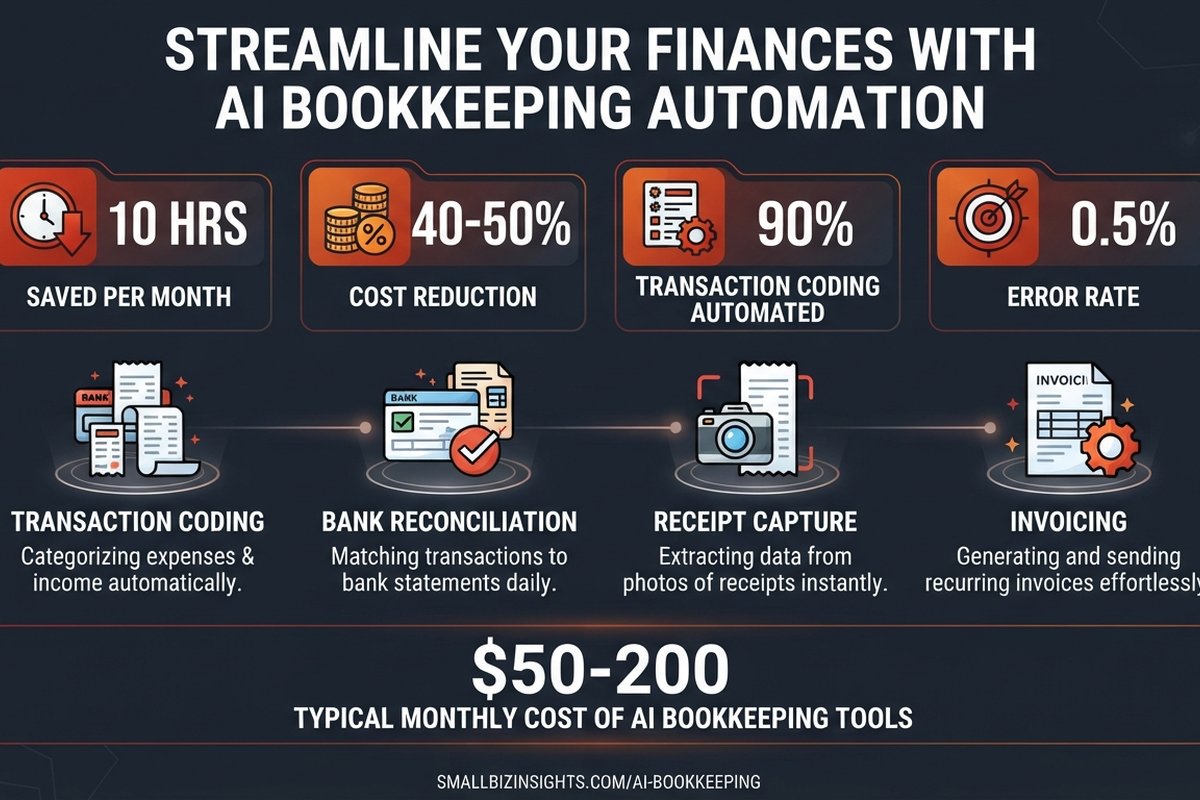
And that's exactly why it's the best place to start with AI. The tasks that are repetitive by design are the ones a machine does flawlessly. Intuit's 2025 survey of 2,000 US small business owners found that businesses actively using AI bookkeeping features save an average of 10 hours per month. For companies with more than 100 transactions a month, that jumps to 16-18 hours.
Read that again. Ten hours a month is a full working day and a half, every month, that vanishes into data entry. Most owners I talk to don't realize they're spending it until they see the number on paper.
Here's the thing I keep coming back to: the error reduction is the part nobody advertises. AI reconciliation catches mistakes at a rate below 0.5%, while manual workflows run 1-8%. That's not just a convenience — that's fewer embarrassing calls from your accountant in March.
What it actually automates (and what it doesn't)
Let me be precise, because "AI bookkeeping" gets oversold in both directions. Here's the honest split:
What the AI does well today
- Transaction coding. The tool sees a payment to a known supplier and assigns the right expense account. QuickBooks reports it handles 85-95% of routine categorization correctly on the first pass.
- Bank reconciliation. It matches bank transactions to your records and flags the ones that don't fit. Companies using AI reconciliation see matching time drop by about 70%.
- Receipt and bill capture. Snap a photo or forward an email, and the software extracts the amount, vendor, date, and category. Receipt processing time drops by 80% or more.
- Invoicing and collections. It generates invoices, sends follow-ups on overdue ones, and can tell you which clients are likely to pay late.
What still needs a human
- Judgment calls. Whether that unusual expense should be capitalized or written off, and how to handle a transaction the AI has never seen.
- Tax strategy and compliance. The tool can organize your data; it can't decide your tax position or defend it. Rules differ wildly by country, so this stays with a professional.
- Final sign-off. Someone has to review and approve before the books close. AI gets you 90% of the way; the last 10% is yours.
That combination is the honest value. AI handles the volume, and you keep the judgment. It's a shift from typing to reviewing, which is a far better use of your time or your bookkeeper's.
What it costs in 2026
Prices have dropped to the point where the question isn't "can I afford it" but "why am I still doing this by hand." The two big platforms and the AI-first newcomers all land in affordable territory:
| Tool | Entry price (monthly) | AI features included |
|---|---|---|
| QuickBooks Online | $19-38 | Auto-categorization, bank reconciliation, Intuit Assist |
| Xero | $15-25 | Bank rules, Hubdoc receipt capture, forecasting |
| AI-first platforms (Ramp, Paro, Finntree) | $50-200 | Full invoice-to-close automation, anomaly detection |
A useful rule of thumb, from Eagle Rock CFO's 2026 research: entry-level AI accounting tools for a small business run $50-200 per month. That's less than what many owners pay a bookkeeper for a single month, and it replaces most of the data-entry portion of that work.
The real number to watch is return on investment, not the subscription. Their data shows most small companies reach full ROI within 10-14 months of going live, with faster payback when you have more transactions. If you run more than a few hundred transactions a month, the savings usually cover the subscription within a quarter.
The mistakes that turn AI bookkeeping into a mess
AI bookkeeping fails in predictable ways, and they're almost never the software's fault. Here are the four that come up again and again:
- Turning it on and walking away. The tool mis-categorizes something, nobody reviews it, and the books quietly rot. Review the first month line by line until you trust the patterns.
- Skipping the chart of accounts. If your accounts are a chaotic list of 200 near-duplicate categories, the AI will learn that chaos. Clean up your chart of accounts first and the tool performs dramatically better.
- Mixing personal and business spending. AI matching struggles when the same card pays for diesel, dinner, and a client lunch. Separate the cards.
- Expecting it to replace your accountant. It won't, and it shouldn't. It replaces the data-entry work, not the professional judgment. Trying to cut the accountant entirely is how you end up with an angry tax filing.
Every one of those failures is avoidable. The common thread: treat AI as a tool you supervise, not a robot you hire and forget.
QuickBooks, Xero, or an AI-first tool?
If you already run QuickBooks or Xero, the answer is simpler than you think: turn on the AI features you already pay for. QuickBooks reports its built-in AI reduces time on routine bookkeeping tasks by about 50% for users who activate it, and it's trained on billions of transactions. Xero's bank rules and Hubdoc capture do the same job in a slightly different style.
The AI-first platforms (Ramp, Paro, Finntree, and others) are worth a look when the volume is high or you want the whole invoice-to-close flow automated in one place. They cost more, but they handle accounts payable, approvals, and reconciliation as one system.
My honest take: if you're already on a mainstream platform, start there. The upgrade is free or a few dollars a month, and you keep your existing chart of accounts and history. Only consider a switch if you're setting up fresh or your current tool genuinely can't do what you need.
How to start without wrecking your books
If you're convinced, here's the sequence I'd recommend. It's deliberately slow — that's the point.
- Back up your current books. Export everything before you touch settings.
- Clean up your chart of accounts. Collapse duplicates, name things clearly. This is the highest-leverage hour you'll spend.
- Turn on bank feeds if you haven't. AI bookkeeping runs on clean, live data. No bank feed, no automation.
- Enable auto-categorization and reconciliation. Start with one bank account and one month of data.
- Review everything that month. Catch the wrong calls, tweak the rules, teach it your exceptions.
- Only then expand. Add the other accounts, then invoices, then collections.
That sequence gives you a controlled pilot. Businesses that roll out every account at once usually spend a weekend drowning in review flags and give up. Date by date, account by account, and it becomes routine fast.
Frequently asked questions
Is AI bookkeeping accurate enough to trust?
For routine categorization and reconciliation, yes. AI handles 85-95% of transaction coding correctly on the first pass, and reconciliation error rates drop below 0.5% — better than the 1-8% of manual work. The catch is that the remaining mistakes need a human review to catch. Don't skip the first month of checking.
Will it put my bookkeeper or accountant out of work?
Not in a bad way. AI replaces the data-entry portion, which is likely the piece you're already paying bookkeeping rates for. The judgment, tax strategy, and compliance work stays. Most firms that adopt AI shift their people to advisory work — which is more valuable than data entry anyway. See what separating real profit from busywork revenue looks like when the admin load drops.
How much does AI bookkeeping cost for a small business?
If you're on QuickBooks or Xero, the AI features are mostly included in your existing plan. For a dedicated AI-first platform, budget $50-200 per month. Either way, the savings in time (10 hours a month on average) and reduced bookkeeping cost usually pay for the subscription within a quarter or two.
Isn't this only for bigger companies?
No, and it's more useful the smaller you are. A larger company may have a finance team; a small business owner carries the bookkeeping themselves. Ten hours a month means far more to a five-person company than to one with fifty. The tools are priced for small businesses, not enterprises.
What if I already use an accountant?
Then talk to them about it. Most accountants these days already use these tools, and they'd rather review clean, well-coded books than parse a shoebox of receipts. Your subscription makes their job faster and your monthly fee smaller — that's a conversation worth having.
How long does setup take?
A basic rollout — one bank account, auto-categorization on, reconciliation on — takes an afternoon. A full invoice-to-close setup on an AI-first platform takes a week or two. The bottleneck is rarely the software; it's cleaning up your chart of accounts and reviewing that first month of results.
Want to automate your finance workflows the right way?
We build automation that connects your accounting, invoicing, and operations so the boring work disappears. No overblown promises, just systems that save hours from month one. Tell us where your week goes and we'll show you what can be automated.
Talk to BigLobster →