
A new client should not have to wonder what happens after they sign. Yet that first week is where many small teams lose momentum: the welcome email sits in a draft, the intake form arrives late, and somebody searches three inboxes for the latest version of a document.
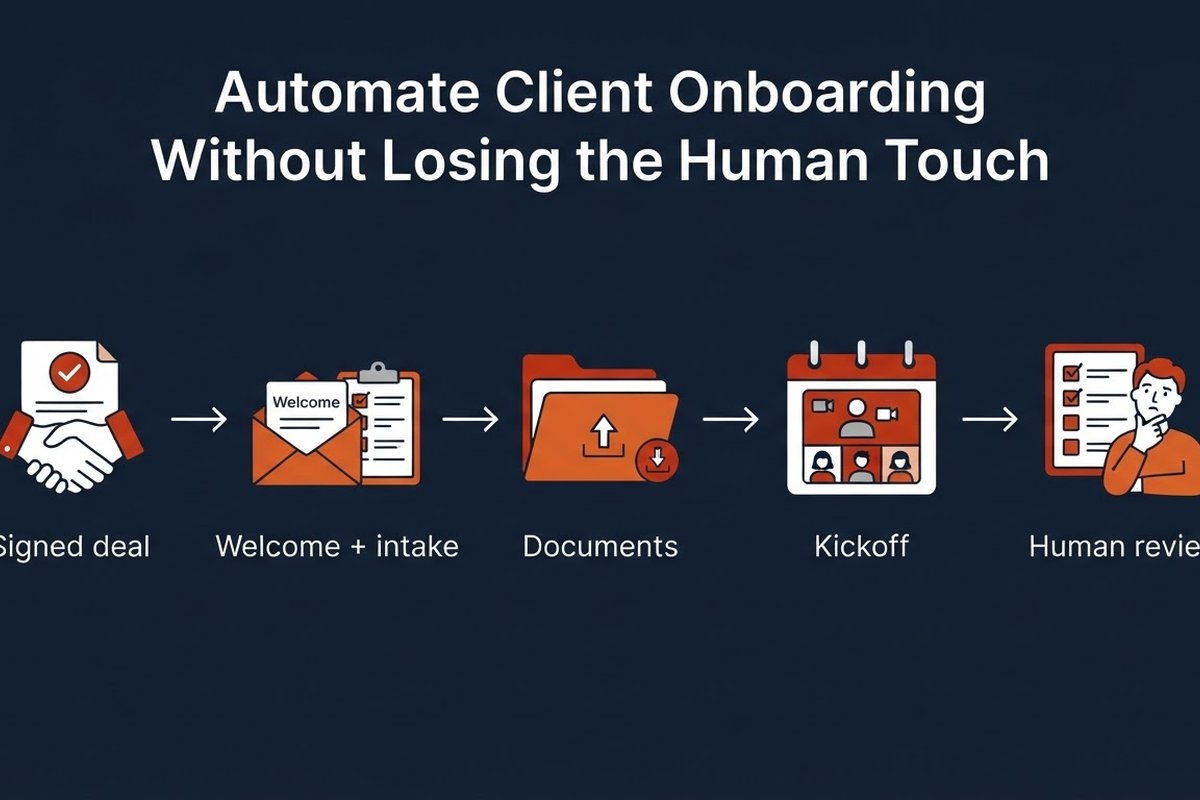
Client onboarding automation fixes the repeatable parts. It can send the welcome message, collect information, create the project space, schedule reminders, and tell your team what needs attention. It should not replace the kickoff conversation or hide a human when a client has a complicated question.
Here is the useful distinction: automate the handoffs, not the relationship. The result is less admin for your team and a calmer first week for the client.
What should client onboarding automation actually do?
Start with the moment a deal becomes real. That might be a signed proposal, a successful payment, or a status change in your CRM. That event should trigger a short sequence with clear ownership.
- Send a personal welcome email with the next two or three steps.
- Share an intake form that asks only for information you will use.
- Create a client folder and a project from a known template.
- Offer a scheduling link for the kickoff call.
- Remind the client when a required item is still missing.
- Alert a person when the workflow reaches an exception.
The automation does not need to be a chatbot. A reliable chain of triggers, conditions, and notifications is often enough. Add an AI step where the input is messy: summarise a long intake response, classify a request, or draft a tailored welcome note for review.
Map the first week before choosing a tool
Do not begin with a platform comparison. Spend 30 minutes writing down what happens between “yes” and the first useful piece of work. Ask the person who performs the onboarding, not just the person who sells it.
For each step, record the trigger, the owner, the input, the output, and the place where the work currently gets stuck. You might find that the real bottleneck is not the welcome email. It is waiting for a client to upload one document, or asking the same question twice because the answer never reached the delivery team.
Keep the first version narrow. One service, one client type, one path. A consultant could automate the flow from signed proposal to kickoff. A field-service company might start with job details, photos, and appointment confirmation. A small agency might automate access requests and brand-asset collection.
Make a baseline before you change anything. Measure time from signature to welcome email, time to completed intake, manual minutes per new client, and the percentage of onboardings that need a rescue chase. These numbers give you something better than a vague feeling that the new system is faster.
Build the welcome and intake steps first
The first message should answer the questions a new client is already asking: what happens next, who is responsible, what do you need from me, and when will we speak? Keep it short. A warm sentence written by a person is worth more than a paragraph of generic AI enthusiasm.
Put the intake link, scheduling link, and contact route in one place. Use conditional questions so clients do not have to complete fields that do not apply to them. If a new client needs to upload sensitive material, explain what it is for and where it will be stored. Avoid collecting “just in case” information.
An AI assistant can help turn a completed intake into a one-page internal brief: goals, constraints, open questions, and suggested next actions. Treat that as a draft. A team member should check it before it becomes the source of truth.
Automate reminders, not judgment
Most onboarding delays are not dramatic. A form is half-complete. A document is missing. The client intended to book a call and forgot. This is where timed reminders earn their place.
Use a small sequence rather than a flood of messages. Send the intake request immediately. If it is incomplete after two days, send a useful reminder that names the missing step. After another few days, notify your team and stop the automated sequence. A person can decide whether to call, change the request, or pause the project.
Set limits before you launch: no more than two client reminders, no messages outside agreed hours, and no automatic follow-up for complaints, pricing disputes, or anything that sounds urgent. The workflow should know when to hand over.
Internally, create a project from a template once the required intake is complete. Add the owner, due dates, and a short summary. If the client has asked an unusual question, route it to the right person instead of burying it in an automated task list.
Keep a human checkpoint where it matters
There is a temptation to describe onboarding as “fully automated.” That is usually the wrong target for a service business. Your client is buying judgment, confidence, and access to people who understand the work.
Keep a person in the loop for at least four moments: reviewing the intake brief, approving any AI-written message, handling missing or contradictory information, and leading the kickoff. For a low-risk confirmation email, automatic sending may be fine. For a promise about scope, timing, price, or a technical decision, require approval.
Give the workflow a failure path. What happens when a form cannot be submitted? When the calendar has no suitable slot? When an attachment is unreadable? A notification to a named owner beats a silent retry that nobody notices.
Permissions matter too. Connect only the systems the workflow needs. Do not give an automation broad access to every client folder just because one step needs to create a folder. Review access when someone changes role or leaves the team.
Measure the first 30 days honestly
After launch, resist the urge to add more steps because the workflow looks clever. Watch the numbers for a month. Compare them with your baseline and read a few client replies.
- Speed: time from signed agreement to welcome email and first useful outcome.
- Completion: percentage of clients who finish intake and provide documents on time.
- Workload: manual minutes per onboarding and number of rescue chases.
- Quality: corrections to AI summaries, missed handoffs, and client questions about next steps.
A faster process is not better if it creates confusion. Ask two simple questions after the kickoff: “Was it clear what you had to do?” and “Did you know who to contact?” Their answers will show you where the automation needs less cleverness and more clarity.
Onboarding is a good first automation project because the boundaries are visible. One event starts it, the steps repeat, and the exceptions can be named. Start with the boring handoffs. Keep the welcome human. Then improve one bottleneck at a time.