
Two things happened on September 15, 2026, and only one of them made any noise. Google shipped a Workspace update that connects Gemini to your accounting, your CRM and your email marketing. The noise went to a different announcement. The update itself is the one you may want to look at.
What Google actually changed
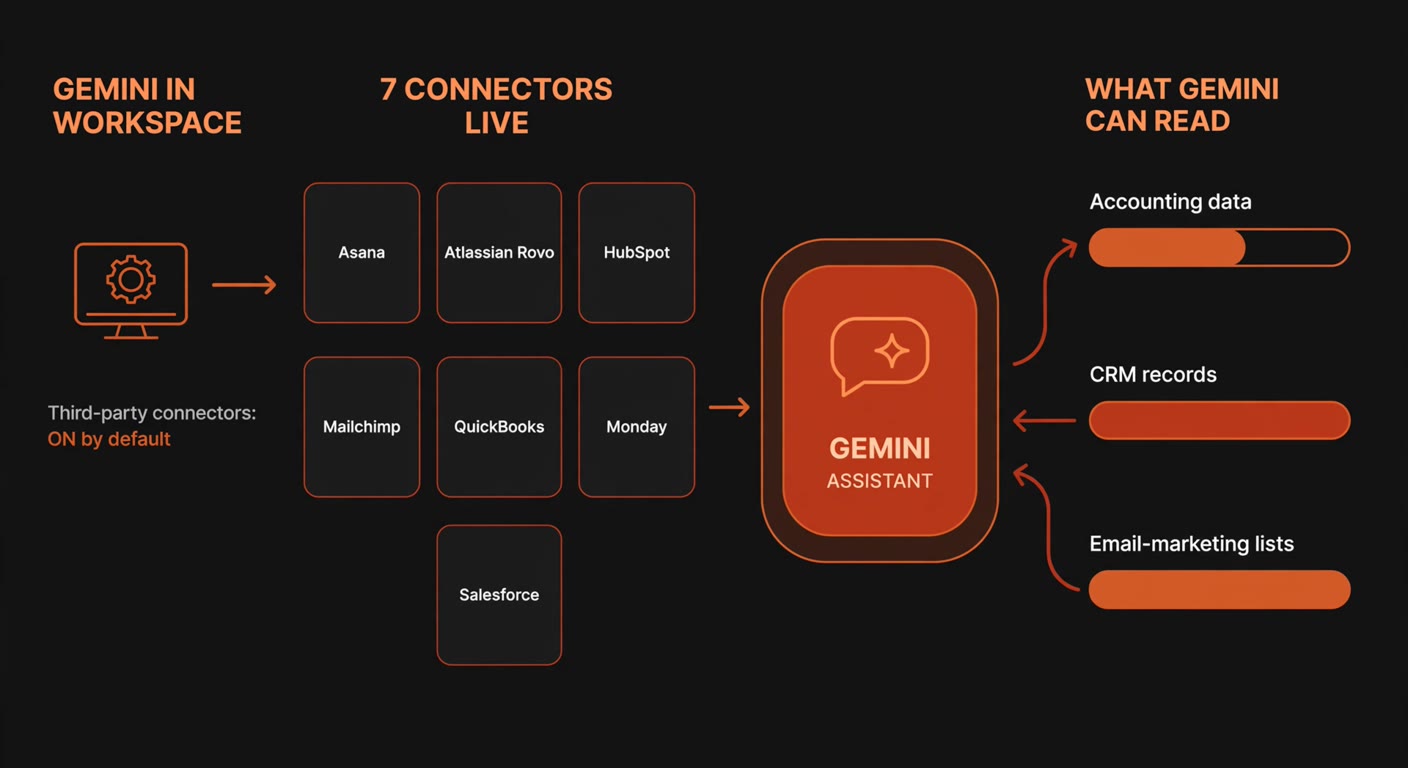
The Workspace Updates announcement states that Gemini in Workspace can now interact directly with seven third-party services through Model Context Protocol (MCP) integrations: Asana, Atlassian Rovo, HubSpot, Intuit Mailchimp, Intuit QuickBooks, Monday and Salesforce.
In practice that means you stop switching tabs. You ask a question inside Gmail, Docs, Sheets or Google Chat and Gemini answers using data that lives in another system. If you run a five-person business whose invoices live in QuickBooks, whose customers live in HubSpot and whose newsletter list lives in Mailchimp, that is a real convenience. It also means your AI assistant has stopped being a text box and become a reader of your customer and financial records.
Then comes the line that matters more than the feature list:
The feature is ON by default for users with Gemini for Google Workspace access, and it is managed at domain, organizational unit or group level in the Admin console under Apps > Google Workspace > Gemini for Workspace > Third-Party Connectors.
Default-on is not a scandal. It is how most Workspace features ship, and an administrator can change it. But in a company without an IT department, "an admin can change it" translates, in practice, to "nobody has looked".
Which of your data is now within reach
The seven connectors are not equivalent, and it helps to sort them by what a wrong answer would cost you.
- QuickBooks — customer records, invoices, expenses, payment status. This is the one to decide about first, because it is your money.
- HubSpot and Salesforce — contacts, companies, deals, activity notes. Customer data, much of it personal data under GDPR.
- Mailchimp — subscriber lists, campaign performance, open rates. Email addresses of people who never heard of Gemini.
- Asana, Monday and Atlassian Rovo — projects, tasks, tickets. Internal, mostly harmless, occasionally embarrassing.
Worth knowing before you panic: the connectors inherit the permissions each person already has in the source system. HubSpot's own connector documentation says its Gemini connector is read-only for contacts, companies and deals, and that users only see records in Gemini that they are already allowed to view in HubSpot. That is the right design. It also means the connector does not grant new access — it grants a new route to access someone has, from a place where you were not watching.
The switch that does not work the way you would expect
Most advice on this topic stops at "go into the Admin console and turn it off". Google's own admin documentation adds a wrinkle that changes the plan. These integrations arrive through the Google Workspace Marketplace, so you control them the way you control any other Marketplace app — through the Marketplace allowlist, not through the API controls screen you would normally use to block an app. The help page on supporting access to Workspace integrations states it in one sentence: you cannot use API controls to restrict user access to integrations, and users can keep using an integration even after you change the app access from Trusted to Blocked.
Read that again, because it describes a failure mode that leaves no trace. You open the screen where you are used to blocking apps, you change a setting to Blocked, you close the ticket in your head — and the integration still works. The admin console is where you set policy; it is not a place where "off" is guaranteed to mean off.
Two more details from the same page are worth knowing before you start toggling. Some connectors need a helper app published by the third-party service, and if you also manage an allowlist inside that service, you have to allow the helper app there or your users get nothing at all. The practical conclusion is short: set your policy in the Third-Party Connectors screen, then log in as a normal user and try the thing you think you blocked.
A twenty-minute check you can run this week
You do not need a policy document for this. You need one screen, one list, and one decision per connector. Grab the person who holds the Workspace admin role — in most small companies that is the owner, a partner, or whoever set up the domain years ago.
- Find out who actually has Gemini. Filter your user list in the Admin console by Gemini licence. Connectors only affect accounts with Gemini for Google Workspace access — typically a handful of people, and rarely the person who does the invoicing.
- Screenshot the connector screen before you touch anything. Apps > Google Workspace > Gemini for Workspace > Third-Party Connectors. The screenshot is your "before", and it is the fastest way to answer the question of what was on last month.
- Decide per service, not in bulk. A sensible default for a business under fifty people: leave the project and ticket connectors (Asana, Monday, Atlassian Rovo) if your team genuinely wants them, and take a deliberate decision on QuickBooks, Salesforce, HubSpot and Mailchimp, which hold money and personal data.
- Switch the connectors off for admin and owner accounts. These are the accounts with the widest access in every connected system, so a misdirected question there reads the most data. They can be switched back on for a specific task.
- Write one line and date it. Who decided, which connectors stayed on, and why. One line, not a policy. If a customer, insurer or auditor asks in eight months, that line is the answer.
- Test as a normal user. Log in as a non-admin account and ask Gemini to pull something from a system you switched off. If it answers, you have found the Marketplace allowlist problem before anyone else did.
When leaving them switched on is the right call
There is a version of this article that tells you to switch everything off, and it would be wrong. If your team already connects an AI assistant to your business systems — the same reasoning applies whether you did it with Claude's connectors or anything else — you have already accepted that trade, and the Gemini connectors do not change the arithmetic much. Permission inheritance means an employee asking about a deal sees the deal they could already open in HubSpot. Nothing new becomes visible.
Where connectors earn their place is the boring question. "Which invoices went past due this week?" answered inside Gmail, without opening QuickBooks. "Draft a follow-up for the leads that went quiet" pulled from the CRM into a Doc. For a company where one person handles sales, invoices and marketing, that is the difference between a tool you use daily and a feature you forget exists.
The decision worth making is not on or off. It is deliberate. Five minutes per connector, once, beats finding out eighteen months from now that a feature nobody remembers enabling has been reading the accounts the whole time.
The pattern worth noticing
This is the second time this year that a major platform has made an AI feature touching business data the default rather than the opt-in. Our piece on shadow AI in small companies covered the same shape from the employee side: tools get adopted before anyone decides they should be, because adoption takes one click and governance takes a meeting. Settings screens like Third-Party Connectors are where that gap becomes visible.
The fix is not a committee or a quarterly review. It is a habit with a trigger attached: when a vendor announces AI features for software you already pay for, spend twenty minutes in the settings screen before someone discovers it for you.
Update, October 2026: Google has kept moving on the same feature. On October 21 it began rolling out a centralised "customize" hub in the Gemini app, where users pick from more than 40 connected apps and admins review third-party integrations under Apps > Additional Google services > Gemini. Google also corrected its own instructions for the Workspace connectors: the click path to manage them is Apps > Google Workspace Marketplace apps > Apps list, not the Third-Party Connectors screen named in the September post. If you ran the twenty-minute check above in September, this is the moment to confirm the policy you set still covers the connectors users can now add themselves.
Frequently asked questions
Does this mean Gemini can change data in my accounting or CRM?
Based on what the vendors publish, these connectors are read-oriented: HubSpot's own documentation describes its Gemini connector as read-only for contacts, companies and deals. Verify it per connector rather than assuming it either way, and keep the user permissions inside each system as your real control.
Will employees see records they could not see before?
No — that is by design. Connectors respect the permissions a person already has in the source application. What changes is the route: data that used to require opening Salesforce can now surface in a Gemini answer inside Gmail or Chat. Restrictions still apply; reading everything you are already allowed to read simply gets easier.
Can I block the connectors with API controls in the Admin console?
Google's admin help is explicit that you cannot. Integrations are Marketplace apps, so access follows the Marketplace allowlist, and changing an app from Trusted to Blocked does not stop users from using the integration. Set the policy on the Third-Party Connectors screen and confirm it with a test account.
Do I need a Gemini licence for any of this to affect my company?
The connectors apply to users with Gemini for Google Workspace access, so if nobody in the company has it, there is nothing to review yet. Put the check in your calendar for the next time you buy a licence, because the setting will already be on when you do.
Which connector is the most urgent to review?
QuickBooks. It holds invoices, customer names and payment status, and a tidy summary of unpaid invoices is exactly the sort of answer that gets pasted into a chat or forwarded to the wrong person. If you only have ten minutes, spend them there.
Not sure what your AI tools can already reach?
BigLobster helps small teams find the AI features that are already switched on inside the software they pay for, decide which ones should stay, and write the one line that proves the decision was made on purpose.
Ask us to review your setup