
Microsoft has changed the buying question. Copilot is no longer only an add-on you attach to an existing Microsoft 365 subscription. Microsoft 365 Business Standard with Copilot and Business Premium with Copilot became generally available on July 1, 2026.
That does not mean you should switch today. A bundled license may simplify billing, or it may make you pay for security features and AI seats you do not need. The right answer depends on your current plan, who will use Copilot, and whether your files and permissions are ready. For what it does and what it costs, start with our Microsoft 365 Copilot guide for SMBs.
What changed on July 1?
In its May 28, 2026 announcement, Microsoft described new Business Standard and Business Premium SKUs with Copilot built in. The pitch is straightforward: familiar Office apps, work-focused AI, and Microsoft’s security controls in one subscription.
The bundle also connects Copilot to a wider set of work systems. Microsoft says the experience can use more than 1,000 connectors, including Shopify, PayPal, Xero, DocuSign, Asana, and monday.com. That sounds useful. It also means you need to ask a less exciting question: which systems will your Copilot actually be allowed to reach?
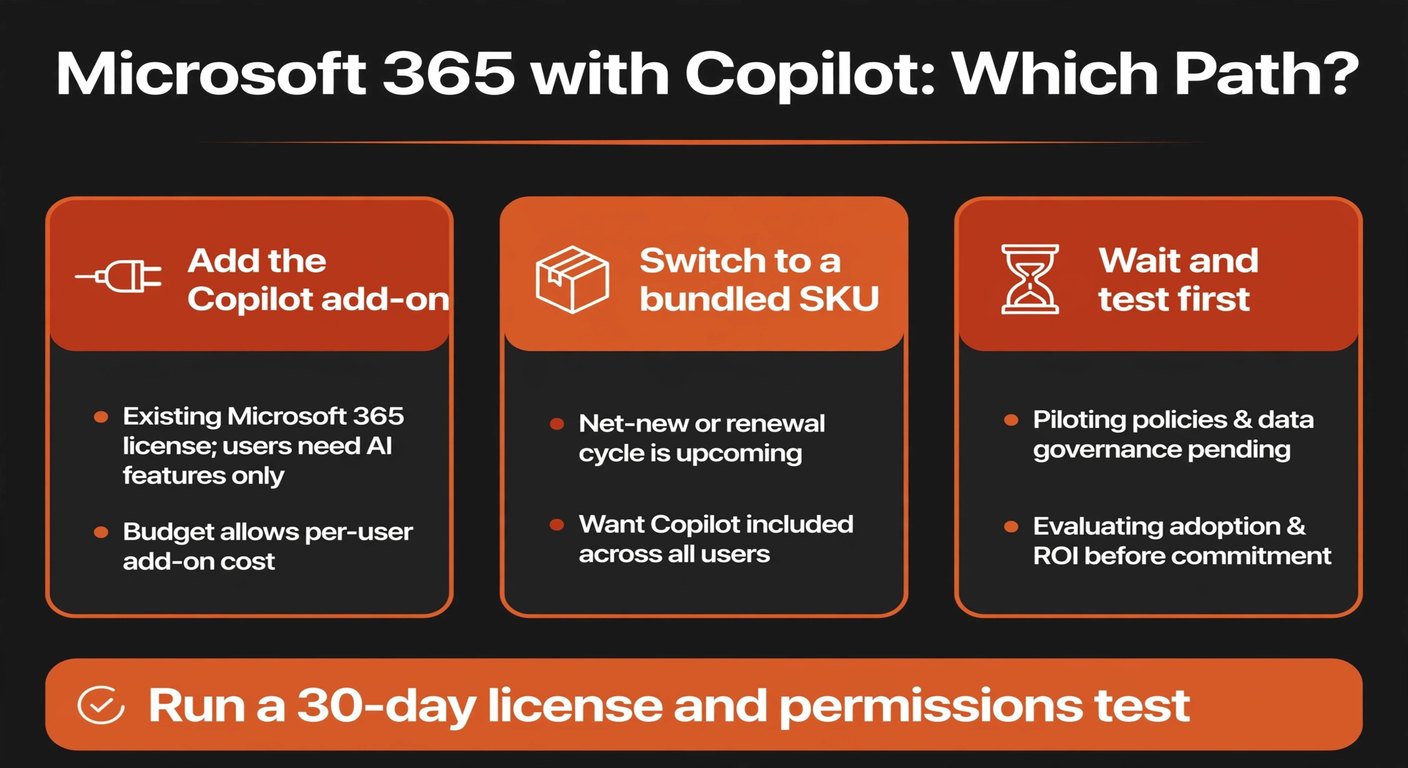
Microsoft has not made a bundle automatically better for every small company. If you already have the right Microsoft 365 plan and only want Copilot for two people, an add-on may still be the cleaner choice. If your team is on an older plan and needs stronger device and data controls, Premium with Copilot may be worth comparing on its full price, not just its AI label.
Should you add Copilot or switch to a bundle?
Start with the license you already pay for. Write down the number of seats, the current monthly total, and the features your team uses. Then create two alternatives:
- Add-on: keep the current Microsoft 365 plan and add Copilot only for selected people.
- Bundle: move relevant seats to Business Standard with Copilot or Business Premium with Copilot.
- Wait: keep the current setup while you clean up files, permissions, or workflows.
Compare the total for the next twelve months. Include unused seats, annual commitments, tax, and any security products you would otherwise buy separately. A lower-looking per-user price can still be more expensive if half the team never opens Copilot.
There is also a people question. Copilot is most useful where work already happens in Word, Excel, Outlook, PowerPoint, and Teams. If your team spends its day in Google Workspace, a Microsoft bundle creates a second work surface. Test the fit before moving email or documents just to obtain an AI feature.
What should you check before changing licenses?
Run this review before you sign an annual commitment.
Map the real work
Ask each intended user to bring two tasks they repeat every week. Examples include turning meeting notes into actions, summarizing a long email thread, preparing a first draft of a proposal, or finding figures in a spreadsheet. Avoid vague requests such as “use AI more.” If nobody can name a real task, you are not ready to buy more seats.
Check the data behind the answer
Copilot cannot fix a file system that nobody trusts. Look at duplicate documents, old shared folders, inconsistent customer names, and spreadsheets with no owner. Pick one small area and clean it before judging the results. A polished answer drawn from the wrong file is still wrong.
Audit permissions before inviting AI in
Microsoft says Copilot respects existing permissions. That is helpful, but it does not repair over-sharing. If every employee can open the payroll folder, Copilot may make that access easier to use. Review SharePoint sites, OneDrive folders, Teams files, and external sharing. Remove broad access first; then test the questions users are likely to ask.
Check connector boundaries
Make a list of the systems you might connect: CRM, accounting, ecommerce, project management, and support. For each one, record who owns the connection, what data it exposes, and which actions it can take. Reading an order status is different from changing an order. Start with read-only access where possible.
One more point: Microsoft’s announcement includes a footnote that some capabilities may require additional products. Treat marketing examples as a starting point, not as a complete quote. Confirm the exact feature, connector, seat type, and data-control requirement with the plan documentation before you budget.
How do you run a useful 30-day test?
A small test beats a company-wide rollout. Choose two workflows with visible outputs and low downside. For example, have one person use Copilot to prepare meeting summaries and another use it to create a first draft from a known document set.
Record a baseline before the test: how long the task takes now, how often it needs rework, and what a good result looks like. During the test, keep a simple log. Note the prompt, source files, time spent reviewing, and any factual or permission problem. You are not trying to prove that Copilot is clever. You are checking whether it makes a repeated job faster without adding a new checking job.
At the end of the month, make one of three decisions:
- Keep and expand if the same task is faster, the review burden is reasonable, and the data boundary is clear.
- Keep but narrow if it works for a few roles but not the whole team.
- Stop or wait if the output is unreliable, the files are too messy, or the total cost has no clear payback.
That last option is not a failure. A delayed purchase can be the sensible result of a good test.
When does Business Premium with Copilot make sense?
Premium deserves a separate conversation from Copilot. Its case is stronger when your team needs more control over devices, identities, sensitive files, or remote work. If you only want help drafting emails, paying for a higher plan may be the wrong way to get it.
Ask what problem Premium solves even if Copilot vanished tomorrow. If the answer includes device protection, identity controls, or tighter handling of confidential information, compare the plan on that basis. If the answer is only “it includes AI,” start with the cheaper route and a smaller seat count.
For either bundle, name one owner. That person should manage licenses, permissions, the test log, and the process for removing a seat when someone leaves. No database or large governance project is needed. A short shared document with an owner, purpose, data types, and review date is enough for a first pass.
Frequently asked questions
Is the bundled plan always cheaper than an add-on?
No. The result depends on your current Microsoft 365 plan, the number of Copilot seats, annual terms, and whether you need Premium’s other controls. Compare the complete invoice, not one line item.
Should every employee get a Copilot seat?
Usually not at first. Start with people who work heavily in Microsoft 365 and have two repeatable tasks to test. Expand only when the result is useful and reviewable.
Can Copilot clean up our permissions for us?
No. It follows the access rules it finds; it does not replace an access review. Check shared folders, Teams, SharePoint, OneDrive, and external links before connecting more data.
What should we do this week?
List your current plan and invoice, select two test users, and choose two real workflows. Then review the folders and connectors those workflows would touch. You will have a better buying answer in a few hours than after another product demo.
Want a practical second opinion?
BigLobster helps small teams map the workflow, permissions, and human review that should come before another AI subscription.
Talk through your workflow