
Most small businesses do not discover a broken AI workflow because an alarm goes off. They discover it when a customer asks why nobody replied, a report contains yesterday's numbers, or someone admits they have been copying the output into a spreadsheet by hand.
That is why I like a short workflow audit. Not a six-week consulting exercise. Thirty minutes with the person who receives the input, checks the result, and deals with exceptions is often enough to expose the weak point.
The goal is not to make every process autonomous. The goal is to know what the workflow does, where it can fail, and whether it is still earning its place in your stack.
Before you add another AI step, find out whether the current one is producing useful work or just producing activity.
A practical rule for small-business automation
Why should you audit an AI workflow at all?
AI workflows drift. A supplier changes its document format. A CRM field gets renamed. A prompt is edited to solve one edge case and creates three new ones. A team member stops reviewing drafts because the queue looks “mostly right.” None of this is unusual. Leaving it unexamined is the expensive part.
Research from IBM’s Global AI Adoption Index has repeatedly put data complexity and skills among the main obstacles to business AI adoption. That fits the practical reality: the model is only one component. The input, permissions, rules, handoffs, and feedback loop matter just as much.
Run an audit when a workflow has been live for a month, after a tool or process change, or when people start creating workarounds. A workaround is useful evidence. It tells you where the designed process does not match the real one.
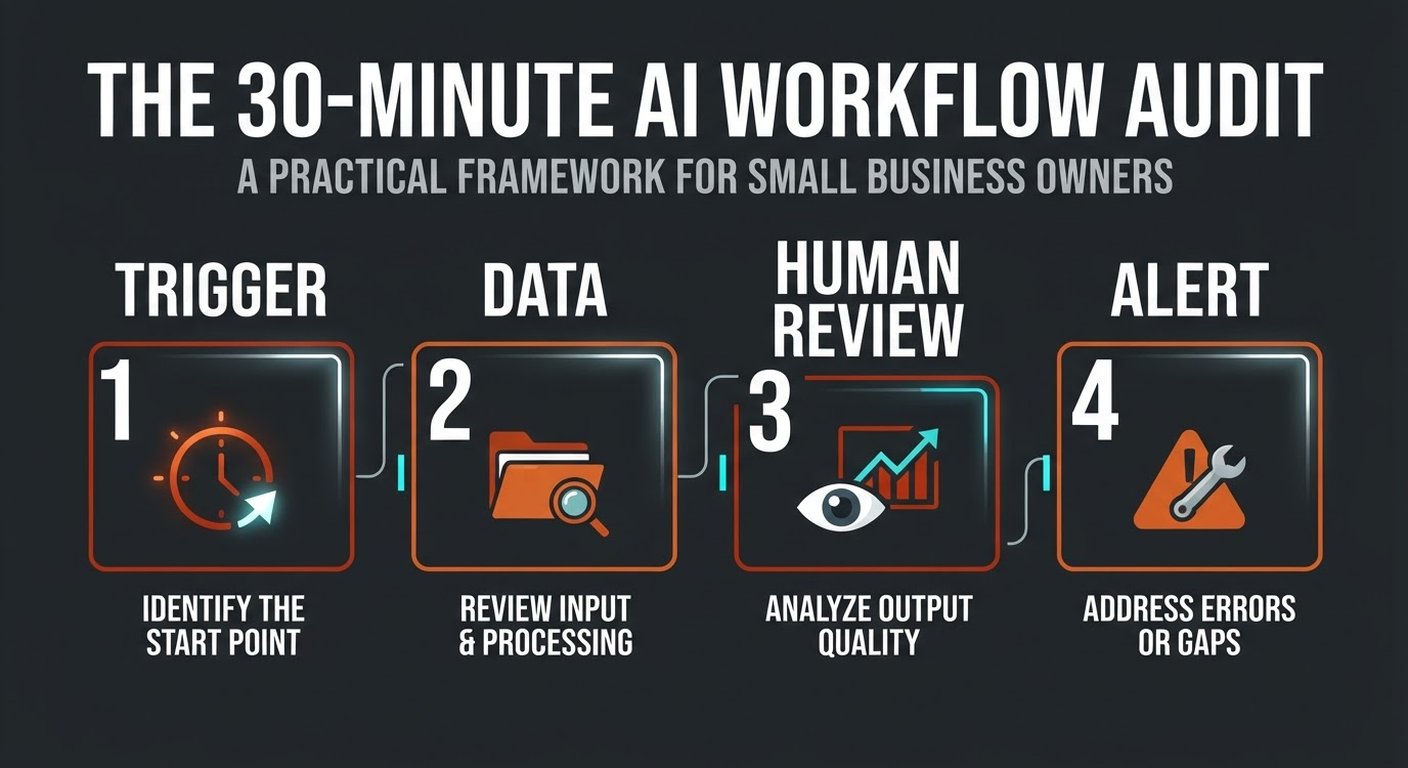
Start with the trigger, not the AI model
Ask one simple question: what starts this workflow?
Write down the exact event. It might be a website form, a new email attachment, a calendar booking, a payment, or a row added to a sheet. Then check whether the trigger is reliable and specific enough. “A new email arrives” is usually too broad. “An email arrives in the quotes inbox with a PDF attachment” gives the workflow something it can actually handle.
Check four things:
- Coverage: Which requests enter the workflow, and which arrive through a side channel?
- Duplicates: Can the same item trigger the workflow twice?
- Timing: Does the process run immediately, on a schedule, or only when somebody remembers to press a button?
- Ownership: Who notices when the trigger does not fire?
If the answer to the last question is “nobody,” you do not have monitoring. You have hope. Add a daily or weekly exception report before you make the workflow more complex.
Is the input clean enough to trust?
Next, follow the data. Where does it come from? Which fields are required? What happens when a customer leaves a field blank or a supplier sends a scan instead of a searchable PDF?
Look at ten recent examples, not the best examples. Record the patterns that made the workflow hesitate or produce a weak result. You may find that the AI is not the problem. The source records may use three spellings for the same product, dates may be in different formats, or the “customer type” field may mean something different to sales and finance.
For each input, decide whether the workflow should:
- Process it automatically.
- Ask for missing information.
- Send it to a person for review.
- Reject it with a clear reason and a manual fallback.
Do not hide uncertainty. A blank value that becomes a confident-looking sentence is worse than an obvious error. Label missing data and preserve the original source so a reviewer can see what the system used.
Where does a person need to review the output?
Human review is not a sign that automation failed. It is a design choice. The useful question is where review has the most value.
For low-risk work, a person might review a sample each week. For customer-facing replies, payments, refunds, pricing, or changes to records, review should happen before the action. The reviewer needs context: the source input, the proposed output, the confidence or reason, and a clear way to approve, edit, or reject it.
Track the edits. If reviewers change the same sentence, category, or amount repeatedly, turn that pattern into a rule or fix the source data. Do not respond to every correction by making the prompt longer. Long prompts can hide a process problem rather than solve it.
A good review queue answers three questions at a glance: what is waiting, why is it waiting, and what happens if nobody acts today?
What should you measure beyond “it ran”?
Run counts are easy to collect and easy to misunderstand. A workflow that processed 2,000 emails may have created 2,000 pieces of cleanup.
Choose one quality measure and one business measure. Examples include:
- Percentage of outputs accepted without edits.
- Percentage of items routed to the correct team.
- Time from request to completed action.
- Hours spent on manual correction each week.
- Response time, booked calls, paid invoices, or another downstream result.
Keep a small sample of accepted, edited, and rejected outputs. Review it monthly. Your sample does not need to be perfect; it needs to be consistent enough to show whether the process is getting better.
Compare with the baseline from before automation. “The workflow generated more drafts” is not a win by itself. “The team cut handling time from 18 minutes to 7, while the correction rate stayed below 5%” is a decision-ready result.
What happens when the workflow fails?
Every workflow needs a failure path that a non-technical person can understand. If the AI service is unavailable, does the request wait, retry, or go to a manual queue? If an integration returns an error, who gets notified? If confidence is low, where does the item go?
Test one failure on purpose. Send a malformed file. Remove a required field. Use an unfamiliar category. Then watch what happens. A red error in a developer console is not an operational plan.
The fallback should preserve the original request, record the reason for the handoff, and give somebody a deadline. For important customer work, the manual route should be documented before the automation goes live.
Keep the workflow reversible while you learn. Draft instead of send. Flag instead of delete. Suggest instead of approve. You can expand the action boundary after the evidence supports it.
How do you turn the audit into a small fix?
At the end of thirty minutes, choose one gap. Not seven.
If the trigger is unreliable, fix the intake. If the input is messy, standardize the fields or source documents. If reviewers cannot tell what to approve, improve the queue. If nobody sees failures, add an alert. If the output is fine but the process creates no business result, stop paying for activity and choose a better workflow.
Give the fix an owner and a deadline. Re-run the same audit after two weeks using fresh examples. You want to see fewer exceptions, less rework, or a faster path to the result. If none of those moved, the gap may be upstream.
This is also where you decide whether to buy, configure, or build. An off-the-shelf tool is usually enough for a narrow workflow with standard connectors. Custom work earns its keep when the process depends on your internal systems, permissions, or business rules. Either way, start with evidence from the audit.
Frequently asked questions
How often should a small business audit an AI workflow?
Audit a new workflow after its first month, then every quarter or after a major change. Audit sooner when staff create workarounds, correction rates rise, or a connected system changes.
Do we need a technical person in the audit?
Not for the first pass. Include the person who does the work and, if possible, the person responsible for the connected tool. Bring in technical help when the gap involves permissions, APIs, security, or a system you cannot inspect safely.
What is a reasonable first workflow to audit?
Choose a daily process with clear inputs and a visible owner: lead routing, document extraction, quote drafting, support triage, or a recurring internal report. Avoid a broad “company assistant” as your first test.
When should we stop an AI workflow?
Stop or redesign it when the cost of review and correction is higher than the manual process, when the data cannot be made reliable, or when the workflow has no measurable business result. Stopping a weak automation is better than expanding it.