The problem: your paper work orders are bleeding money
Your technician finishes at 2 PM. Has to head back to the office to fill out the paperwork. Or worse: scribbles it out in the truck, illegibly, and forgets to note the 2 extra hours he worked Saturday because he jotted them on a napkin.
The office gets that paper 3 days later. Can't read the handwriting. Calls the technician. He's on another job. Invoice gets pushed back a week. Customer complains the bill doesn't match what the technician told them.
This happens at hundreds of Spanish industrial SMBs every day. And it's not "sloppiness." It's real money walking out the door through:
- Unbilled hours: technician forgets to log overtime or travel time.
- Transcription errors: office staff types a number wrong, and you invoice less.
- Invoice delays: invoice is 15 days late because the paperwork got lost.
- Materials not charged: technician uses extra material and doesn't record it.
- No customer signature: customer disputes the work afterward and you have no proof.
A 2026 study by Zulu Labs on Spanish industrial SMBs estimates that 3.8% of revenue is lost to work-order inefficiencies. For an SMB with €500k in annual billing, that's €19,000 down the drain.
What a digital work order is (and why you need one in 2026)
A digital work order is an app (usually on the technician's phone or tablet) that replaces paper. But it's not just "move the form to a screen." A good work-order app does:
- Logs hours and materials in real time: technician fills it out on site, before leaving.
- Photos and documents: technician shoots photos of finished work, materials used, meter readings. They attach automatically.
- Digital customer signature: customer signs on the screen. You have proof of acceptance.
- Automatic sync: when the technician has signal, the work order goes straight to the office. No middleman.
- Integration with your software: the digital work order can create a job in your ERP, reserve materials from inventory, and generate a quote or invoice.
In 2026, most work-order apps use AI to help technicians: photo-based material recognition, voice transcription for notes, and time estimates based on similar jobs.
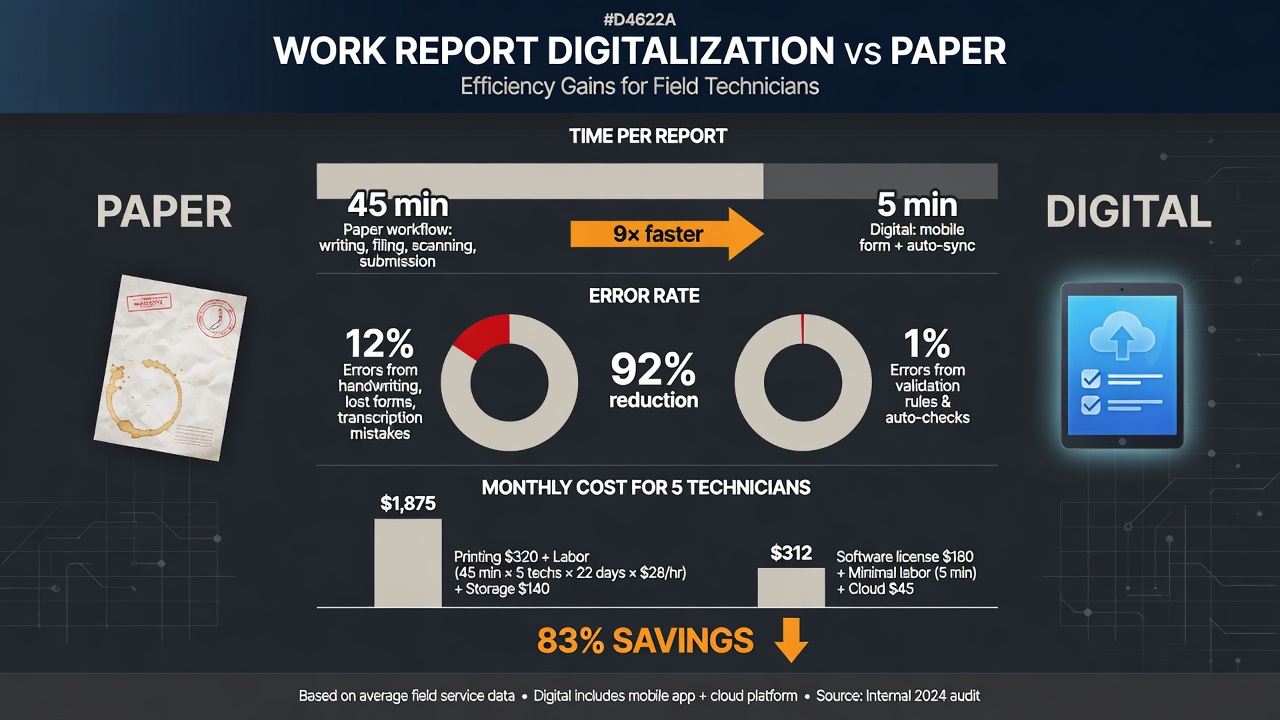
Result: technician spends 5 minutes filling it (instead of 45), office gets the data instantly, and you invoice the next day.
7 features your work-order app must have (if it doesn't, don't buy it)
1. Offline mode (no internet needed)
Job sites don't always have signal. The app must let technicians fill out work orders offline and sync when they reconnect. If it needs internet all the time, skip it.
2. Materials and pricing catalog
Technician should pick materials from a list (with code, name, and price) instead of typing them. Prevents errors and speeds up the process.
3. Digital signature with timestamp
The signature needs to be legally binding. The app must capture the signature, geolocation, date, and time. If a customer disputes the work, you have proof.
4. Photos with timestamp and geolocation
Photos of completed work should include date, time, and GPS coordinates. Many apps add this automatically.
5. Approval alerts
When the work order is submitted, your office gets notified. If there's an error (missing materials, excessive hours), it gets rejected and the technician fixes it before invoicing.
6. PDF and Excel export
Must generate a PDF for the customer and an Excel for your accountant. No proprietary formats nobody can open.
7. Integration with billing/ERP
This is what really saves time. The approved work order auto-generates a draft invoice in your software (any standard accounting software, ERP, etc.). Some integrations are built-in; others require custom development for a few hundred euros.
How much it costs to digitize work orders in 2026
Two models: SaaS (monthly subscription) or custom development. For most SMBs, SaaS is the right choice.
| Model | Monthly cost (5 techs) | Startup cost | Time to launch | Customizable |
|---|---|---|---|---|
| Basic SaaS | €50–100/month | €0–300 (setup) | 1–3 days | Limited |
| Advanced SaaS | €150–300/month | €500–1,000 (integration) | 1–2 weeks | Moderate |
| Custom development | €0 (self-hosted) | €2,000–8,000 | 4–12 weeks | Full |
My recommendation: start with advanced SaaS that integrates with your billing. If your SMB grows and you need very specific features, consider custom development. But for an SMB with fewer than 20 technicians, SaaS is more than enough and more cost-effective.
"First month using digital work orders, we recovered €2,300 in overtime we used to forget to bill. The app cost €89." - Industrial installer in Barcelona, 12 technicians.
5 mistakes when picking a work-order app (and how to avoid them)
Mistake 1: choosing by price alone (cheap becomes expensive)
An app at €10/month per tech sounds great. But if it doesn't integrate with your billing, your office still transcribes orders by hand. The time savings disappear.
Mistake 2: not testing offline mode
Many apps claim offline functionality but fail at syncing. Request a demo and try filling out a work order in the subway or basement. If it doesn't work, move on.
Mistake 3: ignoring technician usability
If the app is hard to use, your technicians won't use it. Or worse: they'll use it wrong. The app needs to be as simple as WhatsApp. Have your technicians test the demo before you buy.
Mistake 4: forgetting GDPR compliance
Work orders contain personal data (customer name, signature, address). The app must comply with GDPR. Ask the vendor where data is stored and whether they have security certification.
Mistake 5: buying without integration to your current software
If you already use billing or ERP software, make sure the work-order app integrates with it. Otherwise you'll manually export and import data—a bottleneck that swallows your time savings.
How to implement digital work orders at your SMB (step by step)
You don't need to be a tech company to digitize work orders. The process is:
- Evaluate your current setup: how many technicians, what you use to invoice, what problems you have with paper.
- Pick 2–3 apps and request demos: let your technicians and office staff test them. Don't decide alone.
- Verify integration: ask the vendor to connect the app to your billing. Have them show you how data flows.
- Training plan: 1 hour for technicians, 1 hour for office. If the app needs more, it's too complex.
- 15-day pilot: pick 2 technicians, use it for real, and evaluate. If it works, roll out to the rest.
- Incentivize technicians: if they fill out digital work orders same-day, give them a small bonus. Building the habit takes effort.
You can have digital work orders live in less than 30 days. ROI usually shows up in the first quarter.
Frequently asked questions
Will my older technicians use the app?
Most older technicians already use WhatsApp and take photos daily. A well-designed work-order app is just as easy. The problem isn't age—it's usability. If the app is intuitive, they'll use it. If not, they won't.
What if I lose the phone with work orders on it?
Professional apps back up to the cloud. If you lose the phone, your data is safe. Just change your password and deactivate the device.
Can I keep paper as backup?
Yes. Actually, keep a stack of blank paper forms for when the battery dies or the app fails. But the goal is for paper to be the exception, not the norm.
Is a digital signature legally valid?
Yes, as long as the app meets EU regulations on electronic signatures. Serious apps include a certificate that guarantees document integrity. You can present it in court if needed.
How long until the investment pays for itself?
For an SMB with 5 technicians, the savings in office time and recovered hours usually pay for the app in 2–3 months. After that, it's pure profit.
Want to digitize your work orders without the headaches?
At BigLobster we set up your work-order app, integrate it with your billing, and train your team. No code, no jargon, results from day one.
I want digital work orders →