If you have employees at your SMB, you probably already know that time tracking has been mandatory since the 2019 Decree. But what's coming in 2026 is a completely different ball game.
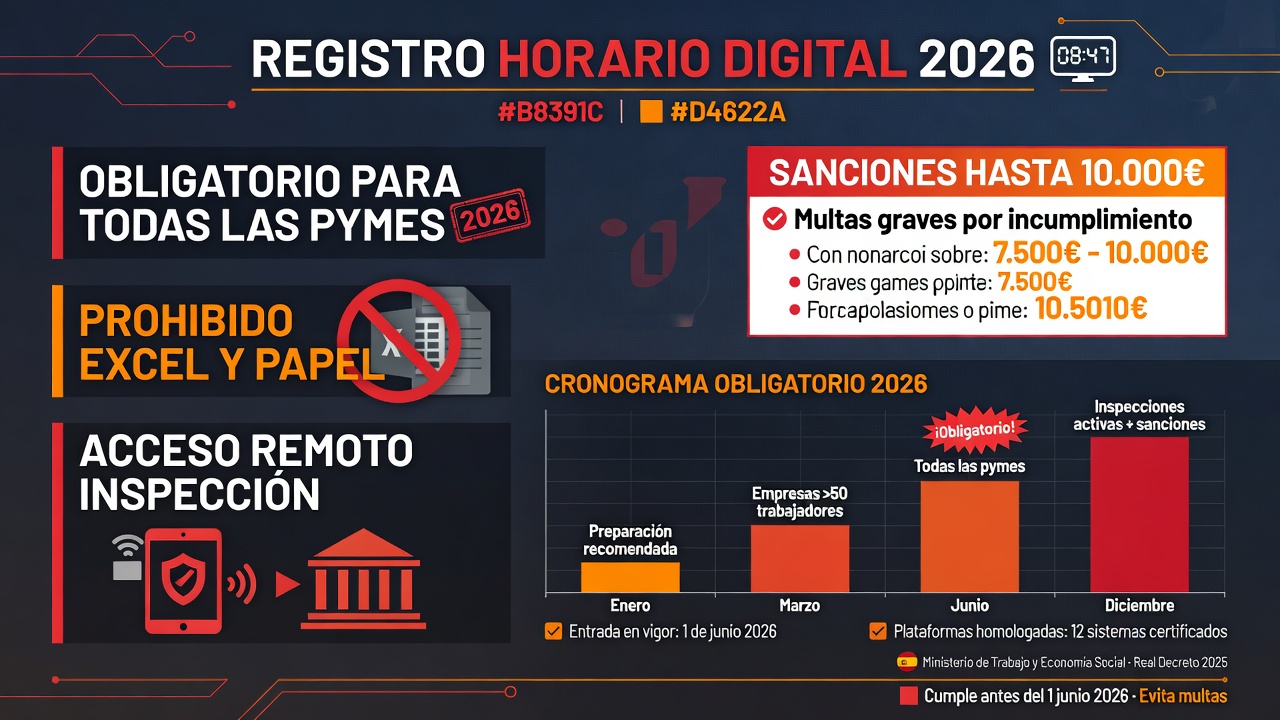
The Ministry of Labour plans to approve the new Digital Time Tracking Regulations before July 21, 2026. And this time they mean business: fines up to €10,000, an explicit ban on spreadsheets, and a requirement to give the Labour Inspectorate remote access to your system.
I won't sugarcoat it: this is an administrative headache. But if you don't prepare, the cost of getting it wrong will be far higher than the price of time-tracking software.
What is digital time tracking exactly (and why Excel no longer works)
Time tracking isn't new. Since 2019, all companies must record their employees' working hours—start time, end time, and date—and keep those records for at least 4 years.
The problem is that the old rule didn't specify the format. So 90% of Spanish SMBs (I'm being generous here) use a shared Excel file, paper by the door, or a system that lets you delete punch records with no trace.
The 2026 Decree closes that loophole. And it does so with four requirements that no spreadsheet can meet:
- Tamper-proof: records cannot be deleted or changed without leaving a trace. You need a timestamp or cryptographic hash.
- Traceability: if a record is corrected, the system must preserve the original and log who changed it and when.
- Remote access: the Labour Inspectorate must be able to view records remotely, without you present. The system needs an export module for XML or CSV.
- Retention: 4 years of accessible data, locally or in the cloud, in compliance with GDPR.
If you use Excel, you fail all four. So you need a proper digital system. And no, not just any system will do.
"Digital time tracking isn't bureaucratic red tape. It's about having reliable data if there's a wrongful dismissal or workplace accident. The problem is most SMBs aren't ready."
Source: HR firm interviews in GaliciaTimeline: when you need it ready
The Ministry's target is July 21, 2026 to approve the Decree in cabinet. The transition period will be set by the Decree itself.
According to a draft circulating among unions (leaked to the press on June 30), the timeline will be quite tight. Probably a couple of months from publication in the Official Gazette.
That means if you're reading this in July 2026, odds are you'll need a working system in place by September. Don't wait until December.
What if they don't pass the Decree before summer? The unions have issued an ultimatum: if time tracking isn't strengthened before August, they won't sign any more agreements with the government. So it's happening this year, one way or another.
Penalties: what the mistake will cost you
Now for the part that stings. Spanish employment law distinguishes between minor, serious, and severe violations.
| Violation type | Estimated penalty | Example |
|---|---|---|
| Minor | €30–750 | Missing or incomplete records, no intent to deceive. |
| Serious | €751–7,500 | Missing records that hide actual working hours, or obstruction of inspection. |
| Severe / Repeat | Up to €10,000 per employee affected | Falsified records, or failure to install a system after being ordered. |
Real-world example: if you have 5 employees and the Inspectorate finds you're using Excel (which can't guarantee tamper-proof records) and you don't give remote access, you could face a €50,000 fine if they classify it as repeat or multiple violations.
These aren't made-up numbers from a private survey. It's the law (Royal Decree 5/2000, Article 39.2). You can look it up yourself in the Official Gazette.
Which time-tracking systems are approved (and which aren't)
You don't need to spend €5,000 on a fingerprint-scanning access control system. There are options for every budget.
But watch out: if the system doesn't meet the four requirements I mentioned (tamper-proof, traceable, remote access, retention), you'll run into trouble with the Inspectorate and face a hefty fine.
Approved systems (valid for 2026)
- Mobile time-tracking apps: employees punch in via smartphone using GPS or QR code. The app generates a timestamped record. Some already have an export module for the Inspectorate. Cost: €3–8 per employee/month.
- Cloud-based HR software: like Factorial, Sesame, or Holded. They handle time tracking, vacation, payroll, and meet the Decree requirements. Cost: €5–15 per employee/month.
- Biometric time clocks: for companies with a fixed team that enters and exits the same location. Cost: €500–2,000 for hardware + software subscription.
Systems that will get you into trouble
- Excel or Google Sheets: no tamper-proof records or traceability. Explicitly banned.
- Paper and pen: same problem. Plus no way to give the Inspectorate remote access.
- "Presence tracking" systems without timestamps: if the software lets you delete punch records without a log, it won't pass inspection.
How to comply without losing your mind (or your budget)
If your SMB has between 1 and 20 employees, my recommendation is straightforward: a mobile time-tracking app. It's the cheapest option, easiest to roll out, and checks every box.
Here's how to set it up:
- Pick your tool: compare 3 options, get quotes, and verify they have "Digital Time Tracking Certification compliant with 2019 Decree and 2026 Regulations".
- Enroll your employees: you'll typically need their ID number, social security number, and contract type. Takes about 10 minutes per person.
- Train your team on how to punch in: run a quick session. If it's a mobile app, make sure everyone has a smartphone or provide a computer at the office as an alternative.
- Set up access for your payroll provider: give them read-only permissions so they can download records for payroll processing.
- Do a test export: ask the software provider to show you how the XML or CSV export works—the format the Inspectorate will request. Store it securely.
If your company is larger (more than 20 employees) or you run shift work, get full HR software. The rollout takes more effort, but you avoid headaches with shift management and overtime calculations.
And whatever you do: don't try to build your own system with a homemade database. The cost of the Inspectorate rejecting your system because "it doesn't guarantee tamper-proof records" far exceeds the cost of a €50/month subscription.
How AI can help with this
Time tracking isn't thrilling. But AI can take some of the load off:
- Anomaly detection: AI can alert you if an employee clocks exactly 8 hours every single day (suspicious) or if someone forgets to punch in every Friday (automatic warning).
- Automated inspection reports: instead of manually exporting each month, AI can schedule automatic sends of records in legally compliant formats.
- Payroll integration: some time-tracking systems already use AI to link punch records directly to payroll software and auto-calculate overtime.
At BigLobster we're helping several Galician SMBs automate this process. It's not the most glamorous work, but it takes a huge weight off your shoulders and saves you from five-figure fines.
Frequently asked questions (if you still have doubts)
What if my employees work remotely or out in the field?
No problem. Time-tracking apps with GPS or QR code work anywhere. The employee punches in from their phone and the system records the time and location (if you want it to). But watch your GDPR compliance: you can't track employees outside their working hours.
Do I need to put a computer by the office door?
Not at all. If all your employees have smartphones, they can punch in via the app. If someone doesn't have a phone, you can put a fixed computer or tablet in the office. What you can't do is tape a sheet of paper to the wall and have people sign it.
What happens if an employee forgets to punch in?
The system should allow "missed punch" corrections with manager approval. But here's the catch: those corrections must be logged (traceability). If you notice someone forgets every Friday, you've got a workplace culture problem—or something worse.
Does this apply to freelancers without employees?
No. Time tracking is only for companies and self-employed people with staff. If you're a solo freelancer, you don't have to log your own hours (though some do to justify reduced self-employed contributions).
Where does this info come from?
From analysis of the 2026 Regulatory Calendar (approved by the cabinet on May 5), press leaks, and current legislation (2019 Decree and employment law). I haven't made up the timelines or penalties.
Is your SMB ready for 2026 time tracking?
Don't wait for the Inspectorate to knock on your door. We help you choose and implement a digital time-tracking system that meets all requirements and is easy to use. No obligations, no high-pressure sales.
Talk to BigLobster →