
For most of the last decade the question was simple: can you afford to hire, or do you keep carrying the work yourself? Now there is a third answer sitting between those two, and it is the one more small teams are choosing.
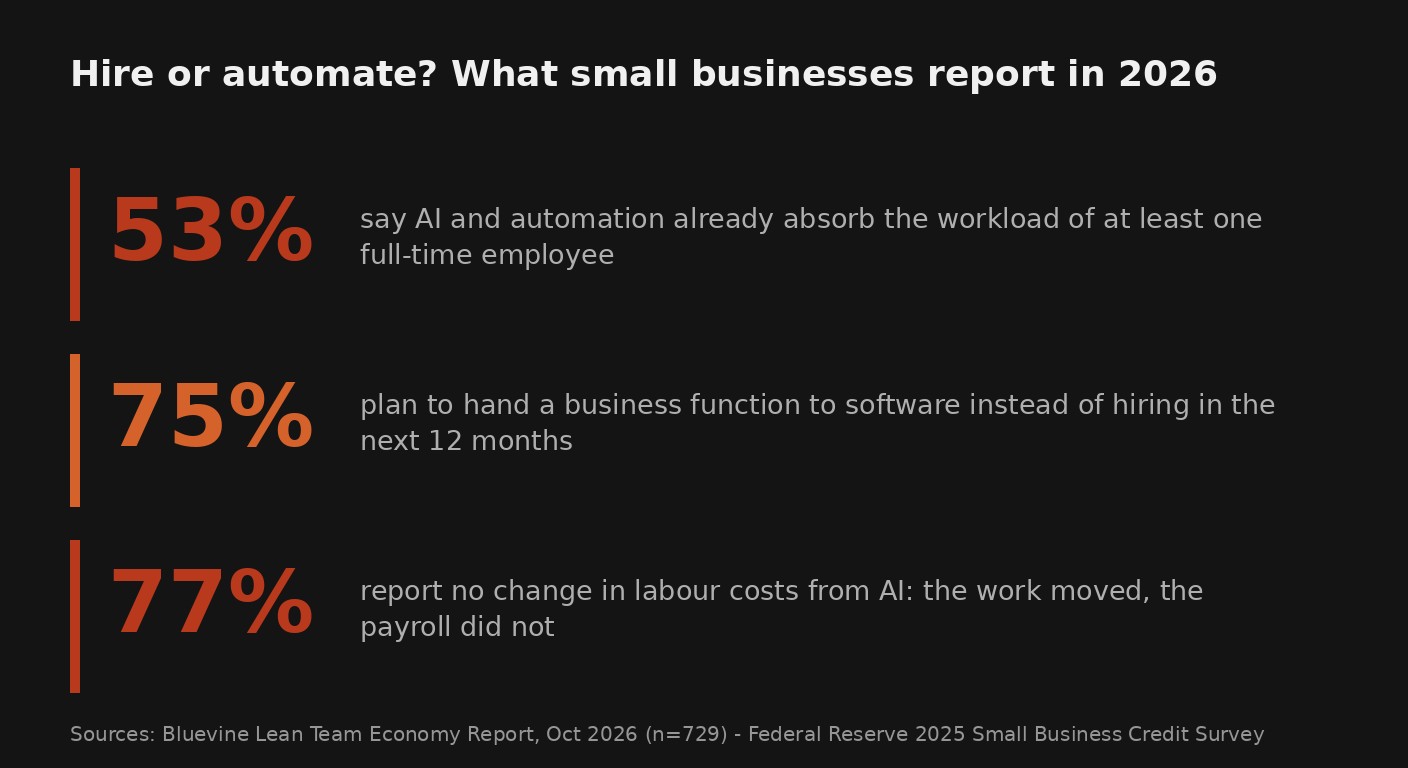
Bluevine surveyed 729 US small business owners for its Lean Team Economy Report, published on 7 October 2026. Fifty-three percent said AI and automation tools already absorb the workload equivalent to at least one full-time employee. Three in four said they plan to hand a specific business function to software in the next 12 months rather than hire for it. The same report looked at 200,000+ live customer accounts and found average headcount flat at 3.3 people for three years, while account balances grew.
Read that carefully, because it is easy to misread. It does not say small businesses fired anyone. It says they kept the headcount flat and pushed the extra work onto tools. I have watched owners do exactly this, and the ones who got it right did not automate a job. They automated the repeatable half of one.
What the new data actually shows
The number that gets quoted is the 53%, but it is the softer figure underneath it that should decide how you spend the next quarter.
Federal Reserve researchers used the 2025 Small Business Credit Survey to look at what AI adopters expect over the following year. Among firms already using AI, 77% reported no change in their labour costs from the technology. The work shifted; the payroll did not. Meanwhile the same firms were markedly more likely than non-adopters to expect higher revenue over the next twelve months, even after the researchers adjusted for firm size, owner age and past performance.
Put those two findings together and you get the useful version of the story. Automation in a small business is not showing up as a smaller wage bill. It is showing up as capacity: more quotes sent, more jobs scheduled, more follow-ups closed, with the same number of people. The payroll saving is real but it lands later, and only if you reinvest the freed time instead of letting it evaporate.
That distinction decides the whole question. If you are hiring because the work is genuinely more than your team can carry, automation buys you breathing room before the hire, not instead of the hire. If you are hiring because one repeatable process has grown past what a person should be doing all day, you probably have an automation problem wearing a hiring costume.
A three-question test before you write the job ad
You do not need a strategy document to make this call. You need to answer three questions honestly, and the answers tell you what to do next.
- Is the work the same shape every time, or different every time? Same shape means automatable: an invoice arriving, a booking coming in, a lead filling a form, a report landing on the same day each week. Different every time means judgement, and judgement is where a person earns their salary.
- Can you write down every step without guessing? If you can describe the process as a numbered list, software can follow it. If you find yourself saying "well, it depends", you have found the part that still needs a human.
- What happens if it runs wrong for a week? A wrong newsletter is annoying. A wrong payroll run or a mispriced quote is expensive. The cost of a bad output is the ceiling on how much you automate without a human checking the last step.
Most roles split cleanly down the middle. A sales admin's day is maybe 60% repeatable (updating the pipeline, sending the same follow-ups, booking meetings) and 40% judgement (reading a room, knowing when a prospect is stalling). Automate the repeatable 60%, and the 40% that remains might not need a full-time hire yet. That is the whole trick, and it is why the "AI replaced a job" framing almost never fits what actually happened.
Where automation earns its keep first
Not every function is worth automating, and the tempting ones are usually the wrong ones to start with. The easiest wins share three traits: high volume, low variation and a human already checking the output. Here is where small teams see the fastest payoff.
| Function | Why it automates well | What still needs a person |
|---|---|---|
| Quotes and invoices | Same structure every time, pulled from the same fields | Non-standard pricing and discounts |
| Appointment booking and reminders | Rules-based, runs on a calendar | Judging urgency or rescheduling a difficult customer |
| Lead follow-up | Timing and sequence are the same for everyone | The conversation that actually closes the deal |
| Weekly reporting | Pulls the same figures on the same day | Deciding what the numbers mean |
Start with one row. Pick the function that costs you the most hours and has the least variation, automate it end to end, and watch it for a month before you touch anything else. Owners who try to automate three processes at once almost always end up with three half-finished workflows and no idea which one is failing.
Where a person still beats software
It is worth naming the other half, because the fastest way to lose a customer is to hand a human-shaped problem to a script.
A person is still the right choice when the work involves a relationship over time, an exception nobody has seen before, or a decision with real money attached. Negotiating a contract, handling an angry client, choosing which of two suppliers to trust, deciding whether to take on a risky job: software helps by gathering the facts, not by making the call. The 2026 findings back this up at the top of the market. When the Federal Reserve asked small firms how AI changed their operations, the overwhelming majority reported no reduction in spending on outside services or internal labour. The tools are not replacing the decision-makers. They are clearing the repetitive work out of the way so the decision-makers have room.
The trap: automating a job nobody owns
Here is where most small teams go wrong, and it has nothing to do with picking the wrong tool.
They automate a process, and then nobody owns it. When the workflow sends the wrong reminder or misses a step, there is no person whose job it is to notice. That is how a time-saving setup quietly becomes a liability: it runs unattended for months, and the first sign something broke is an unhappy customer on the phone.
The fix is not more software. It is naming one person who owns the automated process, even if that is twenty minutes a week. Someone checks the output, someone can pause it, someone knows what "normal" looks like so they catch "wrong". Teams that skip this step report automation that feels like extra work. Teams that do it report the thing the data describes: the same people getting more done.
Frequently asked questions
Does automating a function mean I should not hire anyone?
No. It means the next hire should be for work software cannot do: judgement, relationships and exceptions. Automate the repeatable half of a role first, then look at what is left and decide whether that still adds up to a full-time job.
How long before I see a return?
For simple, high-volume functions like reminders, quotes or weekly reports, teams usually see the hours come back within the first month. The money shows up later, because most small businesses reinvest the freed time into sales rather than cutting staff. That is exactly what the Federal Reserve data describes: better revenue expectations, flat labour costs.
What if I automate something and it breaks?
It will, eventually. The defence is to name one person who owns each automated process and checks its output on a schedule. A workflow with an owner gets fixed in a day. A workflow without one runs wrong for months.
Do I need to replace the tools I already use?
Rarely. The wins described in the 2026 data come from connecting the systems a business already runs, not from buying a new platform. Start by automating inside your existing accounting, CRM or booking tool before you add anything to the stack.
Not sure which half of the role to automate?
BigLobster maps the repeatable parts of a job, wires them into the tools you already run, and leaves the judgement calls where they belong: with your team. No new platform to learn.
Map my first automation