
Why your SMB loses sales with ordinary customer service
Let's be honest: if you run a small business, your customer service is probably "respond when I can." A WhatsApp after you leave the production floor, an email in the morning, a call between tasks. It's not that you're disorganized—you just don't have more hours.
But customers don't wait for office hours. Industry data shows that 67% of leads go cold when a company doesn't respond in the first five minutes. And I'm not just talking about new prospects: I mean an existing customer who at 9 p.m. wants to know if their order ships tomorrow. If you don't reply, at 9:15 they're asking your competitor.
AI doesn't magically create more hours. But it does something else: it takes the repetitive, low-value chat off your plate so the few hours you have go toward closing deals. That changes the math without hiring anyone. If you'd rather skip the setup, our AI automation services for SMBs build and monitor the assistant for you.
What an AI assistant can do (and can't do)
First things first, so nobody sells you a bad bill of goods. A well-built AI assistant excels at four things:
- Answer FAQs: hours, pricing, delivery times, directions, return policy. The questions you get a hundred times a year.
- Manage bookings and reservations: schedule, confirm, remind. No more email ping-pong to lock in an appointment.
- Classify and escalate: detect when a question is serious (a complaint, a large quote) and hand it to the right person with context intact.
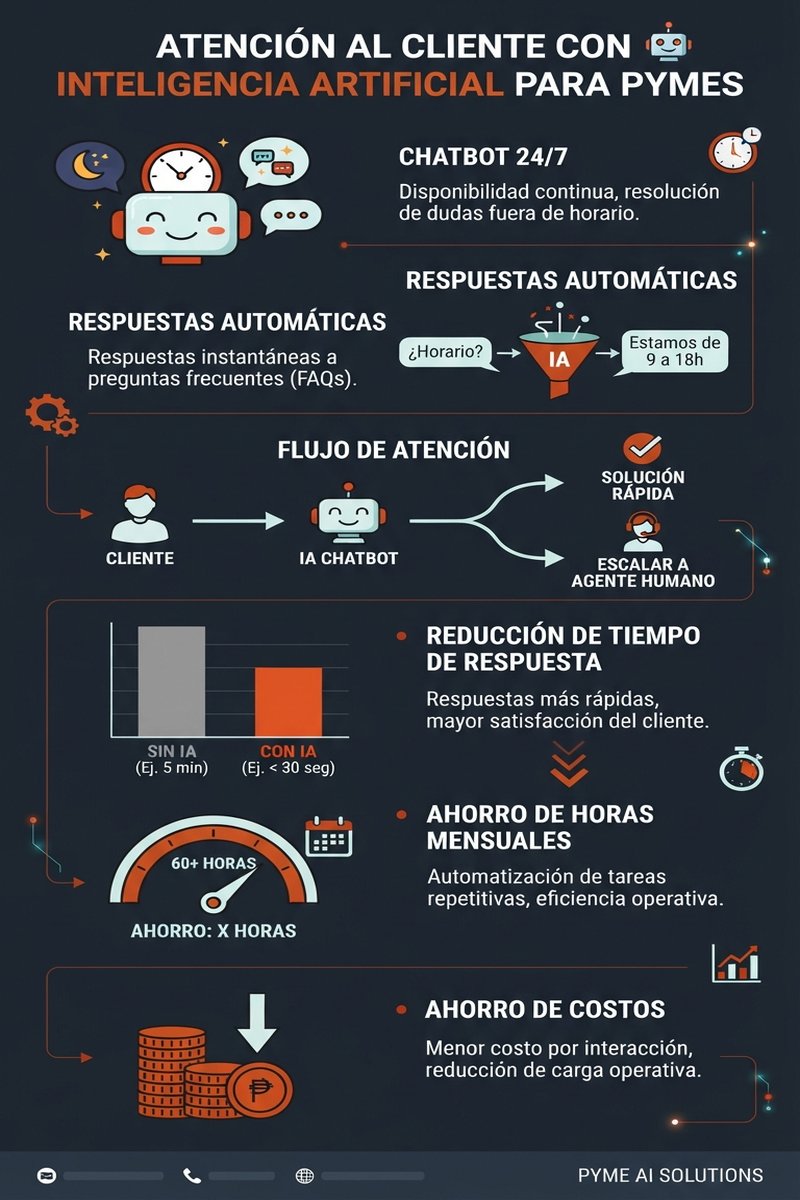
- Stay awake 24/7: work nights, weekends, during your meeting. The customer doesn't wait, and that's already an edge.
And here's the part almost nobody tells you: what it's bad at.
- It doesn't fix a broken process. If your logistics are messy, a bot saying "your order arrives soon" won't fix it—it'll frustrate the customer more.
- It can't replace human judgment on sensitive issues. An emotional complaint or a big customer threatening to leave needs a person. Delegating everything to the bot costs you.
- It doesn't know your business from day one. It has to learn your tone, your products, your exceptions. That takes time and careful setup.
Think of the assistant like a very fast, very patient, tireless intern who doesn't know the company yet. Your job is to teach them. If you expect to plug it in and have it ace day one, you'll be disappointed.
The three mistakes that doom a chatbot
I've seen dozens of SMBs launch a bot, get excited the first week, and abandon it by month two. Always the same reasons.
Mistake 1: Feed it generic AI wisdom and call it done
If your bot spits out general AI knowledge but doesn't know your product catalog, your hours, or your return policy, the customer gets the same answer Google would give. A useful assistant runs on your data: your products, your prices, your policies. Without that, it's decoration.
Mistake 2: Hide the human option
A bot that loops forever and never escalates to a person is the worst invention. The customer gets frustrated twice: first with the problem, then because there's nobody there. The golden rule is simple: if the bot can't resolve in two attempts, escalate to a human without making them repeat everything from scratch.
Mistake 3: Launch and abandon
You launch it and forget about it. Three days later a customer asks something unexpected, the bot says something ridiculous, and nobody notices. AI customer service needs monitoring—especially the first month. Read the conversations your system saves so you can correct and improve on the fly.
"A bot that never escalates to a human is the worst idea. A bot you launch and forget is second worst. A customer service assistant gets trained, monitored, and refined."
BigLobster Automation TeamWhere should you deploy it? Web, WhatsApp, and phone
You don't have to choose just one. Most SMBs start where the questions already are coming in.
Chatbot on your website
This is the most common entry point. A visitor lands on your site at midnight and gets a chat that responds: hours, pricing, whether you work weekends. Plus, it detects buying intent (they're checking your pricing page, asking about a specific product) and routes them to a salesperson the moment your team comes online. That's not just support—that's lead capture.
Automated WhatsApp
In Spain, WhatsApp is the king channel. An assistant can reply to standard messages instantly, sort contacts by priority, and notify your team only when it matters. If you haven't automated WhatsApp yet, I recommend reading how sales automation works on WhatsApp.
Voice assistant
Phone is the trickiest because people have less patience than typing. New voice assistants (recent releases from Vodafone and IONOS point exactly here) answer calls, handle standard questions, and book appointments. The customer hangs up with their issue solved, not even knowing they spoke to a bot. It's not for everyone, but if your business lives on the phone, it's where you recover the most hours.
What it actually costs to set this up
Let's get to the numbers that matter. Real 2026 pricing for an SMB:
| Option | Monthly cost | Best for | Effort |
|---|---|---|---|
| Template tool (DIY) | $0–100 | Businesses with standardized, repetitive questions | Medium: set up FAQ and connect it |
| AI chatbot SaaS | $50–300 | SMBs with real question volume | Low-medium: pick channel and train |
| Agency implementation | $500–3,000 setup + monthly | Those who want it working without the headache | Low: they build it and show you |
The number that really matters is ROI. A bot handling 150 questions a month that a person used to handle at 15 minutes each returns 37+ hours monthly. At €15/hour, that's €550+ a month. Most serious solutions pay for themselves in the first month of real use—and then some.
Is this right for you? The question nobody asks
Not every business needs a chatbot. Before you spend a euro, ask yourself three things:
- Do I get the same question repeatedly? Hours, pricing, timelines. If customers ask the same thing in a loop, you need a bot.
- Do questions come in outside my work hours? If your most active customers reach out when you're offline, a bot's availability is a real win.
- Am I wasting time on repetitive work a system could handle? Booking, reminding, sorting. If that eats your mornings, automate it.
If all three are no, skip it and save the money. But if even one is yes, the bot is already costing you—you just haven't counted it yet.
I'll be straight: setting this up properly has work. Connecting WhatsApp, teaching it your products, deciding when to escalate to humans, ensuring it doesn't embarrass you with important customers. That's why some prefer to have a team that's done it a hundred times handle it rather than wrestling with tutorials.
Steps to get started this week
If you're sold, here's how I'd start without getting stuck:
- Pick one channel first. The one getting the most questions today. Don't try to launch three at once.
- Write down the ten most frequent questions with good answers. That's the material that trains the bot.
- Define the escalation rule. What kinds of conversations should never be bot-handled (complaints, big quotes, vendor issues).
- Configure it with your data—not generic responses. Your catalog, your hours, your policies.
- Test it yourself first. Ask it what your customers ask and fix what breaks.
- Monitor the first month. Read the conversations, refine, then let it run.
Doing one channel well beats launching three channels halfway and abandoning them.
Frequently asked questions
Is an AI customer service assistant expensive for a small business?
Depends on how you build it. Template tools run €50–100 a month. Agency implementations start at €500–3,000 setup plus monthly fees. The key: hours saved usually exceeds the cost in month one if you have real question volume.
Will customers get angry if a robot answers them?
They get angry if the robot doesn't solve it and there's no path to a human. If the bot replies well and escalates correctly, most customers don't mind and appreciate an instant response. Bad experience doesn't come from AI—it comes from a misconfigured bot with no exit.
Do I need technical skills to set it up?
Template tools use visual menus: paste your Q&A and connect to your site or WhatsApp in clicks. For custom work or ERP/CRM integration, a team that's done it before makes sense. If you're uncertain what's involved, I explain how to integrate AI agents without a technical team.
Which channel should I start with?
The one getting the most questions right now. If phone calls eat your day, start there. If it's WhatsApp, that's usually first. One channel done well beats two done halfway.
Does AI customer service comply with data protection law?
When the assistant handles customer data, it must follow GDPR like any system: inform customers what happens to their data, keep only what's needed, don't expose one customer's info to another. A reputable provider has this solved. If you build it yourself, check this before launch.
How long does it take to go live?
With a template tool and one channel, a couple of days gets you responding. For it to answer well (knowing your catalog, your tone, your routing rules), budget one to two weeks of fine-tuning. Speed shows in response quality here.
Want your business to respond around the clock?
We build a customer service assistant that knows your business, with human escalation done right, and no tutorial headaches. Fixed pricing and real timelines.
Talk to BigLobster →