
Your team is probably already using AI. Someone drafts sales emails with it. Someone else summarizes meetings. A third person has built a small automation in a personal account and hopes nobody asks how it works.
That is not a failure. It is a signal. People have found places where the business is slow, repetitive, or hard to keep up with. The management problem is that experimentation often moves faster than shared skills, data rules, and review habits.
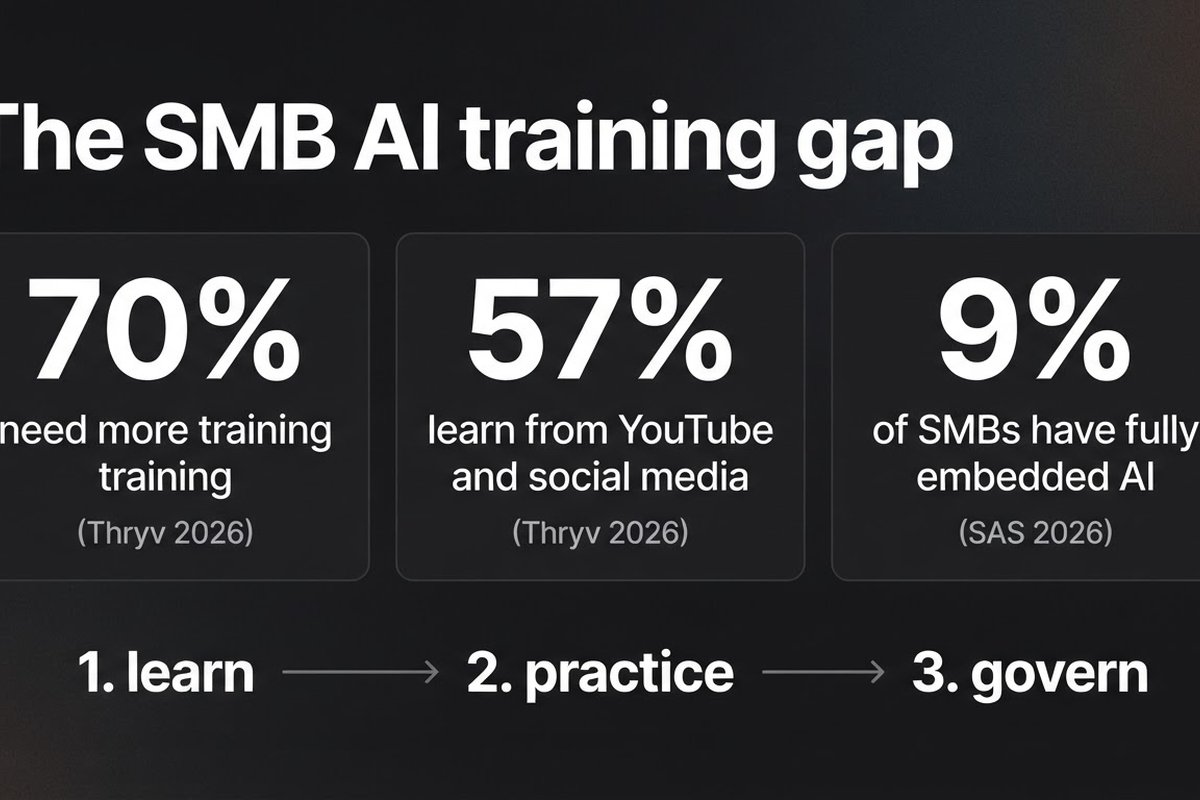
Thryv's 2026 survey of 561 small and mid-sized business decision-makers found that 66% were using AI, while 70% said they needed more training to use it effectively. The same survey found that 57% relied on YouTube or social media as their main training source. That is a cheap way to learn a feature. It is a poor way to teach a company how to handle customer data or approve an automated action.
Why tool demos do not create capable teams
A tool demo shows what a product can do with a neat example. Your team works with messy spreadsheets, half-complete customer records, unusual requests, and deadlines. Those are different conditions.
Training fails when it stops at “type a better prompt.” People need to know four things instead:
- Which tasks the tool is allowed to help with
- What information must stay out of it
- How to check an answer before it reaches a customer or a financial system
- What to do when the answer is wrong, incomplete, or outside the tool's role
Those decisions are more valuable than memorizing prompt tricks. Models change. Good judgment transfers.
“The goal is not to make everyone an AI expert. The goal is to make the right work easier without making the business less careful.”
What should an SMB teach first?
Start with the work people repeat every week. It has clear inputs, a visible result, and enough volume to show whether training helped.
Teach a safe data habit
Give the team a plain-language data rule. Public information can go into a public tool. Internal information belongs in an approved workspace. Customer personal data, private contracts, credentials, payroll details, and unreleased pricing need a higher bar.
Do not bury this in a long policy. Put it on one page with examples from your own company. “Can I paste this?” is the question people will actually ask.
Teach review, not blind acceptance
AI output is a draft until a person checks it. For an email, that might mean verifying names, promises, dates, and tone. For a finance workflow, it means checking totals against the source record. For a customer-support reply, it means confirming that the answer matches the current product or service.
Make the review step visible in the workflow. If people have to remember it under pressure, it will disappear.
Teach escalation
Every team member should know when to stop. A missing source, a sensitive request, an unusual customer complaint, or a proposed refund should route to a person. A good automation handles routine cases and makes exceptions easier to see.
How do you build training around real work?
Pick one workflow per department and train against real examples. Do not use only the perfect examples supplied by a vendor.
For sales, use three old enquiries: one clear fit, one poor fit, and one ambiguous case. Ask the AI to classify them and draft the next step. Then have the salesperson compare the output with what actually happened.
For operations, take last month's recurring report. Have the tool produce a first draft, then check every number and note which source was missing. For support, use a handful of resolved tickets and test whether the draft answer follows the team's actual policy.
This does two jobs at once. People learn the tool, and the company discovers where its own process is unclear. If two experienced employees disagree about the correct answer, no prompt will fix that disagreement. The process needs a decision first.
A 30-day AI training plan that a small team can run
Week one: map use and set boundaries
Ask each team what AI tools they use, what tasks they use them for, and what data those tasks touch. Keep the conversation free of blame. You want honest answers, not a polished list that hides personal accounts.
Choose an approved tool for the first pilot. Write the one-page data rule and name an owner who can answer questions. This is also a good time to read our guide to shadow AI risk if people are already building their own workflows.
Week two: practice one task per role
Run a 45-minute session with each group. Spend 10 minutes explaining the task, 20 minutes practising with real but safe examples, and 15 minutes reviewing failures. Leave five minutes to write down the new checklist.
Keep the first task boring. Email triage, meeting summaries, document extraction, and weekly reporting are better starting points than autonomous hiring decisions or customer refunds.
Week three: put review into the process
Run the workflow in draft mode. The AI can classify, summarize, or prepare a response, but a person approves every output. Record how often the draft needed a correction and what kind of correction it was.
That correction log is your best training material. A wrong date tells you one thing. A confident answer based on an outdated policy tells you another.
Week four: measure and decide
Compare the pilot with the old process. Track time per task, correction rate, number of escalations, and whether the team actually used the output. If it saves time but creates extra checking, be honest about the result.
Keep the workflow only if the net result is better. Then document it and move to the next task. Our guide to maintaining AI automations covers what to monitor once a pilot becomes part of daily work.
Which training metrics are worth tracking?
Do not count logins and call that adoption. A person can open an AI tool every day and still create no useful result.
- Time per completed task: compare the full process, including review, with the old version.
- Correction rate: count outputs that needed a factual, policy, or formatting fix.
- Escalation quality: check whether risky cases reach the right person with enough context.
- Reuse: see whether people use the approved workflow again without a trainer standing beside them.
Review these numbers after two weeks and again after a month. If usage is low, ask whether the task is wrong, the tool is awkward, or the team does not trust the result. More training is not always the answer.
What should never be fully automated first?
Delay tasks where a mistake can create a legal, financial, safety, or relationship problem. That includes final hiring decisions, contract commitments, refunds, disciplinary actions, medical advice, and anything that changes a customer's account without review.
AI can still help with the preparation. It can organize evidence, highlight missing information, draft a response, or surface an unusual pattern. Keep the final decision with a person who has the authority and context to make it.
That approach is not anti-automation. It is how you earn trust while the team learns what the system can and cannot handle.
Frequently asked questions
How long does AI training take for a small business?
A first role-specific session can take 45 minutes. Plan for a 30-day practice cycle so people can use the workflow, report failures, and build a reliable review habit.
Should everyone receive the same AI training?
No. Everyone needs the same basic data and review rules, but practice should match the job. Sales, operations, finance, and support face different inputs and risks.
How can we tell if training worked?
Measure the complete task: time saved after review, correction rate, escalation quality, and repeat use. Logins or the number of prompts written are weak signals.
Should an SMB train employees before buying AI tools?
Yes, at least enough to define the task, data boundaries, and success measure. A short process audit often tells you more than a tool demo.
Need a practical starting point for your team?
BigLobster helps SMBs choose one useful workflow, set the guardrails, and train the people who will run it. Start with a process that earns its place.
Discuss your first workflow →