
beehiiv sent its pricing email on 1 October and, if you skimmed it, the takeaway was "nothing changes for you". That is only half true. Nothing changes yet — you pay the new numbers at your first renewal on or after 1 November 2026. That is four weeks to decide something you can still decide cheaply.
There is a second sentence in the same announcement, easy to miss: some accounts were moved to the subscriber tier that matches their current list size. If your list grew while the tier stayed put, you were already being billed the wrong price.
This is not a big increase on a small bill. It is a platform repricing itself as a full publishing suite rather than a cheaper place to send email, which changes who should stay. Below: what changed, the renewal rule that decides when it hits you, three moves that lower the bill without leaving, and the one case where leaving is the cheaper answer.
What changed on 1 October
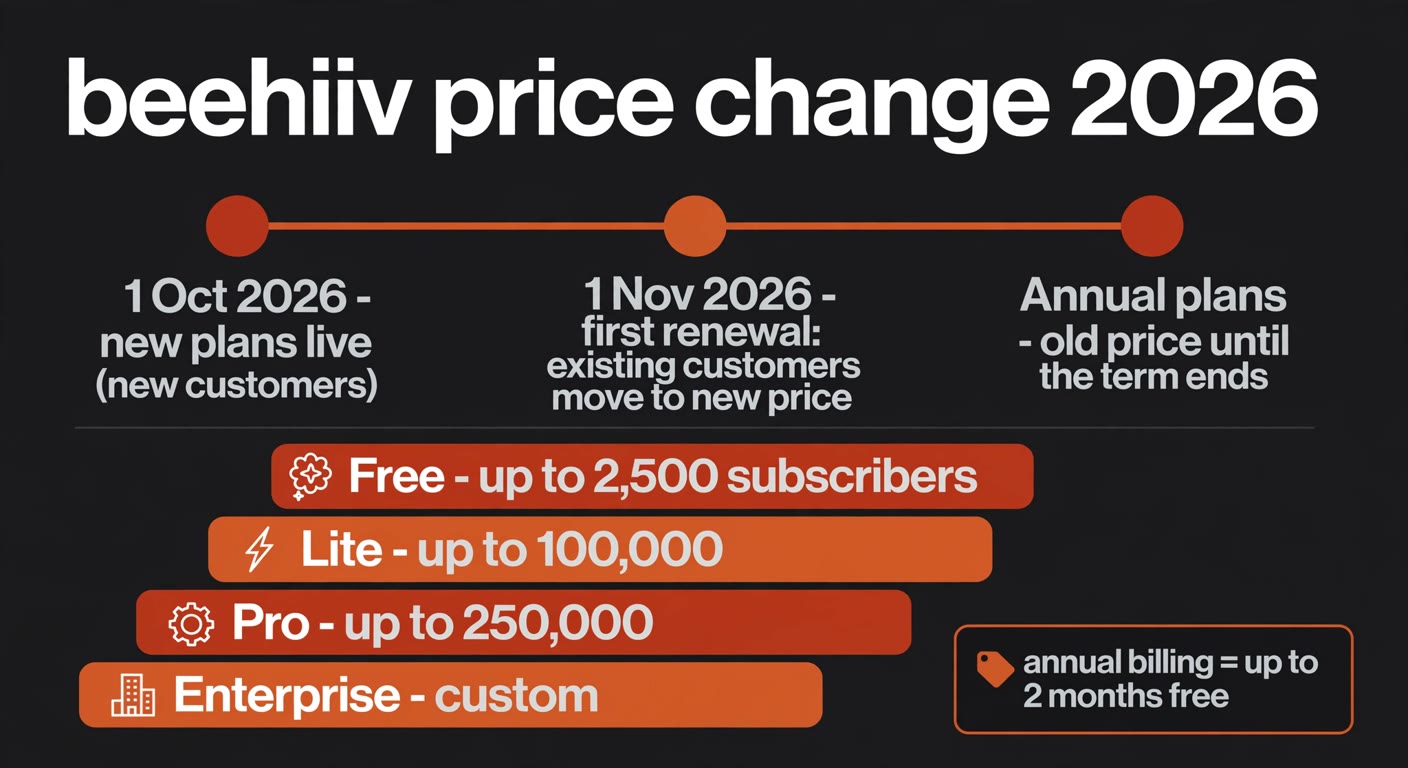
The plan names moved first: beehiiv now sells Free, Lite, Pro and Enterprise. Scale became Lite, and Max became Pro.
The features behind the labels are close to unchanged. Lite covers publishing and paid subscriptions up to 100,000 subscribers; Pro raises every limit and adds webinars, webhooks and priority support. One number worth noticing is the self-serve ceiling: it used to be 100,000 before you were pushed into an Enterprise conversation, and Pro now carries you to 250,000 without one. For a growing paid newsletter, that is the part of this update that is unambiguously good news.
The price, on the other hand, went up. At the 10,000-subscriber level, reporting on the announcement put Lite at $139 a month against $109 before, and Pro at $239 against $219 (The Verge, 2 October 2026). That is roughly a quarter more on the mid-tier. Your own number depends on your tier, so the only figure that matters is the one on your billing page, not the one in the email.
The rule that decides when you actually pay it
This is the part that separates the people with a decision to make from the people with nothing to do.
New beehiiv customers pay the new prices from 1 October 2026. Existing accounts pay them from their first renewal on or after 1 November 2026. Read that again, because it is not a single deadline — it is your billing date plus a rule.
If you are on a monthly plan, beehiiv says you get at least 30 days' notice before the first invoice at the new price. So the change lands at your next renewal after 1 November, not on 1 November itself.
If you are on an annual plan, you keep your current price until your current term ends. You do not need to do anything, and your plan moves over automatically. Your increase is deferred to whenever that annual term comes up for renewal, which could be months away.
Two smaller details decide what you will actually be charged when the switch happens. Existing discounts carry over to the new plan, but they cannot be combined, so redeeming a later offer such as a Black Friday deal replaces whatever discount you hold today. And beehiiv moved some accounts to the subscriber tier that matches their current list size, which means the number in your head may not be the number you are on.
So before anything else, log in and answer three questions: what plan am I on now, what tier does my active subscriber count put me in today, and when is my next renewal. Everything below depends on those three answers.
Three levers that lower the bill without leaving
Migrating your list to a different platform to dodge a price rise is almost always a bad trade: exports, re-verification, re-authenticated sending domains and a deliverability hit that takes months to recover. Look at your own bill instead. There is usually more money in these three moves than in the whole percentage.
Move from monthly to annual — but check the number first. beehiiv's own savings guidance puts this at the top of the list, and the annual discount is now worth up to two months free relative to paying monthly. What it did not repeat this time is the promise from 2024, when monthly customers could upgrade to annual during the notice window and lock their old price for another year. Treat that as unconfirmed: ask support what your annual number would be before you switch. The discount is what makes annual cheaper, not a grace on the new list price.
Right-size your tier with a list cleanup. Price follows active subscribers, not the rows in your export, and beehiiv's FAQ says the same thing: cleaning disengaged subscribers may move you to a lower tier. Hard bounces and addresses that have not opened anything in a year cost you twice — once in the subscription tier, again in the deliverability of the mail you want read. A suppression pass takes a couple of hours and it pays back even if you stay put.
Let the list pay for itself, or admit that it does not. beehiiv's monetisation surfaces are why the pricing works for some publishers: an ad network with sponsors, paid subscriptions at a 0% platform cut, digital products and paid recommendations. If your list earns something, the fee is a cost of revenue and the question is only whether the margin still works. If your list earns nothing and is not meant to, then the flat monthly fee is pure expense — and that is the honest trigger for the next section.
When leaving is the cheaper answer
The case for leaving has nothing to do with the percentage. It is about what your list does for a living.
beehiiv's flat monthly fee is built for publishers who monetise. A paid newsletter with real revenue keeps more of that revenue under a flat fee than under a percentage model like Substack's 10% cut of subscription revenue — and that is the comparison beehiiv makes itself. The higher the flat fee climbs, the more subscription revenue it needs to justify.
Flip it around. If your list is free and ad-supported, or it is a company newsletter whose job is to support something else you sell, the arithmetic inverts. You pay the same fee whether or not the list earns anything, so the plan price becomes a cost per thousand emails sent, and at the levels reported for a 10,000-subscriber list that is a real line item for something that does not produce revenue. That is the group this announcement hits hardest, and for them the honest answer may be to move.
If you are heading there, decide it on total cost rather than on the plan price. Three destinations cover most cases: a percentage-based platform like Substack, where you pay only when the list earns; a plain email service provider such as MailerLite or Kit if you mainly need reliable sending; or a self-hosted setup if you have the capacity and volume to justify it. Then price the switch itself, because migration is not free: exporting and re-verifying the list, re-authenticating your sending domain, rebuilding automations, and a short deliverability dip while the new sending reputation warms up.
A price rise is a poor reason to migrate in a panic and a perfectly good trigger to finally review a decision you had been postponing. Those are different things.
A 30-minute checklist before your renewal
Do all of it at your billing page, this week, not on the day the invoice lands.
Get your three facts, and your last invoice. In beehiiv, open Settings, then Billing & Plan. Note your plan type, the subscriber tier you are billed on, and your next renewal date, and check that tier against the active subscribers you actually have across all your publications, because that is the figure the price keys off. Then read the total on your most recent invoice, add-ons included, so the comparison you make later is against your real number and not a list price.
Do the cleanup before the tier is measured. Suppressing inactive and bouncing contacts is worth doing regardless, but if it can drop you a tier, the timing matters: do it ahead of your renewal date, not after you have been billed at the higher tier.
Check your discount. A promotional discount carries over, but it cannot be combined with a new offer, and a failed payment takes it with it. Know what you hold before you decide.
Then start, whichever way you are going. If you are leaving, begin the export and the sending-domain warm-up now, while you are still paying for the current month, instead of sprinting in the last week. If you are staying, put the renewal date and the new amount in the calendar — the whole point of the window is that the decision is cheap for four weeks and expensive afterwards.
Frequently asked questions
I'm on an annual plan. Do I need to do anything?
No. Annual customers keep their current price until the term ends, and the plan moves over automatically. Your increase arrives at that renewal, which could be months away — use the time for the list cleanup and the annual-versus-monthly arithmetic.
Is the free plan changing?
No. Free stays free for lists up to 2,500 subscribers. If your list is under that ceiling, none of this applies to you.
Does beehiiv still take a cut of my subscription revenue?
No. The 0% platform fee on paid subscriptions is unchanged — the part of the model that makes a flat fee attractive when you compare it with a percentage-based platform.
How do I see exactly what I will be charged?
Open Settings, then Billing & Plan. That page shows your current plan type, the tier you are billed on and your next billing date. beehiiv also moved some accounts to the tier that matches their current subscriber count, so if your list has grown and you never updated the tier, check it before the renewal rather than after.
Want the subscription stack looked at by someone who does this weekly?
BigLobster reviews the software a small team actually pays for — stale seats, tiers priced by rounding, discounts about to expire — and puts the numbers next to the renewal calendar so the decisions land before the deadlines do. No migration pitch unless the arithmetic says so.
Ask for a software cost review