
If you pay for Xero in the US, your invoice changes on October 1, 2026. Not dramatically: two to seven dollars a month depending on your plan. You will probably not notice it for a couple of months, and that is exactly why it is worth ten minutes now.
Because the price rise is not the interesting part. Xero published two changes on the same page and the same date, and one of them can cost a business more than the subscription itself. Most of the coverage so far has been written by bookkeeping firms for their own clients. This is the version for the person who signs the invoice.
What actually changes on October 1
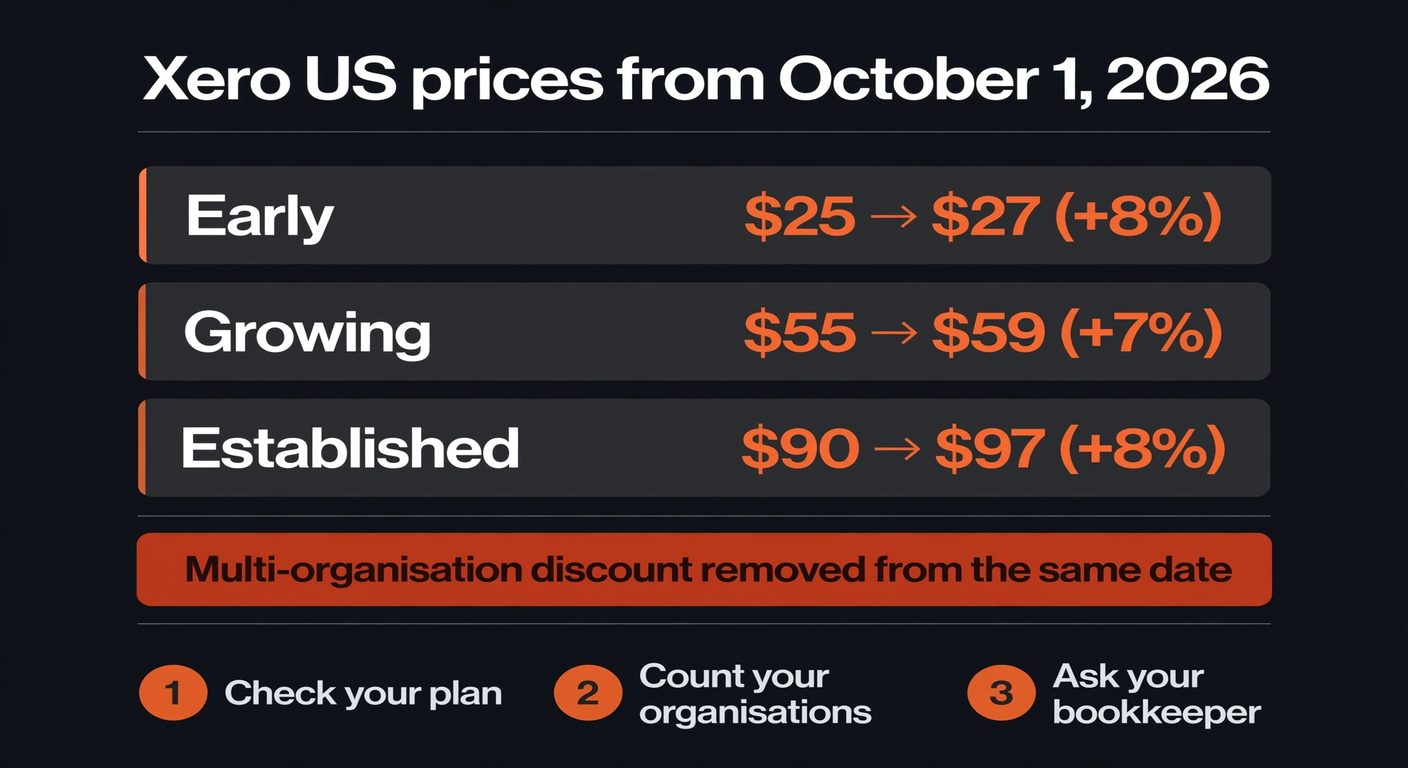
Xero's own pricing update page lists these figures for US subscribers (USD, excluding sales tax and add-ons):
| Plan | Now | From October 1, 2026 | Change |
|---|---|---|---|
| Early | $25/month | $27/month | +$2 (8%) |
| Growing | $55/month | $59/month | +$4 (7%) |
| Established | $90/month | $97/month | +$7 (8%) |
Two sentences on that page matter more than the table. The first: the new prices apply to "new and existing US subscribers". Being an existing customer does not hold your rate. The second: discounts and promo codes keep working until they expire, but the multi-organisation discount is being phased out from October 1.
The discount removal is the expensive half
Plenty of small businesses run more than one Xero organisation. Two trading entities under one owner. A holding company and the operating company. A partner's separate business that you bought bookkeeping software for because it was simpler than arguing about it. That is a normal setup, and it is the setup the multi-organisation discount was built for.
If your plan doubles because you lost a $2 to $7 a month increase, fine, you barely feel it. If you pay for three organisations and the discount disappears, the change lands differently: three subscriptions, each at the new rate, with nothing subtracted. The percentage in the table is not the percentage on your card statement.
The price on the pricing page is the price for one organisation. Nobody's card statement says "one organisation".
Worth checking against your own billing history, not the plan table
Three checks to run this week
None of this takes an afternoon. It takes about twenty minutes if you know where to look, and one email if you do not.
Find out which plan you are actually on
Xero's own instructions are to open Subscription in your account and read the Subscription column. Do not guess from memory. Plenty of businesses are paying for a tier they upgraded to during a busy month two years ago and never revisited, or for payroll capacity for people who have since left. The tiers step up mainly on payroll seats, expense users and payment allowances, and it is common to be one notch above what the business uses.
Count your organisations, not your plans
Then multiply. If you have one organisation, the October change is small and you can probably stop reading here. If you have two or more, work out the total: current price times number of organisations, minus whatever discount is being applied today, then compare it with the new price times the same number of organisations with no discount. That difference is the real number, and it may well be larger than the line item you saw in the announcement.
Ask whoever keeps your books
If a bookkeeping firm bills Xero through its partner account, the price change flows through their arrangement, not yours, and the answer to "what will this cost me" is an email they can answer in a minute. Better to ask in September than to discover it in a February reconciliation. While you are there, ask the more useful question: which Xero add-ons and integrations are you paying for that nobody has opened in six months?
Should you switch to a different accounting tool?
Short answer: probably not, and this is the part a comparison article will not tell you. Intuit raised QuickBooks Online prices for Essentials, Plus and Advanced on renewals from August 1, 2026, so the cheap alternative is not cheap in the way the price tables suggest. Every serious bookkeeping platform has moved its rates this year, for the same reason: they are all paying more for the compute behind the automation they spent two years adding.
Switching also costs money that never shows up on a pricing page. Chart of accounts rebuilt. Bank feeds reconnected. Historical reconciliations re-imported. Your accountant learning a new interface, or charging you to. If your team does not like the tool, that is a reason to move. Four dollars a month is not.
Change tools when the software is wrong for the way you work. Do not change tools to save the price of a coffee.
The only switching rule that survives contact with a migration
Where the money actually is
Here is the honest arithmetic. Xero's rise costs a Growing-plan business $48 a year. The manual work that usually sits right next to the subscription costs far more: somebody retyping supplier invoices, chasing payments by hand, exporting a spreadsheet every Friday to build the same report. That is where a small business finds real money, and it does not require leaving the tool you already know.
Two things worth doing before year end, and neither involves a migration. First, audit the subscriptions that touch your finance stack: the receipt scanner, the invoice tool, the payroll add-on, the payment processor. Xero's increase is one line item in a pile, and the pile is where the money goes. Second, look at what you already pay for but do not use. Most accounting platforms include automation features that owners never switch on, then buy a separate product that does the same job.
Frequently asked questions
Do the new Xero prices apply to me if I am already a customer?
Yes, if you are a US subscriber. Xero's update page says the changes take effect for "new and existing US subscribers from October 1, 2026" and appear on invoices from that date. Your current rate is not locked in by being an existing customer.
Can I lock in the old price by paying annually?
Xero has not published an annual prepay option to hold the old rate, and its page says nothing about a grace period. Where this matters most is the multi-organisation discount: it is being phased out rather than converted, so there is no action that preserves it. Assume the new price is the price.
Where do I find the current price I am paying?
In your Xero account under Subscription. Check the Subscription column, not your memory of the plan you chose. Your invoices in the Billing section show the same figure with any discount already applied, which is the number that will change.
Is it worth moving to another accounting platform?
For the price rise alone, no. Every major platform has increased prices this year, so the saving is small and the migration cost is not. Move if the software genuinely does not fit how you work, or if you are consolidating entities and one platform can hold them cleanly. Move for $4 a month and you will regret it by February.
What about the UK and Australia?
Those markets had their own increases this year under the same pricing-update page structure, and the multi-organisation discount is being removed alongside them. The plans and figures differ by country, so read your own country's update page rather than this one.
Paying for software nobody has reviewed in a year?
BigLobster maps the subscriptions a small business is running — what each one costs, what it actually does, and which ones you can cancel without anyone noticing. The price rise is the easy part; the pile underneath it is where the money is.
Ask for a subscription audit