
Accounts payable rarely breaks in a dramatic way. More often, it drifts. A supplier changes a unit price. An invoice sits in a shared inbox for four days. Someone pays the same bill twice because the PDF has a different filename. The business absorbs each mistake as “just admin.”
That is why accounts payable automation deserves a better sales pitch than “pay invoices faster.” The useful version captures invoices, checks them against what you ordered, routes exceptions to the right person, and leaves a trace of what happened. Speed is nice. Control is what protects your cash.
Automate the repetitive checks. Keep the expensive decisions visible.
A sensible rule for small-business finance automation
What does accounts payable automation actually do?
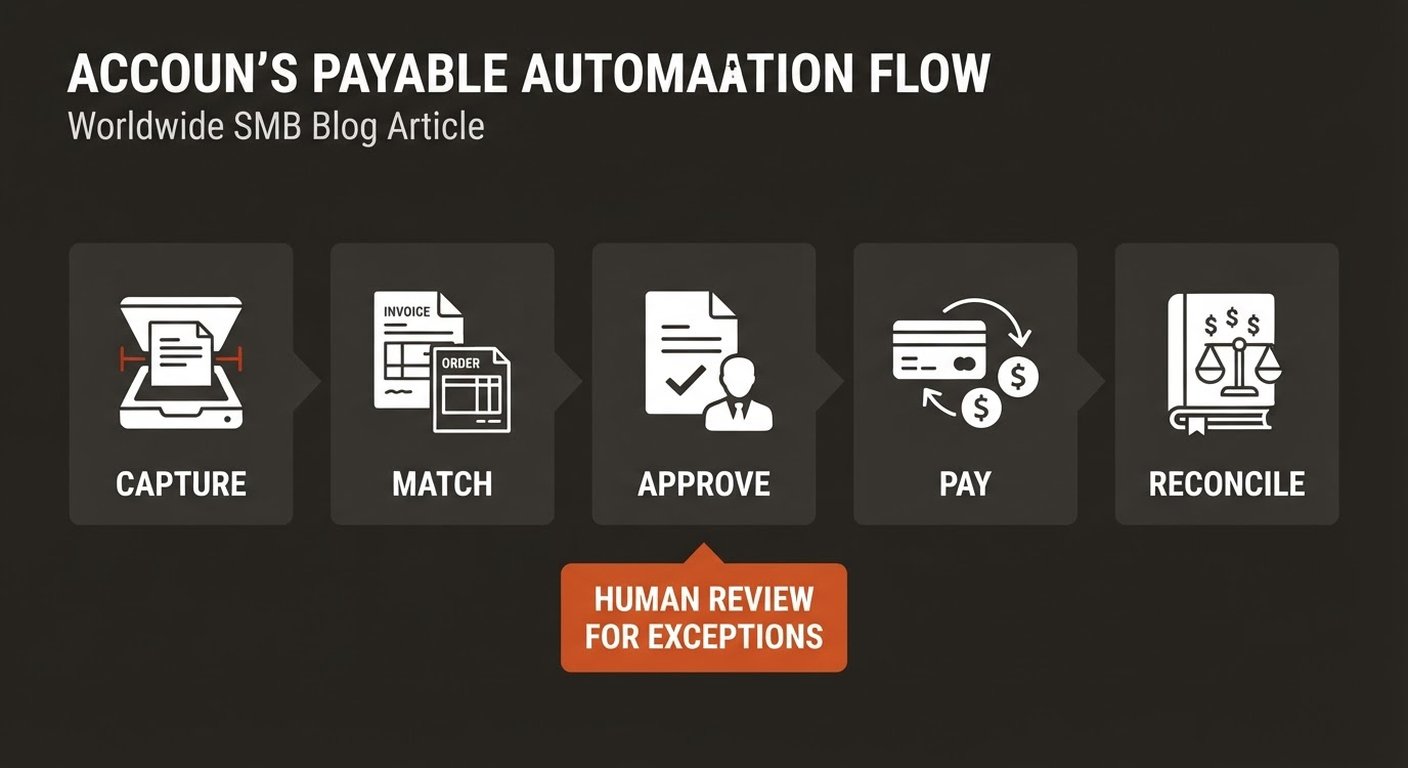
It turns the invoice-to-payment process into a repeatable workflow. An invoice arrives by email, upload, portal, or scan. Software extracts the supplier, invoice number, dates, line items, taxes, totals, and payment terms. The workflow then checks the data, sends it for approval when needed, records the result in your accounting system, and prepares an approved payment.
Modern tools can use OCR and AI to read invoices that do not share the same layout. That matters for a small company because suppliers rarely agree on one neat template. But extraction is only the first step. A perfectly read invoice can still be wrong.
The right question is not “Can the software read this PDF?” Ask instead: “Can it tell me whether this bill matches what we agreed to buy, and can a person see why it flagged something?”
Where does the money disappear in a manual process?
Start by watching the handoffs, not by shopping for software. In a typical small business, the same invoice may be downloaded from email, renamed, entered into a spreadsheet, forwarded to an owner, re-entered into accounting software, and then searched for again when the payment is reconciled.
The visible cost is staff time. The less visible cost is poor information: missed early-payment terms, unclear commitments, incorrect cost coding, and a month-end close that depends on one person remembering where everything is. Research from Boston Consulting Group puts potential procurement cost reductions as high as 45%, but the day-to-day win for a small team is often simpler: fewer hours spent chasing and checking invoices.
Measure a week before you automate. Record invoice volume, minutes spent per invoice, average approval time, the number of exceptions, duplicate-payment incidents, and how often staff chase an approver. You do not need a finance data warehouse. A simple worksheet with consistent definitions is enough to establish a baseline.
Why is three-way matching worth your attention?
Three-way matching compares three records before payment: the purchase order, the goods receipt, and the supplier invoice. The purchase order says what you agreed to buy. The receipt says what arrived. The invoice says what the supplier wants you to pay.
For goods, this catches the problems that a total-only check misses: ten units billed when eight arrived, a unit price that quietly increased, or freight added under terms that did not include it. For services, a two-way check against the contract or approved order may make more sense because there is no warehouse receipt.
Do not treat every mismatch as fraud. Real businesses have partial deliveries, substitutions, rounding, and legitimate changes. The workflow should explain the variance and send it to a human, rather than silently approving or blocking everything.
What should stay under human approval?
Let software handle predictable work: reading invoices, detecting duplicates, checking fields, matching clean records, and reminding an approver. Keep judgment and money movement under a person until the workflow has earned more trust.
- New suppliers: verify identity and bank details outside the invoice email.
- Price or quantity variances: show the exact line that differs and the source record used for comparison.
- Unusual payment instructions: never let an emailed bank-account change flow straight through.
- High-value or sensitive purchases: require the approval level your policy defines, even when the document looks clean.
A human-in-the-loop design is not a failure of automation. It is how you reserve attention for the cases where attention has the highest value. The aim is not zero clicks. It is fewer pointless clicks and better evidence for the clicks that remain.
How do you choose a first workflow?
Pick one repeatable slice. Do not start with “automate finance.” Start with a category that has enough volume to show a result and enough structure to keep the risk manageable. Software subscriptions, utilities, or a predictable materials category are often easier pilots than every supplier at once.
Then define the boundaries in plain language:
- Which inbox, folder, or portal is the source?
- Which fields must be extracted, and which source is authoritative?
- What tolerance is acceptable for price and quantity?
- Who owns each exception type?
- What event proves the invoice is complete and reconciled?
Run the automated and manual paths in parallel for a short period. Compare extraction accuracy, approval time, exception quality, and the amount of rework. Gross processing speed is not enough. If the team spends ten minutes fixing every “automated” invoice, the workflow has only moved the work.
What does a safe rollout look like?
Use a narrow pilot with a named owner. Week one is for mapping the current process and cleaning the vendor list. Weeks two and three are for processing one category in parallel with the manual path. Week four is for reviewing the numbers and deciding whether to expand, adjust, or stop.
Track four outcomes: time per invoice after review, approval cycle time, exception rate, and correction rate. Add a fifth if cash timing matters to you, such as early-payment discounts captured or late fees avoided. Keep the dashboard small enough that somebody will actually look at it.
Also check the audit trail. You should be able to answer who approved an invoice, when, against which order or contract, and why an exception was resolved. If the tool cannot show that history, it may be saving keystrokes while making the process harder to trust.
For background on the cost and control trade-off, compare this approach with our guides to AI bookkeeping automation, AI cash-flow forecasting, and AI approval workflows. The tools differ, but the same rule applies: define the source of truth, keep exceptions visible, and measure the result after human review.
Frequently asked questions
Is accounts payable automation only for large companies?
No. A small team can start with invoice capture, duplicate detection, or approval reminders without replacing its accounting system. The right starting point is the task with enough volume and repetition to repay the setup work.
Can AI approve and pay every invoice without a person?
That is a poor default. Let automation clear low-risk invoices that match your rules, but keep a human approval for new suppliers, unusual bank changes, material variances, and high-value payments. Increase autonomy only after the workflow has a reliable record of decisions.
What is three-way matching?
It compares the purchase order, the goods receipt, and the supplier invoice before payment. It helps confirm that you ordered the item, received the quantity, and were billed the agreed price.
How long does an AP automation pilot take?
A focused pilot can produce useful evidence in four weeks: one week to map and baseline, two weeks running a narrow category, and one week to review accuracy, time, and exceptions. Complex integrations may take longer, but the first test should still stay narrow.