
If you run a small business, you have probably already paid Meta something this year without calling it a subscription: boosted posts, a business verification, maybe one of the standalone app add-ons it started selling in March. Meta One is the company's attempt to fold all of that into one monthly line item, plus a slice of AI.
The pitch is easy to skim and hard to price. So let's do the boring version: what each tier includes, which one replaces something you may already be paying for, and where I would refuse to spend money until a human at Meta puts a number in writing.
What Meta One actually is
Meta One is a subscription layered on top of the free apps. The core experience of Instagram, Facebook, WhatsApp and Meta AI stays free — Meta says that explicitly, and it matters, because nothing here is a paywall on the things you already use to talk to customers.
What you buy is three things bundled together: more AI usage (image and video generation, Meta's Muse-powered media tools, in-app AI features like Restyle), more expression features across the apps, and — on the creator and business plans — professional tooling that used to be scattered across separate products or missing entirely. Meta says it has 15 million subscriptions and trials to date and plans to keep adding agent features aimed at small businesses.
Two practical caveats from Meta's own pages. Availability is not uniform: the rollout is gradual and Meta One is "not available in all regions," with eligibility requirements per account. And pricing is a starting price — "from $14.99" means the entry point, not the ceiling, and the plans you see in your billing settings are the ones that count.
The six plans, and where a small business lands
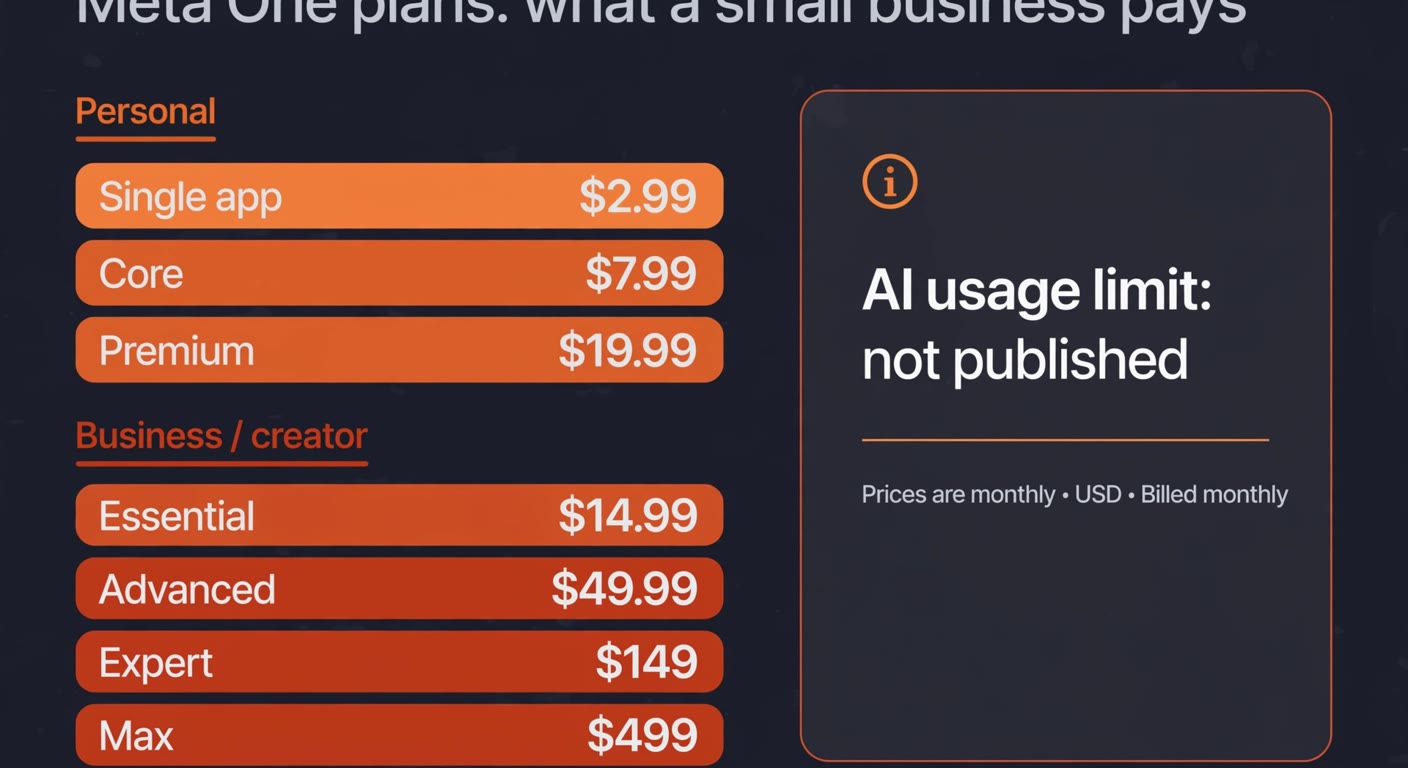
Strip out the marketing adjectives and the structure is simple. Two personal tiers, four business and creator tiers, plus cheap single-app plans below all of it.
| Plan | From | Who it is aimed at |
|---|---|---|
| Single app | $2.99/mo | One app's premium features, no bundle |
| Core | $7.99/mo | Instagram, Facebook and WhatsApp add-ons in one bundle, plus more AI usage |
| Premium | $19.99/mo | The same bundle with more AI usage again |
| Essential | from $14.99/mo | First business tier: Meta Business Agent on WhatsApp, verified badge, impersonation protection |
| Advanced | from $49.99/mo | Scheduling 30 days ahead, links in posts and reels, exportable analytics, team access |
| Expert | $149/mo | More of the same, more Meta Business Agent capacity |
| Max | $499/mo | Highest feature access and agent capacity, with 24/7 support access |
Look at that middle band and something odd appears. Essential to Advanced is a $35 jump, and most of what you get for it is not AI at all: scheduling windows, clickable links in organic posts, exportable analytics, a second person with account access. Those are product features a platform could ship to everyone, sold here as an unlock. The only genuinely compute-heavy item in the list is the number of Meta Business Agent responses — and that is precisely the number Meta does not publish.
The number Meta will not give you
Every plan from Core upwards promises "more" or "expanded" AI usage. None of them says how much. Asked for specifics, Meta told reporters that limits can vary by country, surface and system conditions — which is a polite way of saying the allowance can move without your bill moving.
I am not treating that as villainy. Meta is the fourth large vendor this year to sell AI capacity behind a tier wall with an undisclosed ceiling; OpenAI paused new sign-ups to its $200 ChatGPT Pro tier on September 10, 2026, citing exactly the same compute strain, and the pattern is consistent enough to plan around. But it changes the purchase. A tier with a published limit is a quantity you can compare. A tier with an unpublished limit is closer to buying priority — you are paying so that your assistant does not go quiet in front of a customer, and the value of that depends entirely on your own volume.
The bundle is cheaper than what you may already pay
Here is the one unambiguous win. Meta started selling premium features per app earlier this year: Instagram Plus, Facebook Plus and WhatsApp Plus, at $3.99, $3.99 and $2.99 a month if bought separately. That is $10.97 for all three.
Meta One Core bundles those same three app tiers and adds AI usage for $7.99. If you are already paying for two or three of the add-ons, Core is strictly cheaper than what you have now, and the AI usage arrives free. That is not a clever negotiation, it is arithmetic — and it is the only place on the pricing page where you can compute value without knowing Meta's unpublished limits.
So the first thing to do this week costs nothing: open your Meta billing settings, add up what you pay across the apps, and compare. If the total is above $7.99 for a set of features Core already includes, switch and pocket the difference. If you pay for nothing today, Core is a new cost, not a saving, and you can ignore it until you have a reason.
The WhatsApp angle is the real business case
For most small businesses reading this, the interesting tier is Essential, and the interesting feature is not the AI image generator. It is Meta Business Agent on WhatsApp: an assistant on your business number that answers customers when nobody is at the desk.
Essential (from $14.99) includes more access to that agent, plus a verified badge, a verified channel in the WhatsApp Business app, and impersonation protection — that last one matters more than it sounds, because a fake account wearing your name is a customer-service problem you cannot answer your way out of. Advanced lifts the agent's response allowance along with scheduling 30 days ahead, links in posts and reels, exportable analytics and shared account access without passing around your password.
Before you buy any of it, be honest about the volume. An agent that answers twenty questions a day is a receptionist you do not have to hire. An agent that answers two questions a week is a $180-a-year badge. Measure your actual incoming message volume for a fortnight — WhatsApp shows it in the business app — and let that number pick the tier instead of the feature list.
Worth knowing too: this is the same shift we wrote about in WhatsApp automation for small businesses. The tooling keeps improving, and the question stops being "can a bot handle this?" and becomes "who is accountable when it answers wrong?" Put a human on the escalation path before you scale the agent up, not after.
Three questions to ask in writing before Expert or Max
At $149 and $499 a month you are no longer buying an app feature. You are buying capacity, and capacity without a number is not a quote — it is a promise. Before anyone in your business signs off on those two tiers, get three things in writing from the account team:
- A numeric monthly allowance for Meta Business Agent responses, not "higher" or "expanded." If the only answer is "it varies," the plan is month-to-month by definition and you should cap your exposure at one month.
- What happens when you exceed it. Throttle, queue, or a published overage rate? Those are three very different invoices.
- The notice window if the allowance is reduced. Meta's own wording lets usage vary by country, surface and system conditions, so the question is not whether it can shrink but how early you would hear about it.
If a vendor will not put a number in a document, believe the absence. It is the most honest thing on the pricing page.
What I would actually do
Three decisions, in order, and none of them require a consultant.
First, audit what you already pay Meta. Add up the add-ons and boosts. If the recurring part exceeds $7.99 and Core covers the features, switch to Core — that is free money and it takes ten minutes in billing settings.
Second, if customer messages on WhatsApp are a real part of your week, take Essential at $14.99 for two months and instrument it. Count how many conversations the business agent actually handles, how many get escalated, and whether response times improved. Judge it on that, not on the feature page.
Third, leave Expert and Max alone for now. They are priced for teams managing social presence at scale, with support access to match. A business with two people and a shop does not have that problem yet. Revisit them when you can name the specific outcome you are paying for — and by then, Meta may have published the number that makes the decision easy.
The wider lesson across this year's AI subscriptions is the same everywhere. The advertised price has stopped being the useful unit of comparison. Vendors now move the allowance, the metering unit or the overage default instead of the sticker, which means the only defence is knowing your own consumption before you sign. Budget the AI line as a variable, and re-check it once a quarter, because the thing you bought in September will not be the thing you are paying for in March.
Frequently asked questions
Is Meta One worth it for a small business?
Sometimes, but probably not the tier you were shown. If you already pay for Instagram Plus, Facebook Plus or WhatsApp Plus, the $7.99 Core bundle is cheaper than the add-ons it replaces and the AI usage comes free. If you run customer messages through WhatsApp, Essential at $14.99 is the first tier with a real business case. The $149 and $499 tiers are aimed at teams managing social presence at scale.
Why will Meta not publish the AI usage limits?
Meta says limits can vary by country, surface and system conditions, which keeps the allowance flexible as compute pressure changes. In practice that means the same plan can deliver different amounts in different months without your price changing. You can plan around it, but you cannot compare plans on it.
Does Meta One paywall Instagram, Facebook or WhatsApp?
No. Meta states the core experience of its apps and Meta AI stays free. Meta One sells additional features and more AI usage on top, not access to the apps themselves.
Do I lose anything if I do not subscribe?
Nothing you have today. The risk is not losing access, it is paying for a tier whose main promise is an unpublished allowance. If your current spend on Meta add-ons is under $7.99 a month, there is no saving to capture and no deadline to meet.
How long before I can judge whether it works?
Two months, and only if you measure. Pick one number before you start — conversations handled without a human, or response time on WhatsApp — and check it at 60 days. Without a baseline, every subscription looks like it is working.
Paying for AI tools you have not measured?
BigLobster audits the subscriptions a small business is running — what each one costs, what it actually does, and which ones you can cancel without noticing. Half the time the saving is in the tools nobody remembers signing up for.
Ask for a subscription audit