
Every owner knows the two bad inventory days. On one, a customer asks for the item that should be on the shelf and you have to say, “We are waiting for the next shipment.” On the other, you open the storeroom and find cash tied up in products that have not moved for months.
Most teams respond by checking spreadsheets more often. That helps for a while. Then sales happen in another channel, a supplier delivers late, or a promotion changes the pattern. The spreadsheet becomes a record of what already happened, not a useful answer to “what should we buy next?”
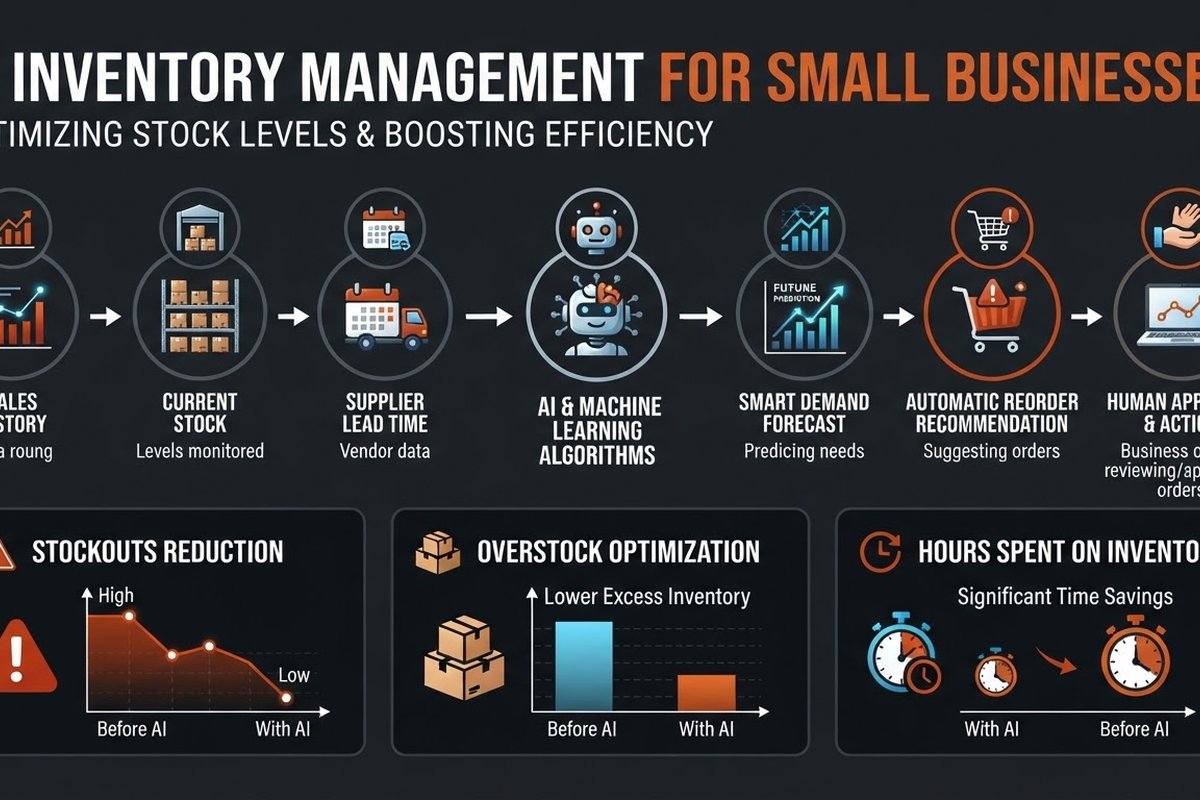
That is where AI can help. Not as an all-knowing purchasing manager. As a second set of eyes that looks across sales history, stock levels, returns, promotions, and supplier lead times before suggesting the next move.
Your stock problem is usually a timing problem
A basic inventory system can tell you that you have 24 units left. It may not tell you that your supplier takes 18 days to deliver, sales have risen every Friday for six weeks, and a marketing campaign starts next Monday.
Good replenishment joins those facts. A simple starting formula is:
Reorder point = expected demand during supplier lead time + safety stock.
The formula is not new. The useful part is keeping the inputs current. AI can update the demand estimate as sales change, compare the supplier’s promised delivery time with its real delivery history, and flag unusual patterns for review.
These are operating targets, not promises from a software vendor. Your own baseline matters more than a generic claim about forecast accuracy. Record your stockouts, emergency orders, excess units, and weekly planning time before changing anything.
What can AI actually do for a small inventory team?
There are four useful jobs. They can live in one platform or in a few connected tools.
- Forecast demand: estimate future sales by SKU, category, location, or channel using history and seasonality.
- Recommend replenishment: suggest when to reorder and how much, while considering lead times, minimum order quantities, and safety stock.
- Find anomalies: flag a sudden sales spike, an unusual return rate, a count that does not match the system, or a supplier that is consistently late.
- Surface dead stock: identify products with falling sales velocity and show how much cash is sitting still.
Notice the verbs: forecast, recommend, flag, and surface. For most small businesses, those are better first steps than “automatically place every order.” A model can be right about the pattern and still miss a one-off event: a large customer order, a product recall, a local closure, or a supplier discontinuing a line.
Clean data beats a clever model
Before comparing tools, inspect five fields for your top products:
- One SKU per sellable item. Do not mix colour, size, pack size, or supplier codes in one record.
- Sales history that includes returns. A sale that came back is not the same as lasting demand.
- Stockout periods. Zero sales while an item was unavailable should not be treated as zero customer demand.
- Real supplier lead time. Use the date ordered and the date received, not only the supplier’s catalogue promise.
- Promotions and one-off events. Mark them so a short-lived spike does not become the new normal.
If two systems disagree about the stock count, adding AI will not fix the disagreement. Pick a source of truth first. For a small retailer that may be the point-of-sale system. For an online seller it may be the store platform. For a distributor it may be the ERP or warehouse system. Connect one source, validate it, and only then add more data.
How should you choose an inventory tool?
Start with the workflow, not the feature list. A traditional inventory system may already solve the real issue if you need accurate stock across locations. An AI layer becomes useful when you also need forward-looking recommendations and your team spends too much time calculating them.
| Situation | Start with | Why |
|---|---|---|
| Few SKUs, stable demand, one channel | Spreadsheet plus alerts | Keep setup smaller than the problem |
| Several channels or locations | Inventory system with integrations | Get one reliable stock count first |
| Frequent stockouts or excess stock | Forecasting and reorder recommendations | Use demand and lead-time signals together |
| High-value or risky purchases | AI recommendations with approval gates | Keep judgment with an accountable person |
When you shortlist products, ask for a sample recommendation using your data. Can the system explain why it wants 120 units rather than 60? Can you exclude a promotion? Can someone override the recommendation and leave a note? Can you export the history when you leave?
Those questions matter more than a polished forecast graph. Shopify’s inventory documentation and Square’s inventory management guide are useful references for understanding what your existing commerce stack already tracks before you buy another layer.
Run a low-risk pilot before automating purchase orders
Pick 20 to 50 products in one category. Choose items with regular sales and enough history to compare a recommendation with reality. Run the system in “recommend only” mode for four weeks.
Each week, save the recommendation before anyone edits it. Then record what happened:
- Did the product run out before the next delivery?
- Did the recommendation create too much stock?
- Was the supplier on time?
- How many minutes did the review take?
- What did the buyer know that the system did not?
That last question is not a failure. It shows you which business rule is missing. Maybe a product sells heavily to one seasonal customer. Maybe a supplier has a minimum order that changes the economics. Add the rule, rerun the pilot, and keep the exceptions visible.
Measure money and time, not just forecast accuracy
Forecast accuracy can look impressive while the business still loses money. Measure the outcomes that affect the owner:
- Stockout rate: how often a customer-facing item was unavailable.
- Excess inventory: the value of units with no sale in your chosen period.
- Emergency purchasing: rush freight, substitute buying, or premium supplier prices.
- Planning time: hours spent checking sheets, counting, and preparing purchase orders.
- Cash released: money recovered from fewer slow-moving purchases or a planned clearance process.
Use a simple comparison. If the pilot saves three hours a week and avoids one emergency shipment each month, write down the value of both. If the software costs more than that value, stop. A smaller tool or a better data process may be the right answer.
Where inventory AI goes wrong
Bad input creates confident nonsense. Duplicate SKUs, missing returns, and stockout days can distort every forecast.
New products have no history. Use comparable products and a conservative first order. Do not pretend a model knows what has never happened in your store.
Promotions break normal patterns. Mark campaigns and planned events. Review the recommendation manually when demand is being deliberately changed.
Silent failures are expensive. Set an alert when the data connection stops, a forecast is missing, or a recommendation changes sharply. Every workflow needs an owner and a manual fallback.
Automation can hide judgment. Keep the reason for each override. That history helps the team improve rules and gives you something to inspect when a recommendation looks wrong.
Frequently asked questions
Do I need a large warehouse to use AI inventory management?
No. A smaller business can start with a focused category and a spreadsheet export. The case gets stronger when you have enough products, channels, or supplier variability that manual review regularly causes missed sales or excess stock.
How much sales history do I need?
Six to twelve months gives a useful first baseline for products with regular demand and seasonality. You can start with less, but treat the result as a rough recommendation and keep a person in charge of the order.
Can AI place purchase orders automatically?
Some tools can. Start by drafting the order for approval. Automatic ordering is a better fit for stable, high-volume products after you have measured the recommendations and set limits for quantity, spend, and supplier.
Is an AI forecast better than a reorder point?
Not always. A fixed reorder point may be enough for a low-volume product with steady demand. Forecasting adds value when demand changes, lead times vary, or you manage many products and channels. Use the simplest method that reliably solves the problem.
What should I automate first?
Start with low-stock alerts, a weekly recommendation list, or a draft purchase order. These reduce repetitive checking without removing the buyer’s judgment. Add forecasting and automatic actions only after the basic data flow is reliable.
Want a clearer inventory workflow?
BigLobster can map the process you already use, connect the right systems, and build a small pilot with measurable guardrails. Start with the stock problem that costs you money now, not an abstract AI project.
Talk to our team