
If you sell on Amazon, you have probably already met Seller Assistant. It showed up in 2023 as a chatbot inside Seller Central that answered questions and surfaced numbers you could have found yourself with enough patience. Handy, forgettable, the kind of feature you use twice and then ignore.
The version Amazon announced on 23 September 2026 is a different animal. In a newsroom post, Mary Beth Westmoreland, Amazon's VP of Worldwide Selling Partner Experience, described a Seller Assistant that keeps memory of your business, runs tasks on its own schedule even when you are not logged in, and — the part that matters most — connects your Amazon data into AI tools you already use, starting with Claude and Amazon Quick.
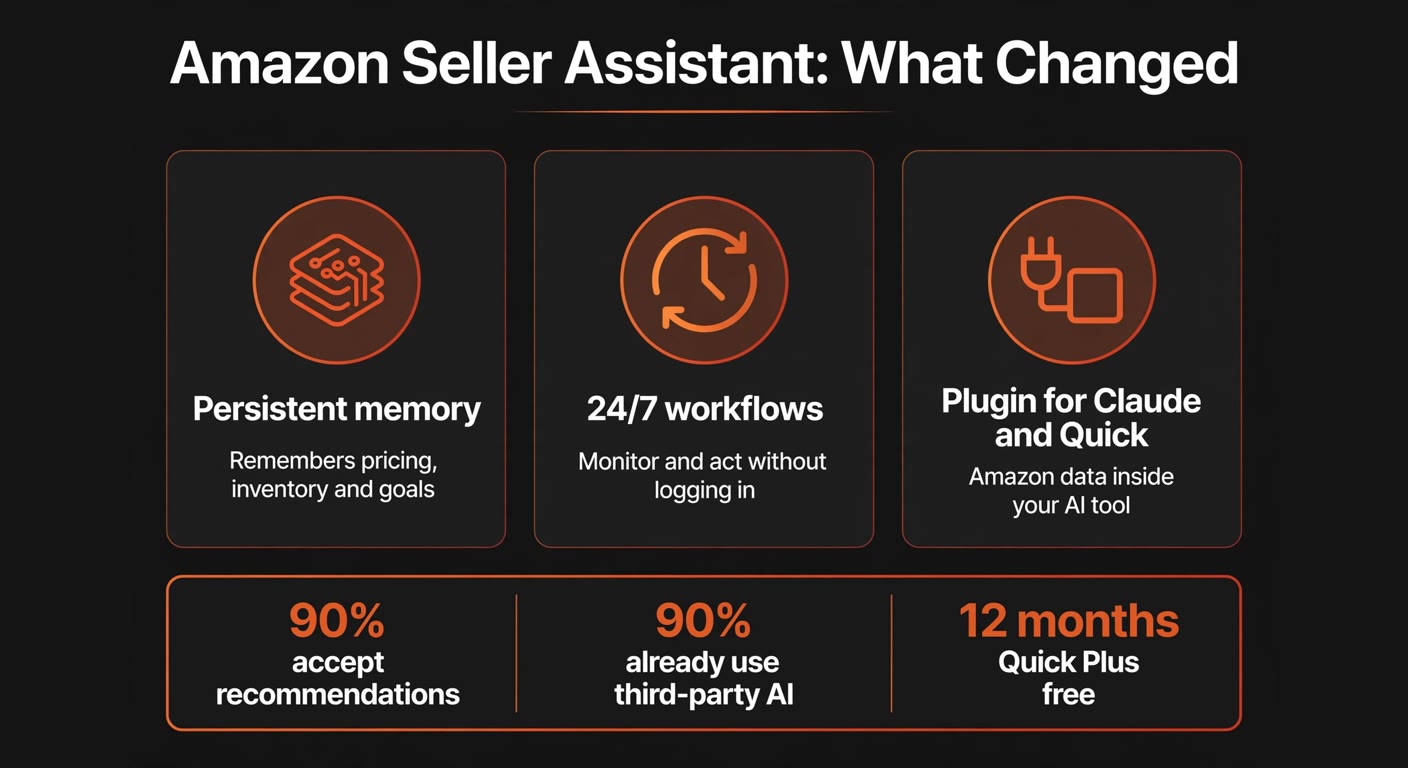
Amazon says the assistant has rolled out to over 90% of its selling partners worldwide and that sellers accept its recommendations more than 90% of the time. Those numbers tell you something real: this is not an experiment you can politely sit out. It is already the default layer of the seller dashboard. The question is not whether to use it. It is where you put the guardrails.
What Amazon actually shipped
Three things changed, and they stack on top of each other.
Persistent memory. Seller Assistant now remembers your pricing patterns, inventory cycles, and growth goals between sessions. Amazon is careful to say that memory stays inside Amazon's infrastructure and is not shared outside the company. In plain terms: the assistant stops treating every conversation as the first one.
Workflows that run unattended. This is the real shift. Before, Seller Assistant acted when you asked. Now it runs custom automations continuously, watching conditions and responding — including while you are asleep or on a beach. You describe what you want in ordinary language, set limits, and pick whether it just recommends or actually takes action. Every step is logged with an audit trail.
The plugin. Amazon now lets Seller Assistant's intelligence sit inside other AI tools. It launched first in Amazon Quick and in beta with Anthropic's Claude, with more integrations promised. The plugin connects your listing data, live performance metrics, inventory levels, and sales analytics to whichever agent you prefer — and, with your approval, it can act on them.
The feature is not the AI. It is the audit trail and the approval step that decide whether you can trust it with money.
The part of the announcement worth reading twice
Should you plug your Amazon data into Claude or Quick?
This is the decision that will actually cost you something to get wrong, so let me be blunt about the trade-offs.
Nine in ten Amazon sellers already use third-party AI tools to run their business, according to Amazon. Until now, getting your Amazon data into those tools meant exporting spreadsheets and re-pasting them every week, or paying for a connector that broke every time Amazon changed a field. The plugin removes that chore. Amazon claims connecting takes about 60 seconds with no coding — and early testers, quoted in the announcement, describe exactly that relief.
The honest catch is where the plugin lives. It launched in beta for sellers using Amazon's own U.S. stores, with international expansion to follow, so if you sell in Europe you may be waiting a while. The Claude side is in beta too. Beta means the connection can change under you, and I would not build a critical process on it yet. If your goal is selling beyond Spain, see our guide to cross-border ecommerce for Spanish SMBs.
Where it pays off: if you run several channels at once — Amazon plus your own shop plus a wholesale line — putting all of it in front of one agent is a genuine upgrade. Your AI stops seeing a slice of your business and starts seeing the whole thing, with the Amazon data sitting next to your accounting and supplier notes. That is the scenario Amazon is selling, and for a multi-channel seller it is a fair one.
Where it does not: if Amazon is your only channel and you already work inside Seller Central all day, the plugin mostly saves you a tab switch. That is not nothing, but it is not worth restructure-your-week money either. Try it, keep the manual export as a fallback for a month, and decide after that.
The free Quick Plus offer — read it before 31 December
Buried in the announcement is a concrete, dated offer that most sellers will skip past: every primary account holder, worldwide, can sign up for a free 12-month Amazon Quick Plus subscription, available through 31 December 2026. Primary holders can also hand a free year to two co-workers at no extra cost.
Amazon Quick is Amazon's general-purpose AI companion for work — it drafts documents and spreadsheets, does deep research, and connects to email, calendar, and files. Quick Plus is the paid tier.
Two things to note before you and your team sign up. First, the deadline is a signup deadline, not a use-by date: the free year starts when you claim it, and it stops being claimable on 31 December 2026. Second, free is a price, not a plan. A twelve-month free seat is worth taking only if you can name what you will use it for. Otherwise you collect three free accounts, never open them, and — because nobody wrote down the end date — they quietly convert into paid seats in late 2027. Put the renewal date in your calendar the day you claim, same as any other subscription.
Which tasks to hand over, and which to keep
The workflows are the part I would actually use, and the part I would configure slowly. Amazon ships prebuilt templates that monitor account health, summarise orders, analyse pricing trends, and hunt for product expansion ideas. You can also build your own in plain language.
The good news is that you choose, per workflow, whether it only surfaces recommendations or takes actions on your behalf. Use that switch deliberately. Here is how I would sort the work:
- Hand over the watching. Alerting you when a top product drops below four stars, when an account-health flag appears, or when a competitor moves on a listing you track. These are pure monitoring. Nothing is lost if the assistant is wrong — you just get a notification, and you would rather have it than miss it.
- Hand over the drafting. A draft response plan, a restock summary, a first pass at a listing refresh. The assistant does the typing, you do the approving. This is where the time saving is real and the downside is near zero.
- Keep the spending decisions. Workflows that adjust pricing or restock automatically should start in recommend mode, not act mode. Give it a month of suggestions before you let it move a price on its own — you will learn where its judgement is good and where it is confidently wrong. If you want a worked example of setting that gate, our guide to human approval workflows for AI walks through it.
- Keep the pricing floor yours. If you do let it adjust prices, set an absolute minimum you will not sell below. A 10% margin product and a 40% margin product look identical to a machine optimising for sales rank, and only you know the difference.
One more thing worth saying plainly: a workflow that runs while you are not logged in is a process you now own. Give it an owner inside the business, even if that owner is you, and check the audit trail once a week for the first month. The trail exists for exactly this reason — use it, or it is just decoration.
What to stop doing
The half nobody sells you, as usual.
Stop paying for the connector you no longer need. If you have been paying a standalone tool or an agency simply to move Amazon data into a spreadsheet or an AI chat, the plugin just made that line item redundant — at least for your U.S. store. Run your subscriptions list this week and check which one exists only to bridge Amazon to something else.
Stop copying data between tools by hand. The weekly ritual of exporting a report and pasting it into ChatGPT or your accounting software is exactly what the plugin was built to kill. Keep the habit for a month as a fallback while the plugin is in beta, then drop it.
Stop signing annual plans for tools that Amazon has just built in. Seller Assistant keeps absorbing tasks that used to be separate products — monitoring, drafting, listing help. Before you renew anything in that space, ask whether the assistant already does enough of it. A duplicate charge is the most expensive kind, because nobody ever gets excited about cancelling it.
Stop stacking free trials you did not ask for. The Quick Plus seat is free and it is genuinely good, but collect it at the moment you have a task for it. Three unopened free accounts are not an asset; they are three renewal dates you will forget.
Frequently asked questions
Is the free Amazon Quick Plus subscription really free?
Yes, for twelve months, and it is open to every primary account holder worldwide, not just U.S. sellers. The catch is the claim window: you have to sign up by 31 December 2026, and each primary holder can also give a free year to two co-workers. What is not free is the year after — the subscription renews at the normal price unless you cancel, so write the renewal date down when you claim it.
Can Seller Assistant change my prices without asking me?
Only if you let it. For every workflow, prebuilt or custom, you choose whether it surfaces recommendations or takes action on its behalf. When it takes action, you can keep an approval step in front of it. If you are not comfortable, start every pricing workflow in recommend-only mode and review the suggestions for a month before you change that.
Does the plugin work outside the United States?
Not yet, at least not fully. The selling partner plugin launched in beta for sellers in Amazon's U.S. stores, with international expansion to follow. The Claude connection is in beta as well. If your store is outside the U.S., treat the plugin as something coming rather than something you can build on today.
Is my Amazon data safe if I connect it to Claude or Quick?
Amazon states that Seller Assistant keeps seller data inside Amazon's infrastructure and does not share it outside Amazon, and that every plugin interaction has access limits, human approval on actions, and a full audit trail. That is a reasonable set of controls. It is also Amazon's own description of its own product — so if you handle sensitive or regulated data, read the current terms yourself rather than take my summary, and start with the least sensitive workflow you can.
We are a small team. Do the workflows help us or just add another thing to manage?
They help most when you keep them few. Two or three workflows — one for account health, one for inventory, one for a listing you are actively pushing — cover most of the value for a small seller. The temptation is to build ten on day one and then never read the alerts. Start with one, live with it for a week, and add a second only when the first has earned its place.